
Are you still looking for the best free video editing software to create more fantastic videos? Don’t worry, this article will introduce 18 best free video editing software. You can find the satisfying video editor for yourself whether you’re Windows users, Mac users, iOS users or Android users. If you’re a beginner, you can try MiniTool MovieMaker.
Currently, sharing videos to social media has been increasingly popular because it can help people draw others’ attention, record good life, learn about the outside world, etc. To make awesome videos, people can take advantage of the best free video editing software.
Here’s the list of the best free video editing software.
Top 18 Best Free Video Editing Software
- OpenShot
- Shotcut
- Windows Movie Maker
- MiniTool MovieMaker
- Freemake Video Converter
- Kdenlive
- HitFilm Express
- Blender
- iMovie
- MacXvideo
- Avidemux
- Lightworks
- Quik
- Magisto
- InShot
- WeVideo
- Adobe Premiere Rush
- KineMaster
Best Free Video Editing Software for Windows
Now, let’s pay attention to video editors for Windows.
1. OpenShot
OpenShot is regarded as the best free video editing software with comprehensive functions. Also, it’s the best video editing software for beginners because it is an easy-to-use and quick-to-learn video editor. It allows users to trim videos, remove background from videos, adjust brightness, and add titles to videos. Besides, it lets users fade, slide, bounce, and animate anything in the video.
Pros:
- It supports 70+ languages.
- It offers superb 3D animated titles and effects.
- It offers various layers.
Cons:
- It takes a long time to export videos.
2. Shotcut
It’s also one of the best video editing software for Windows. As a free and versatile video editor, it’s stuffed with plentiful video effects, such as detaching audio from video, changing the speed of video or audio, offering many video filters and automatic video rotation, and so on.
Pros:
- It supports 4K resolution.
- It renders webcam capture and audio capture.
- Except for video features, it’s packed with various audio features.
Cons:
- It doesn’t have a simple-to-use interface.
3. Windows Movie Maker
Undoubtedly, Windows Movie Maker is considered as one of the best free video editing software for beginners. With a great number of features, it’s available to add titles, effects, and transitions to videos. And it supports different output video formats.
Pros:
- It includes many video transitions.
- It works with videos and images.
Cons:
- It may be too simple for advanced editing.
4. MiniTool MovieMaker
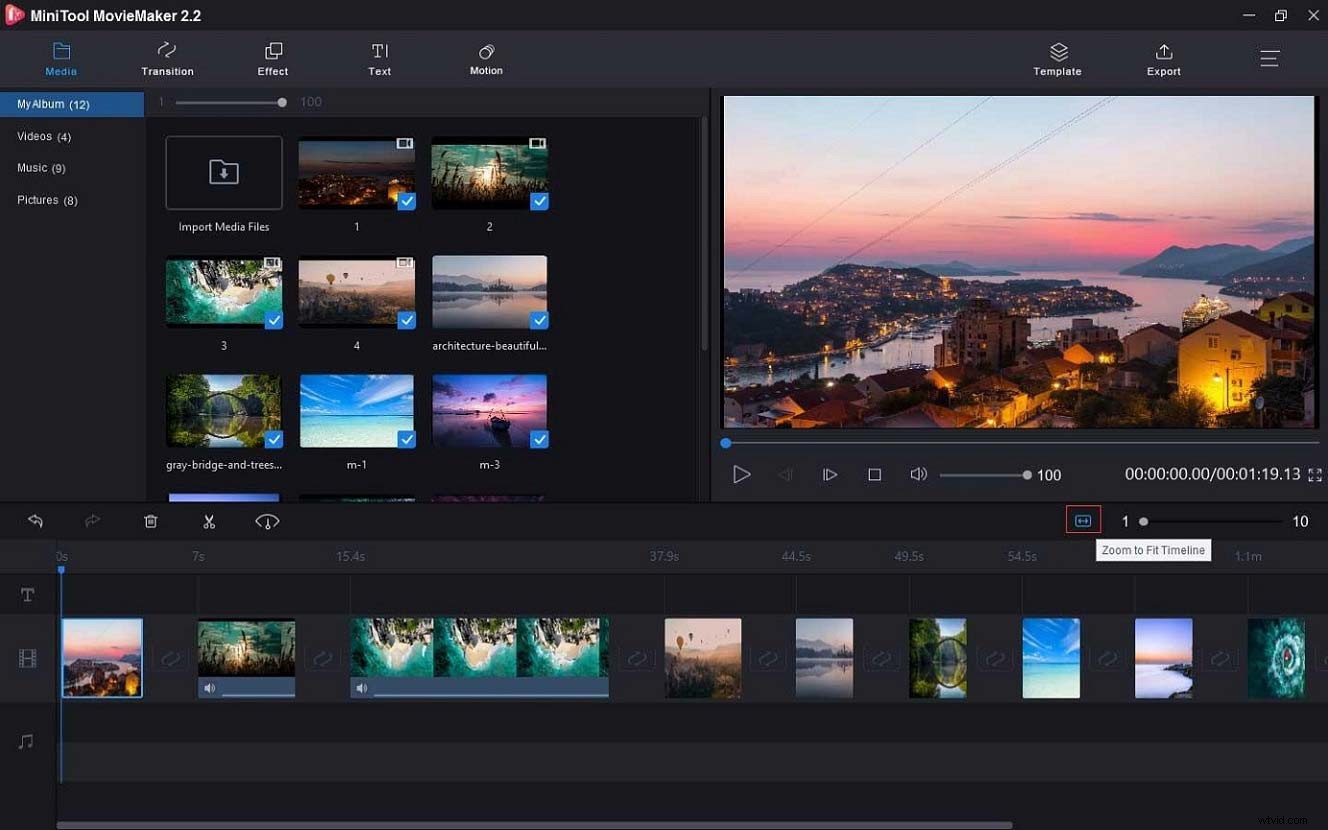
MiniTool MovieMaker is also one of the best free video editing software for Windows. This video maker allows users to create movies with images, video clips, and audio in minutes, and it offers several Hollywood-style movie templates. It helps users rotate video, split and trim video, reverse video, change the speed of video, and flip video, etc. Except for video editing, it also can edit audio easily, such as removing audio from audio, changing the duration of the audio, and so on.
Pros:
- It’s a free and no-ads video editor.
- It creates movies without limits, bundles, and watermarks.
- It has a preview window.
- It allows users to make photo slideshows.
- It can adjust video resolution and quality.
Cons:
- It only works on Windows.
MiniTool MovieMaker helps me create amazing movies easily and makes video editing easier. Click to Tweet
5. Freemake Video Converter
It’s a wonderful video editor that allows users to convert videos easily, extract audio from video, and share videos to website. And it can convert videos and audio files between 500+ formats. Of course, it can cut, join, and rotate videos. What’s more, it can download and change streaming clips from Vimeo, Vevo, YouTube, etc.
Related article: Audio Extractor – 8 Best Tools to Extract Audio from Video
Pros:
- It’s available to convert HD videos without quality loss.
- It can convert videos with subtitles.
Cons:
- Some features can only be used for 3 days after the first install.
6.Kdenlive
Kdenlive, one of the best free video editing software for Windows, allows users to edit several audio and video tracks. With the powerful FFmpeg libraries, it supports the most popular audio and video formats. Besides, it offers a variety of effects, transitions, as well as color correction, and it can create 2D titles, including align and distribute, letter-spacing and line-spacing adjustment, and so on.
Pros:
- It offers interfaces with different themes and timeline preview.
- It is available for basic editing and advanced editing.
Cons:
- It’s not stable and it will crash occasionally.
Best Free Video Editing Software for Mac
Now, let me introduce the best video editing software for Mac one by one.
1. HitFilm Express
It’s one of the best free video editing software for beginners, film students, and YouTubers. It is packed with the most editing features that you desire. This professional video editor offers 410+ video effects, free video tutorials and projects, perfect cutting tools, and numerous tracks and transitions. Besides, it can support 3D video. It provides a great variety of free features, but it still offers a store in which you can buy other features.
Pros:
- It’s an advanced and professional video editor.
- It renders user diverse courses.
Cons:
- It takes time to be familiar with the user-friendly interface.
2. Blender
Blender is also considered as one of the best free video editing software for Mac, was designed as an open-source 3D creation program, but it’s crowded with excellent video editing features, including live preview, audio mixing, syncing, scrubbing and waveform visualization. What’s more, it offers 32 slots for adding videos, audio files, images, and it can change video speed, adjust layers, and add transitions and effects.
Pros:
- It has a built-in video sequence editor.
- It can control speed, adjust layers, and add transitions.
- It has no disruptive pop-up windows.
Cons:
- It offers finite lessons about video editing.
3. iMovie
iMovie is a fascinating video editor for Mac and the best free video editing software for beginners to create trailers and 4K-resolution movies easily. With iMovie, users are able to trim videos, split screen, edit audio, add transitions and music to video, enhance video quality, and offers color correction, etc.
Relater artic: How to Add Audio to Video Free - SOLVED
Pros:
- It has an easy-of-use interface and it’s simple to be familiar with
- It gives 10 amazing filters and many styles of titles.
Cons:
- It’s a little limited for an advanced video editing.
4. MacXvideo
MacXvideo is one of the best free video editing software for Mac. This safe video editor is created for editing videos easily and efficiently and doesn’t require any skill, so it’s also the best free video editing software for beginners. It enables users to trim, cut, slice, rotate, and crop videos, split videos, and combine many clips to one video, add effects and subtitles, etc. Besides, it allows users to transcode videos and convert videos into different formats.
Related article: 5 Best Free Video Croppers for 2020
Pros:
- It can compress 4K/5K/8K videos without quality loss.
- It can share videos to Facebook, YouTube, Vimeo.
Cons:
- It doesn’t offer a free trial.
5. Avidemux
Avidemux is a free video editor with a user-friendly interface. It can be used to cut videos, supports non-linear video editing and visual effects, and supports popular subtitle formats. And output formats include MKV, AVI, MP4, etc.
Pros:
- It’s a simple video editor and requires no skills.
- It has some standard video processing features.
Cons:
- It has a dated interface and cannot be used to add transitions and filters.
6. Lightworks
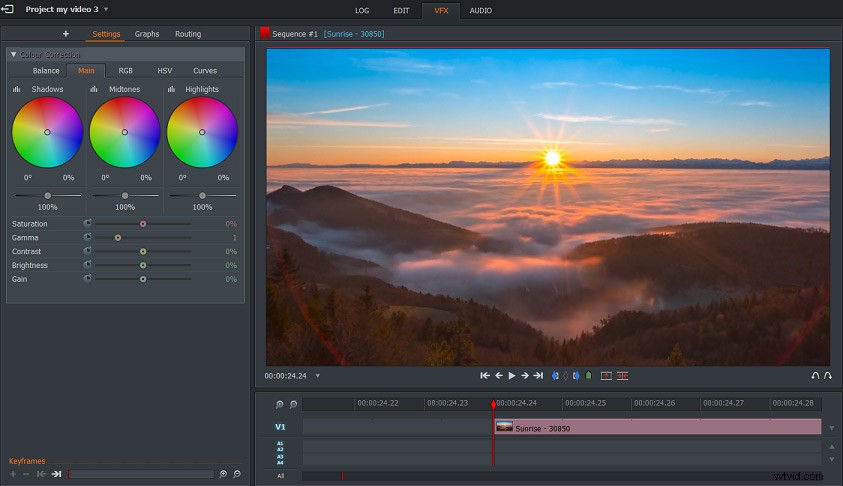
Lightworks, a powerful video creator, is also recognized as the best free video editing software for Mac. It is packed with helpful functions, like simple timeline editing, video trimming, accessibility to free royalty audio and videos. And it can export videos for YouTube, Vimeo.
Pros:
- It supports many file formats and has various built-in effects.
- It has over 25 years experiences in video editing.
Cons:
- 4K video is only available on the paid version.
- The interface is a little complex.
Best Free Video Editing Software for iOS and Android
Now let’s focus on the video editors for iOS and Android.
1. Quik
Quik is the best free video editing software for iOS and Android. With Quik, users can create movies in minutes, and edit videos, photos, music. It’s easy to trim and rotate videos and photos, add text and title to videos.
Pros:
- It can add up to 75 video clips and photos simultaneously.
- It can import files from albums, Google Photos, Dropbox, GoPro Plus, etc.
Cons:
- It has limited editing control options.
2. Magisto
Magisto, another superb video editor for iOS and Android, offers many editing techniques, such as filters, auto-cropping, and combining videos, etc. Besides, it’s a music slideshow maker.
Pros:
- It’s an AI video editor.
- It offers diverse overlays and effects.
Cons:
- It allows users to create or edit videos in 150 seconds.
3. InShot
InShot is also the best free video editing software for iOS and Android with numerous features. It’s perfect for cutting videos, splitting videos into 2 parts, cropping videos, and exporting it with HD quality. And it also works as a video merger, sound recorder, video speed controller, and video converter, etc.
Pros:
- It provides a fast and simple editing.
- It exports videos without quality loss.
Cons:
- It’s only for short videos.
4. WeVideo
This free video editor helps users make movies with video and music clips as well as photos, arrange and trim videos, add captions and motion effects. And it’s also a nice photo editor.
Pros:
- It has a simplified and user-friendly interface.
- It’s easy to share videos on YouTube, Facebook, Twitter, Instagram.
Cons:
- The free version includes watermarks and it offers in-app purchases.
5. Adobe Premiere Rush
It’s one of the best free video editing software for iOS and Android. The built-in camera enables users to capture high-quality content and edit videos immediately. And it can add music, effects, and titles to videos, etc. Besides, it gives advanced audio editing tools.
Pros:
- It’s easy to use and it offers Adobe Cloud storage.
- It can trim, transform video, and add transitions.
- It can add motion graphics, and adjust color.
Cons:
- It’s short of some basic features like video rotation.
6. KineMaster
It’s an all-featured video editor, allowing users to add layers, images, stickers to videos. And it can reverse videos, adjust color, controls video speed, offers slow-motion effects, etc.
Pros:
- It is packed with editing features.
- It supports multi-track audio.
Cons:
- It offers watermarked videos on the free version.
Bottom Line
This article introduces 18 best free video editing software for Windows, Mac, iOS, and Android. After viewing this article, you can find the most wonderful video editor no matter what kind of user you are. Choose one and start your video editing.