
Youku is one of China’s most popular video streaming platforms where users can watch movies, TV series, variety shows, documentaries, etc. But it is only available in China. How to unblock Youku to watch its content outside China? Don’t worry, this post offers 3 solutions.
Youku is one of the best China’s video hosting services. This platform provides a variety of Chinese movies and shows, Korean and Japanese content, as well as some Youku homemade shows. But it is blocked outside China. How to block Youku to access its amazing content overseas? Luckily, this post will show you how to unblock Youku for Firefox, Chrome, iPad, Android, and iPhone. Want to add music to the video? Try MiniTool MovieMaker.
How to Unblock Youku for Firefox?
If you need to unblock Youku for Firefox, you can try Unblock Youku Firefox extension. With this free Youku unblock helper, you can also access other China’s popular video platforms like Bilibili, Tudou, etc. Here’s how to unblock Youku with the Unblock Youku Firefox extension.
Step 1. Go to the Firefox Addon website, search for the Unblock Youku extension. Or just click here to get it quickly.
Step 2. Then click on Add to Firefox button and install the extension.
Step 3. After the installation is finished, launch it on the browser.
Step 4. Visit the Youku website and enjoy the content you like.
How to Unblock Youku for Chrome?
Similarly, you can have the Unblock Youku Chrome extension to unblock Youku for Chrome. Here’s the guide.
Step 1. Open Google Chrome Web Store and type unblock Youku in the search box.
Step 2. Then it will show 3 choices. Here we recommend the first one Unblock Youku extension.
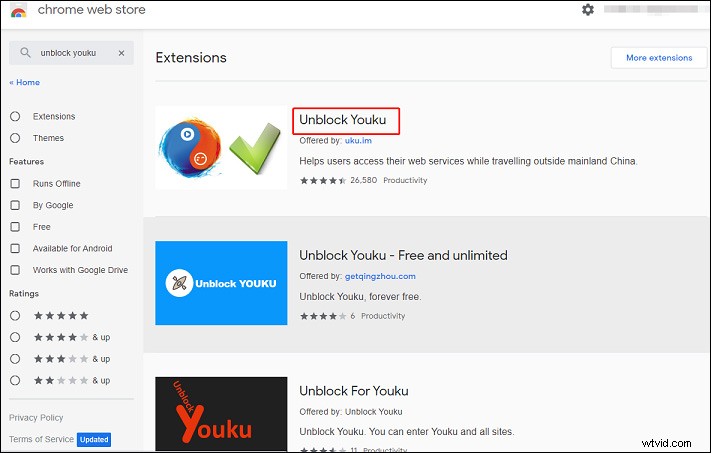
Step 3. Click it, then tap on Add to Chrome button > Add extension to install the Youku unlock extension.
Step 4. Click its icon from the toolbar to run the extension, and then go to the Youku website to watch movies and shows.
Want to download videos from Dailymotion? Read this post - The Best 7 Dailymotion Video Downloaders You Should Try
How to Unblock Youku on iPad/Android/iPhone?
If you want to use the Youku app on your mobile device, you can try a VPN to unblock Youku. There’re many Youku unblock VPNs, such as Hotspot Shield, HMA, FlyVPN, ExpressVPN, NordVPN, etc. With any one of them, you can visit Youku without restrictions outside China and browse and watch Chinese movies/shows.
Here’s how to unblock Youku with a VPN.
Step 1. Choose and subscribe to a VPN, then download it from the official website or Google Play Store, or App Store.
Step 2. Install this VPN and connect to a Chinese server.
Step 3. Open Youku on your device and start video streaming.
Conclusion
This post shows you how to unblock Youku on Firefox, Chrome, iPad, Android, and iPhone. Now, you can try one of the methods to access Youku content outside China. And if you have other ways to unblock Youku, you can leave your recommendations in the below comments area.