
You save some beautiful SVG images from web pages and want to convert them into GIF format. Don’t worry, check out this post and you will know how to save SVG files in GIF format easily.
What is SVG? According to Wikipedia, SVG stands for Scalable Vector Graphics. It’s an XML-based vector image format that supports interactivity and animation. Compared to other image formats, an SVG image has a smaller size and can be scaled in size without losing quality.
SVG is not supported by most photo editors and image viewers but can be viewed in popular web browsers like Mozilla Firefox, Google Chrome, Opera, Microsoft Edge, etc.
How to make a GIF from SVG images? How to convert animated SVG to GIF? Here are some useful methods for you! To make a GIF from a video, you can use MiniTool MovieMaker. It can create a GIF from a video and convert images to a GIF.
Convert SVG Images to GIF
To convert SVG to GIF, FreeConvert is perfect for you. It’s a free SVG to GIF converter. It can convert SVG images to GIFs at once and convert multiple SVG images into a GIF.
FreeConvert also supports converting other files such as videos, audio files, documents, and eBooks.
Here’s how to convert SVG to GIF online with FreeConvert.
Step 1. Go to the website: https://www.freeconvert.com.
Step 2. Find IMAGE Converters and click GIF under the Convert My File To.
Step 3. Upload SVG images. If you want to make a GIF from these SVG images, check the box next to Merge into one GIF and adjust the advanced settings. Then tap on Convert To GIF.
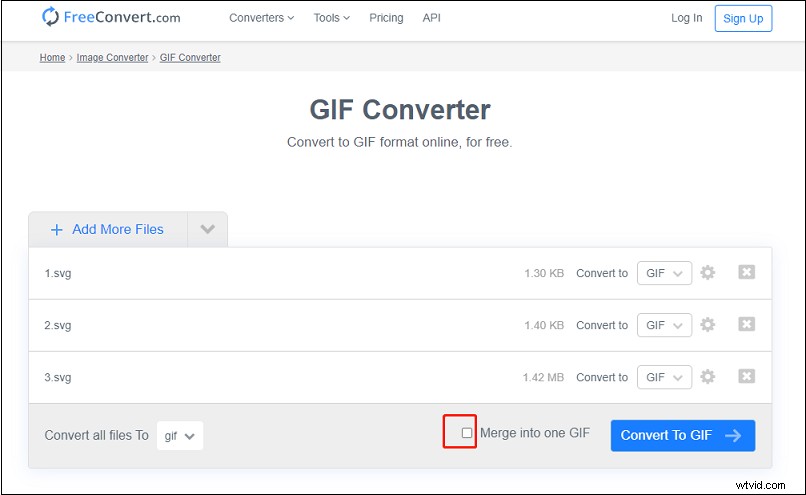
Step 4. Once the conversion is done, click Download to save the GIF.
Convert Animated SVG to GIF
If you need to convert animated SVG images to GIFs, you can convert animated SVG to GIF with an online converter or record animated SVG with a GIF recorder.
Use an Animated SVG to GIF Converter
html5animationtogif is designed for HTML 5 animation to GIF conversions. It allows you to convert animation SVG to GIF, HTML 5 to Video, SVG to Video, Lottie to GIF, and Lottie to Video. During the conversion, it gives you the options to set the duration, loop, quality, frames per second, width, height, and background color for the GIF.
Here’s how to convert an animated SVG to GIF.
Step 1. Visit the website: https://html5animationtogif.com.
Step 2. Click on LOTTIE/SVG in the top menu bar and choose the option SVG To GIF.
Step 3. Click UPLOAD to upload the animated SVG file or enter its URL.
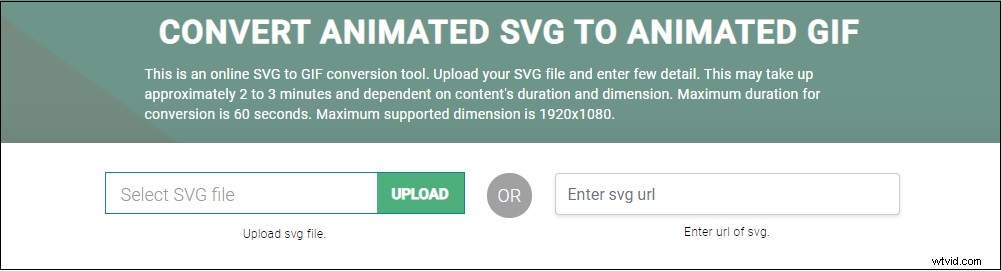
Step 4. Change the output settings as needed. After that, press the CONVERT TO GIF button to start the conversion.
Step 5. Download the converted file after the conversion is finished.
Record animated SVG to GIF
To record an animated SVG, you can ScreenToGIF. It’s a free and open-source GIF recorder that can be used to record and edit animated images.
Step 1. Open your web browser. Drag and drop your animated SVG file to the browser.
Step 2. Launch the ScreenToGIF tool and record the animated SVG image.
Step 3. Then stop the recording and click File > Save as.
Conclusion
This post gives you 3 different methods to convert SVG to GIF. These tools are free to use and 100% working.