
An AVIF file is an AV1 image file. How to open AVIF file? How to convert AVIF to an ordinary file format like JPG or PNG? This post offers everything you want to know about the AVIF file. If you want to create a video with multiple images, you can try MiniTool MovieMaker.
What Is an AVIF File?
AVIF (AV1 Image File Format), developed by the Alliance for Open Media, is an image file format used to store image sequences compressed with AV1 in the HEIF container format. Similar to JPEG, AVIF uses compression to get smaller file sizes.
According to the tests of Netflix, AVIF shows better compression efficiency than JPEG. And AVIF files support multiple color spaces, lossless compression, and lossy compression.
How to Open AVIF File?
How to open AVIF files? The easiest way is using Chrome (v85 or later) or Firefox (v93 0r later) web browser because there’ s no need to download and install any add-ons. You can also try GIMP to open AVIF files. Besides, you can try the free nomacs image viewer to view AVIF files, and it’s compatible with Windows and macOS.
How to Convert AVIF to JPG?
How to convert AVIF to JPG? Here’re 3 AVIF file converters for you, Convertio, Ezgif, and CloudConvert.
#Convertio
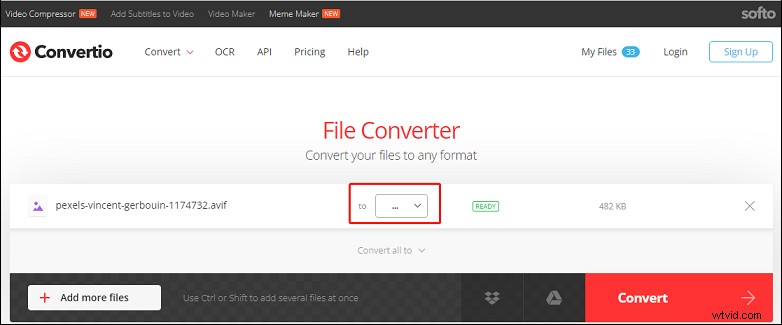
Convertio is an online file converter to convert images, videos, audio files, documents, ebooks, presentations, and more. It can handle more than 25,600 conversions between 300+ file formats. If you want to convert AVIF to JPG, Convertio is a great option.
Here’s how to convert AVIF to JPG with Convertio.
- Go to the Convertio website.
- Click the Choose Files to upload your AVIF file or add it from your Dropbox or Google Drive.
- Tap the dropdown arrow, go to Image > JPG, and click the Convert. Then download the JPG file.
#Ezgif
Ezgif is a free online GIF maker and editor. It can create animated GIFs from images and videos, resize, crop, cut, optimize, rotate GIFs, and more. And it also functions as an AVIF to JPG convert. What’s more, it supports AVIF to GIF or PNG, APNG to GIF, and more.
Here’s how to convert AVIF to JPG with Ezgif.
- Visit the Ezgif website, then select the AVIF, and click the AVIF to JPG.
- Click the Choose File to add your AVIF file, and click the Upload.
- Then you can drag the slider to adjust the JPG image quality.
- Click the Convert to JPG to start. Then click the Save in the Output JPG image section.
#CloudConvert
CloudConvert is one of the most popular online file converters. It supports almost all formats of video, image, audio, document, spreadsheet, ebook, archive, and presentation. Also, it can convert AVIF to JPG. Here’s the how.
- Navigate to the CloudConvert website.
- Click the Select File to upload your AVIF file.
- Click the Convert to button, click the Image and JPG.
- Tap the Convert to start conversion, and then save the JPG file.
Conclusion
That’s all about AVIF file. Now, you can try the above methods to view AVIF files, or choose an AVIF file converter to convert it to JPG for better accessibility.