
You are curious about who is stalking you on Twitter. Can you see who viewed your Twitter? How to know who visited your Twitter profile? You can’t directly find out who viewed your Twitter profiles and tweets, but you can know who engages with your tweets.
Can You See Who Viewed Your Twitter Profile?
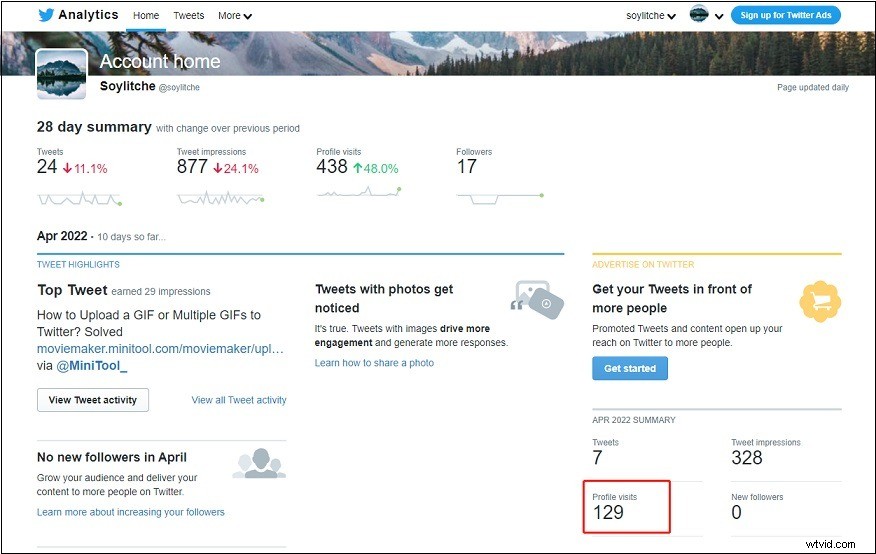
Does Twitter tell you who viewed your profile? The answer is no. There is no way to find out who is visiting your Twitter profile, but you can know how many times your Twitter profile has been viewed per month. (Try MiniTool MovieMaker to make cool videos or GIFs!)
Follow these steps to see your profile visits on the computer.
Step 1. Sign in to your Twitter account.
Step 2. Go to More > Analytics.
Step 3. Then you will see the number of profile visits on Twitter in the 28-day summary and the monthly report.
Can You See Who Viewed Your Twitter Tweets?
Can you see who viewed your Twitter videos? It’s not possible to know who views your Twitter videos, photos, etc. The only way to know if someone has seen your tweets is through direct engagement such as likes, replies, and retweets. All direct interactions are visible to the public. That is to say, others can also see who interacts with your tweets.
If you don’t want others to see some comments on your tweets, you can hide them. Here’s how to hide replies on Twitter.
Step 1. Go to Twitter.
Step 2. Open the tweet with some comments you wish to hide.
Step 3. Find the target replay and click the three dots.
Step 4. From the drop-down menu, select the Hide reply option. Click on Hide reply.
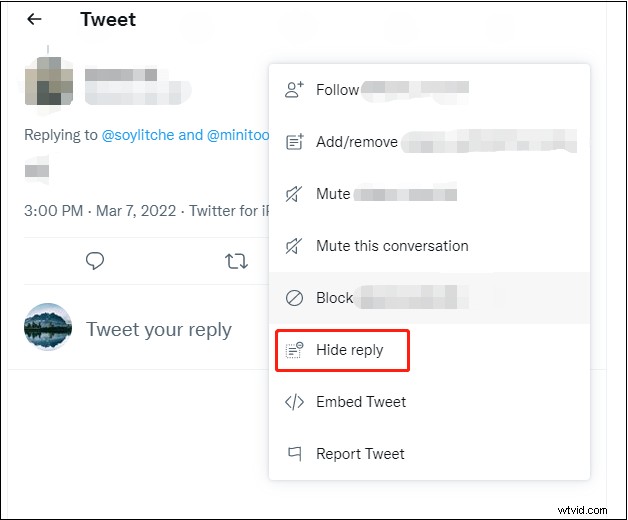
Step 5. To see the replies you’ve hidden, click the three dots in the top right corner of your tweet and choose View hidden replies.
If you want to unhide a reply, click the three dots next to it and select Unhide reply.
How to Make Your Twitter Private
There is another way to hide your Twitter engagements is by making your Twitter account private. Once you make your Twitter account private, your tweets will only be visible to people who follow you. Others cannot follow you unless you approve.
Here’s how to make your Twitter private.
On desktop
Step 1. In the home feed, head to More > Settings and privacy.
Step 2. Tap on Privacy and safety under Settings.
Step 3. Choose the Audience and tagging option.
Step 4. Then check the Protect your tweets box. Confirm by clicking the Protect button.
On mobile
Step 1. Open the Twitter app.
Step 2. Click your profile icon next to the search bar and choose Settings and privacy.
Step 3. Click Privacy and safety and enable Protect your Tweets.
Conclusion
Actually, most social media platforms including Twitter, Instagram, and Facebook don’t track who views your profile and posts in order to protect users’ privacy. There is no third-party app or website that can help you find out who is visiting your Twitter, Facebook, or Instagram profile.