
Jul 14, 2025 • Proven solutions
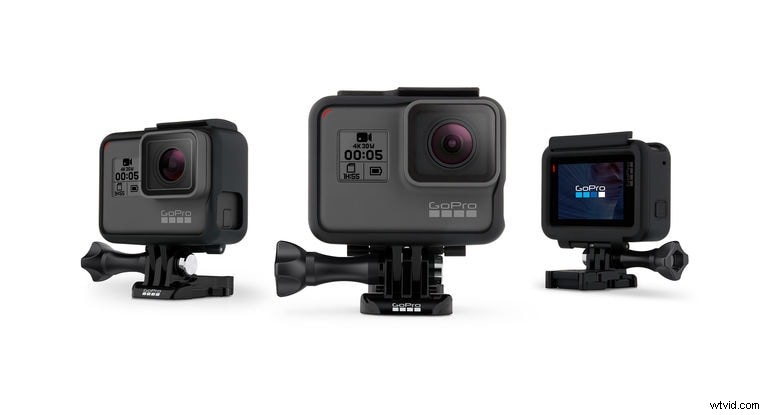
GoPro remains a top choice for action‑camera enthusiasts, thanks to its robust lineup that captures stunning images in time‑lapse, burst, and high‑resolution video. While the cameras record audio alongside video, the built‑in microphone often falls short, prompting many users to seek post‑production fixes.
De‑Noise Recorded GoPro Video with Wondershare Filmora
For many creators, the quickest way to clean up GoPro audio is through dedicated editing software. Wondershare Filmora is a popular choice because it combines powerful video tools with an intuitive interface.
- Action Cam Toolkit: Automatically correct lens distortion, stabilize footage, adjust speed, perform audio de‑noise, and apply color correction.
- Instant Clutter: Merge or trim clips quickly without quality loss. Supports MTS, MOV, and MP4 from GoPro, phones, and other camcorders.
How to De‑Noise Videos Using Filmora
Below is a step‑by‑step guide to cleaning GoPro audio with Filmora’s de‑noise feature.


1. Launch Filmora and create a new project.
2. Import your GoPro clip by clicking Import or dragging it into the timeline.
3. Double‑click the clip on the timeline, switch to the Audio tab, and enable De‑Noise. Adjust the slider until background hiss is minimized. Use headphones to confirm the improvement.
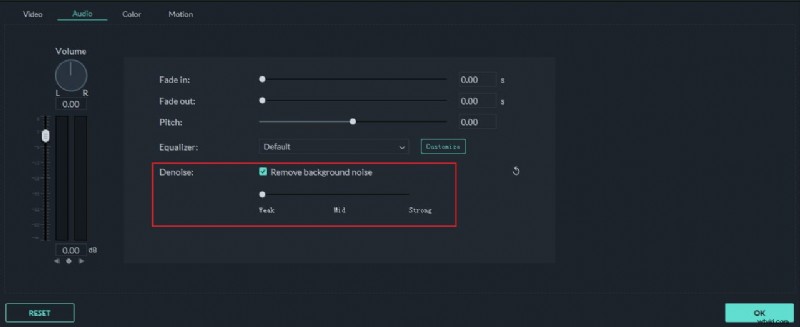
Tip: Increase the track height for clearer audio visualization. Detach the audio track if you need to edit it separately. Filmora also lets you add voice‑overs, background music, or mute sections with advanced tools.
Want to elevate your GoPro footage? Try the ACTION CAM WINTER SET for a professional look.
Tips for Improving Sound in GoPro Video Footage
Enhancing GoPro audio boils down to two main strategies: adding an external microphone or using a dedicated external recorder.
1. Using an External Microphone
Before purchasing, consider the following:
GoPro Microphone Adapter
Hero2 and earlier models featured a 3.5 mm mic jack, but later models rely on the Mini‑USB port. A Pro 3.5 mm Mic Adapter lets you connect line‑level or stereo mics to HERO5 Session, HERO5 Black, HERO4 Black, HERO4 Silver, HERO3+, and HERO3.
Microphone‑Friendly Housing
Standard waterproof cases block the Mini‑USB port. A hard‑plastic frame with port cutouts protects the camera while granting mic access, ensuring sound quality remains uncompromised.
Choosing the Right Microphone
Select a mic that matches your shooting environment. Popular choices include:
- Sony ECM‑CS3 clip‑style omni‑directional stereo mic
- Opteka VM‑100 video condenser shotgun mic
- Sound Professionals SP‑TFB‑2
- Countryman MEMWF05BD2‑R lapel mic
- Sennheiser MKE‑400
- Rode VideoMic series
- Standard lavalier mics
See Best Microphones for Action Cameras 2017 for deeper insights.
Foam Windscreen
If wind noise is a concern, a foam windscreen reduces hiss and improves clarity, especially during outdoor activities like biking or surfing.
2. Using an Independent Recording System
Professional audio can also be captured with a standalone recorder. Devices like the Zoom H1 and H2 are favored for their compact size and high‑quality analog‑to‑digital conversion. While they require post‑production synchronization, the audio fidelity they provide is unparalleled.
For those seeking an affordable yet robust option, the Zoom H4N is a standout. It features built‑in stereo X‑Y microphones, 96 kHz/24‑bit PCM recording, and XLR inputs, all in a battery‑powered, pocket‑sized chassis.
Check the price on Amazon.
Max Wales
Max Wales is a writer and a lover of all things video. Follow @Max Wales for more tips.