
Audio swells are a dynamic way to add some punch to your transitions. In this video tutorial, we cover how to work with them in your own editing suite.
When it comes to editing my movies, using musical swells has become a dynamite (must use) addition to my tool belt. In this tutorial, I’ll go over how to use them, why they’re important, and why you’re missing out (if you haven’t tried them already).
Music swells are essentially auditory ramp-ups created by taking the last section of a song and reversing it. Note, this trick will only work on a song with a long fade-out at the end; it needs to close on a single key hit. I would say 80 percent of songs end like this, so it shouldn’t be much trouble sourcing them. (If you’re looking for some examples, here’s a good playlist.)
Here’s how to do it.
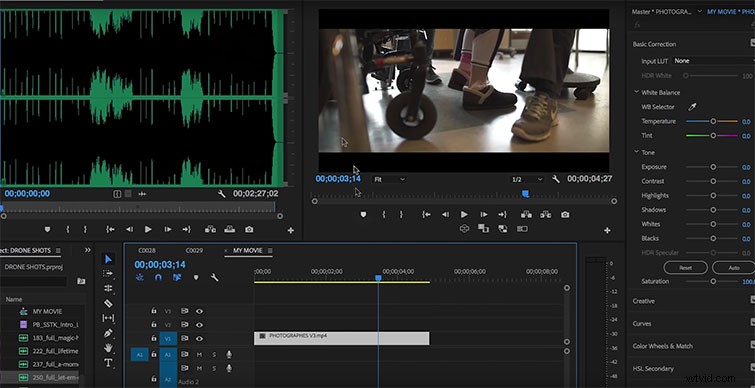
Trim the last section of your song, and place it in a new track on your timeline. This will be that final note hit we were talking about earlier. The length of the final note is different from song to song, so the duration of this clip will vary.
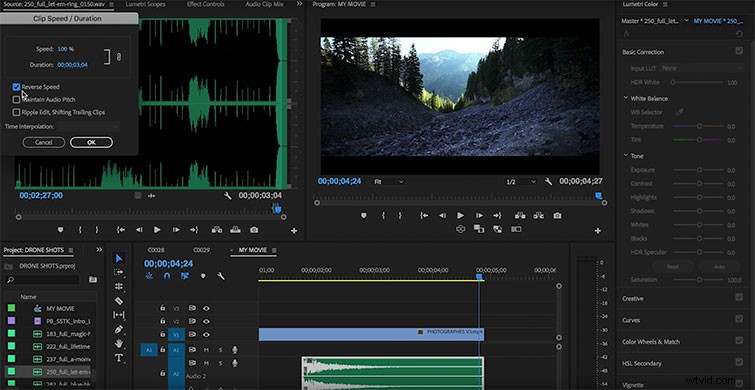
Next, take this clip, and reverse it using the Speed Duration drop-down menu.
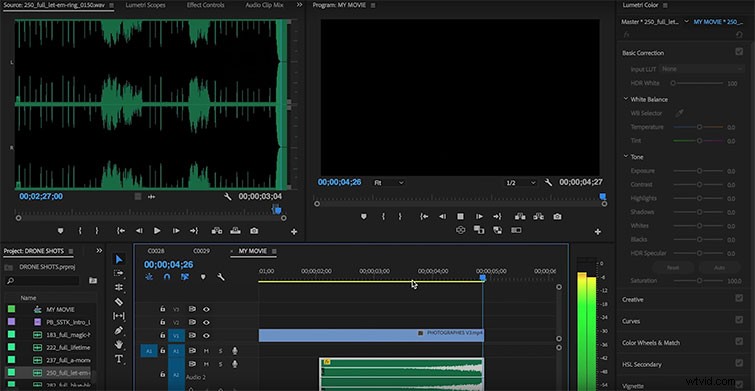
Finally, line up the swell with a clip you want to cut to. I recommend using this at the tail end of shots, scenes, and videos.
That’s it! If the swell doesn’t last as long as you need it to, you can easily stretch it by slowing down the speed and checking off the “Maintain Audio Pitch” box.
This technique can help you enhance your scenes with more pronounced transitions, as well as provide a better closing note. Auditory swells are an incredible multipurpose tool in the editing suite, and I suggest that every editor should begin using them.