
Working with film grain for your next YouTube project? Find out what not to do if you want a clean image.
Over the past five years, YouTube has made significant advancements in bringing higher quality uploads to the platform, including 60fps, 2k, 4k, and now even 8k. However, we may be a few years off from getting that Blu-Ray sharpness on a simple 1080p upload. While most uploads are compressed the same way, there’s one digital asset that can severely affect your YouTube uploads, and that is coarse film grain.

Recently I spent the better part of the day rendering the same file with different bitrates and various codecs in the hope of finding that YouTube sweet spot because, for some reason, my upload was looking like a mushy, blurry mess. On my desktop, despite a coarse grain overlay to mimic ’70s film stock, the image was still crisp, and I could still make out the finer details on the actor’s clothing. On Youtube, however, not so much. I eventually decided to bite the bullet and upload a less-than-satisfactory sharp video to YouTube, citing the website’s compression as the cause of my agony (even though I had uploaded sharper videos to YouTube over the past year). A few days later I had a thought: What if it was the grain?
The project in question required a coarse, dirty grain flicker to imitate some of the B-movies of the ’70s and ’80s. So there was always a lot of minute visual information dashing across each frame, and it brought the information presented in this video by Tom Scott to my mind.
Tom explains why videos that feature an abundance of small moving objects, such as confetti or snow, revert to lower quality playback. For a full demonstration, be sure to watch Tom’s video. In brief, Tom explains the basics of online inter-frame compression — how only the difference between frames gets stored, how the lack of bits will affect your video, and how multiple small moving objects will make your image fall apart.
In the still below, you can really see how YouTube compress the coarse grain. In the background, a man is walking along the horizon, while on the desktop you can see the grainy texture. On YouTube, it’s become a blur — in fact, a lot of the color detail has disappeared in that region. Interestingly, within this particular capture, you can see also see how the dust and dirt that appears from the grain composite has been affected. On Youtube, especially on the top branch, the area surrounding the dirt has become pixelated like a lousy clone stamp. On the lower left, the compression is so high that it’s blended foliage with the background.
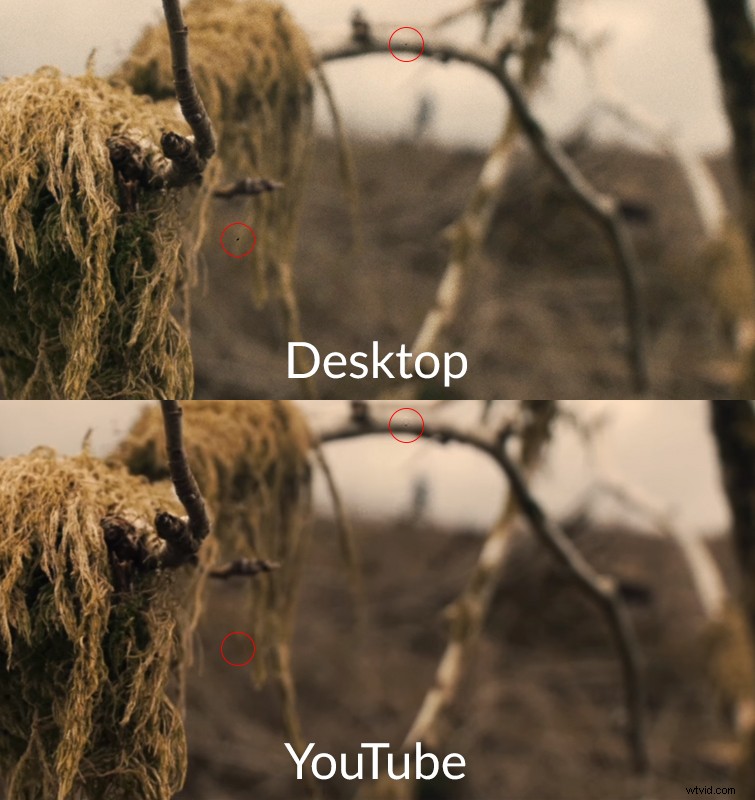
In essence, using a coarse grain with plenty of hair, dust, and noise flickers is going to get processed as hundreds of individual moving objects, and the image will deteriorate in online compression. So, what exactly are the fixes? Unfortunately, for web presentation, you’re going to have to say goodbye to using a heavy grain overlay.
Fine Grain
The fix is to use a clean fine grain. I can understand that not using coarse grain is not really a fix. It’s like having a slight transmission problem with your vehicle, and the mechanic says “Use a different car.” However, paradoxically, by using finer grain, the video gets less compression, and the viewer can see more grain particles than they would if you were to use coarse grain.
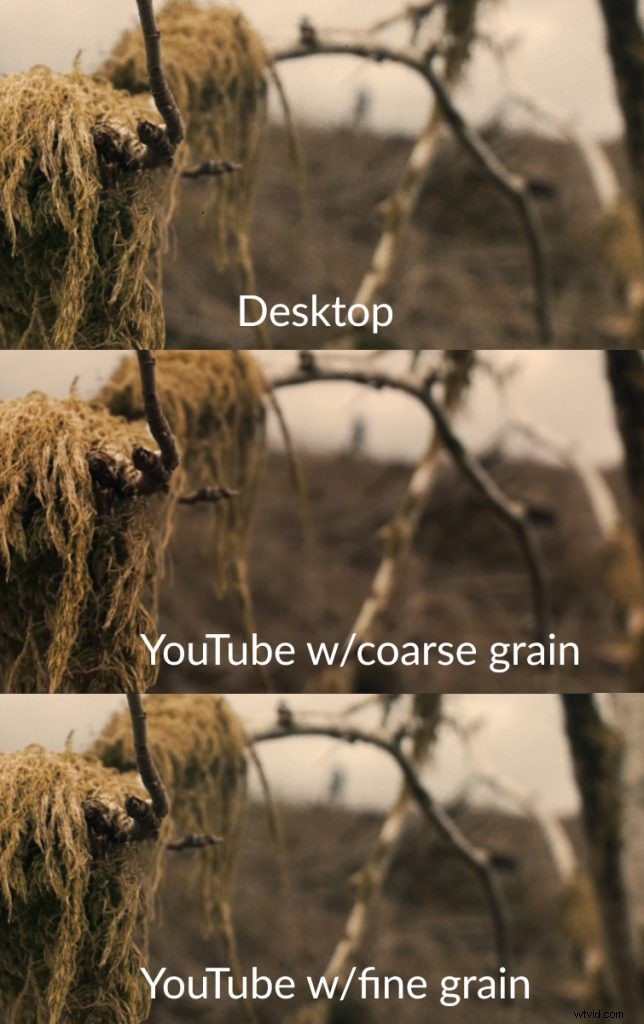
By all means, continue to use coarse grain for the master export, which you would use for festivals or digital download distribution, but for web uploads, look to use a cleaner grain to get a sharper image.