
The MP4 extension is one of the most popular video formats compatible with several devices from smartphones to HD televisions. Part of the reason behind the format's popularity is that it allows users to add closed captions, subtitles, and audio streams which enhances video quality and makes the viewing experience more accessible.
If you want to convert your videos to the MP4 format, here’s a quick 3-step process to hit the ground running:
- Go to VEED and upload your video
- Select convert to mp4
- Download the mp4 file
We've compiled a more detailed explainer for all these steps. Read along to learn how to convert video to MP4 using VEED's MP4 converter.
How to convert videos to mp4 online with VEED’s free converter
VEED's free online video converter simplifies converting videos to diverse file formats, like MP4, FLV, MOV, and more. In just three simple clicks, you can convert any video to the MP4 format without downloading and navigating through complicated and clunky editing software.
What’s more, VEED allows you to produce more well-rounded and value-packed videos by adding subtitles and captions. Since your edits are saved in your account, you can access and export a video anytime, anywhere by simply logging into your account.
Let's look at the three steps to convert video files to MP4 online.
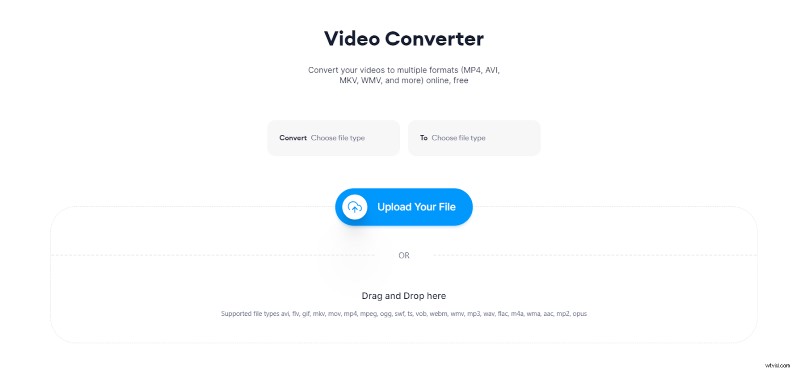
Step 1. Upload your video on VEED’s video to MP4 converter
Visit VEED’s video to MP4 con verter and upload your video file from your computer. You can cick on the Upload Your File button or drop the file in the given space.
Bonus: VEED lets you convert videos to MP4 format directly from YouTube. Simply copy your YT video URL and put it on VEED’s YouTube to MP4 converter, then hit download, and you're all set to begin using videos.
Step 2. Select the option to convert to mp4
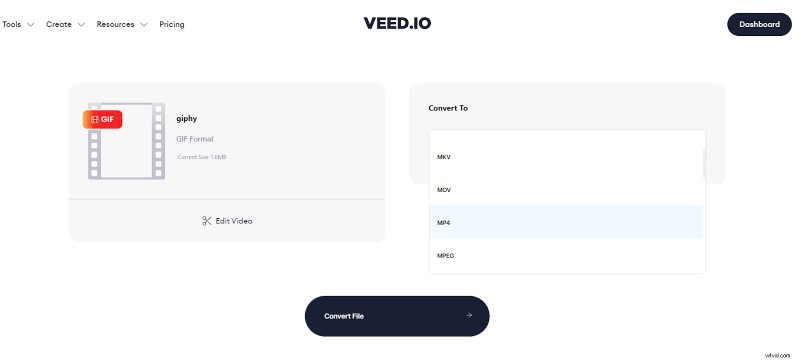
Once the upload is complete, it'll automatically detect the original file format. You'll find the option to choose the format for converting your video on the right. Select MP4 from the list and press Convert File to begin rendering.
Step 3. Download the MP4 file
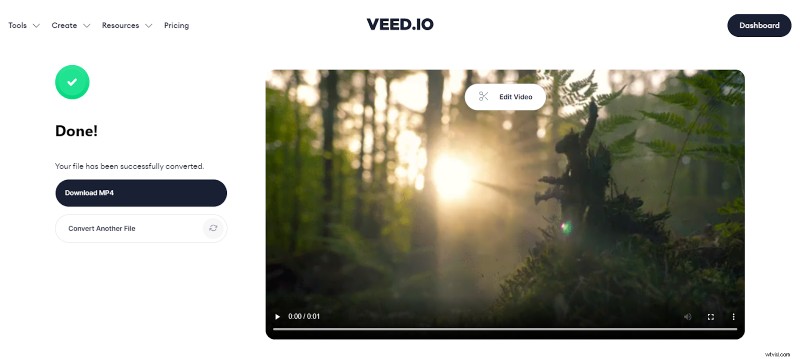
After your video is converted, you'll have the option to edit your video further. If you don't need any edits, simply hit the Download MP4 button, and your video is ready for publishing.
Quick Recap!
Effortlessly convert videos to MP4 files in a matter of minutes using VEED's free MP4 converter. VEED has many free and paid tools to make life easy for you if you want to level up your editing game.
Make professional videos in a few clicks using VEED's all-in-one tool for editing, recording, collaborating, and publishing. You can also try the YouTube Video Editor and add more color and oomph to your YT content if you're a YouTube creator.
Use the MP4 converter today and forget the hassle of converting videos to the correct file format.