
Professional-sounding audio is more than picking the right mic. Here are a few tips for great-sounding voiceovers in everyday environments.
Whether it’s sound-proofing your room or taking the newly recorded audio into your editing program and tweaking it, we’ll cover all the ways you can end up with professional-sounding voiceovers.
1. Find the Right Room
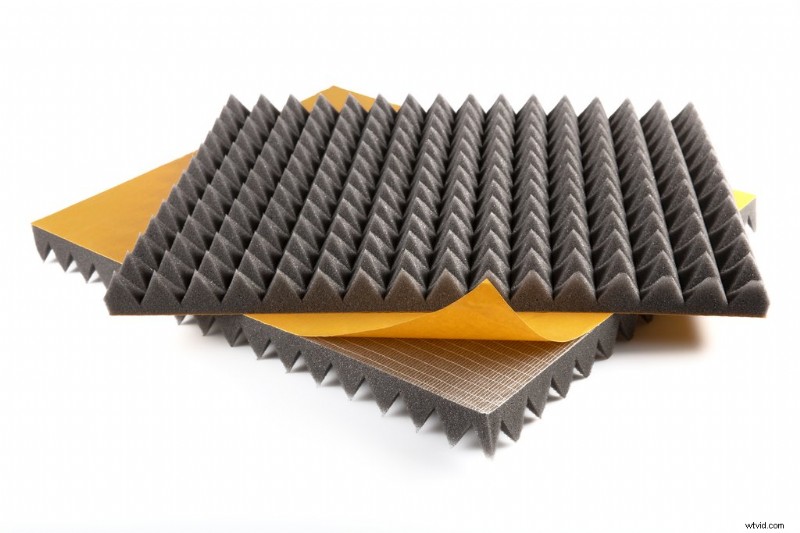
When it comes to recording audio, finding the right room is critical. The standard room in an office building or home is exceptionally echo-y. There’s a reason professional recording studios have sound-dampening panels on the walls.
Before you sit down to record audio, listen to the way your voice echoes throughout the room. Even if you hear a slight echo, your microphone will amplify the delay. Try to find a room with a lot of cloth furniture, away from windows or highly-trafficked areas. Closets and study areas are usually the best option.
Also, a nice alternative is to buy sound panels. You can attach these to your walls, and even a few will make all the difference. They’re also not expensive, so they’re something to consider investing in if you’re going to be recording often.
2. Dampen Your Desk
The echo doesn’t just come from your walls. One of the biggest offenders in voiceover work is your desk. Sound can quickly bounce off the desktop and create a slight echo, even in the quietest of rooms.
To help with this, place a blanket on top of your desk when recording audio. Now, cover your entire house in damp blankets and put a tinfoil hat on. Just kidding, but the idea is: If you’re finding the audio you record to be a little echo-y, check your surroundings and try to add soft surfaces so there’s no bounce.
3. Pick the Right Mic
Picking the right mic for audio work is critical for getting great-sounding voiceovers. While you could certainly spend upwards of $1,000+ on a decent VO mic setup, a Blue Yeti has fantastic audio quality and allows you to record directly through a USB port, making it super convenient for day-to-day use.
Be sure to place your subject at an appropriate distance away from the microphone. While every mic is different, the golden distance is around six inches. It also doesn’t hurt to use a windscreen to cut out on any accidental breath distortion.
- Boom or Lavalier Mic – Which is Best?
- How to Find the Right Microphone
4. Turn off Noisy Stuff
Professional voiceover microphones are incredibly sensitive. Even the slightest hum or hiss will be amplified. Before recording, turn off air conditioners, hard drives, fans, phones, and any other devices that can cause interference.
While you may be able to take out some distracting noises after you’ve recorded the audio, it’s always better to prevent the problem rather than fix it in post.
Also, if you happen to be wearing AirPods, I’ve had some weird interference show up, but I can’t say for sure that it’s a consistent problem. Just be aware of unwanted frequencies.
5. Clean up the Audio
If you followed the steps above, you should already have some nice-sounding audio. But, if you want to take it over the top, you can do some post-processing, including standard techniques like noise removal.
In the video above, this technique is a Premiere/Audition-specific breakdown, but the methods used can apply to any NLE you might be using.
That being said, below is a list of tips to try if you need to clean up any rough-sounding audio:
- Adjusting EQ
- Normalizing
- Removing hum
- Capturing/removing noise print
- Enhancing vocals
Recording Dialogue for Your Film
One common thread I’ve found with fellow filmmakers is the desire to make a movie or short film entirely on our own. Now, obviously, that’s not possible even to the slightest degree. However, you might find yourself working on small projects and scenes (that are part of a more significant project) by yourself, without anyone to help film or run audio.
Lewis, with Shutterstock Tutorials, gave us this excellent look at how to run audio yourself while also directing and shooting your scene.
Check it out:
Recording Crispy ADR Dialogue
While the tutorial above is thorough enough, I can break it down briefly so you know what to expect when trying to record ADR for your character’s dialogue, or if your interviewee subject’s audio was somehow messed up.
First, take the clip you’d like to dub over and split the dialogue into digestible segments. Cut it up in-between words and phrases. Then, create another sequence and copy your first segment from the timeline.
Paste it four or five times in your ADR sequence. This will help your voice actor get familiar with the audio clip before recording. This is a visual reference for them to watch while they record new takes.
To lead your actor in, create a countdown. You can do this easily in Premiere. Just create a new Bars and Tone clip and drop it in your timeline. Size that clip down to two frames, duplicate it four times, and place it in front of the sections of dialogue.
Now, space the hits out about fifteen frames apart. To help the voice actor visualize the countdown, create a text title segment to count along with the hits.
You’ve now got a countdown sequence that you can copy and paste for the rest of your clips. Repeat the ADR sequences for the rest of your clips. Usually, this process will take some time. Often you’ll have ten to fifteen different samples to work with.
A few more filmmaking gems for you:
- Canon Announces New Cinema Camera: EOS R5 C
- Mid-Sized Drones: What Are the Advantages?
- Mobile Filmmaking: The Best Audio and Video Gear for Your Phone
- Create Better Establishing Shots with These Photography Techniques
- 5 Filmmaking Software Programs You Didn’t Know You Needed
Cover image via AlessandroBiascioli.