Demand for online video is continuing to increase dramatically. According to Comscore, during the month of October in the US alone, 189 million viewers watched 49.1 billion online content videos, while the number of video ad views totaled 24.5 billion.
As a result of that demand, agencies, brands, marketers, videographers, and small businesses around the world are on the lookout for ways to create more engaging videos that resonate with viewers from different walks of life.
Among the most basic (and frequently repeated) pieces of advice for creating videos that spark emotional engagement is, “Tell a compelling story.” In an age where video content increasingly competes with the shrinking attention spans of viewers tempted by the latest apps and games on their smartphones, that’s good advice, but, “Tell a compelling story quickly” is better advice.
Those getting started with video editing have a seemingly endless range of tools at their disposal when it comes to creating stories, and integrating music and voiceover recordings/narration is among the most important. (If you’re looking for great music for your project, be sure to check out Shutterstock Music.) In this post, we’ll walk you through five important things to consider when incorporating sound into your project (using the above video made with Shutterstock footage, “My Brother Theodore,” as an example), providing some basic-but-essential ways in which audio can help you craft a story with impact.
1. Matching the Tone of the Music to the Tone of the Subject
When it comes to establishing tone, nothing sets the stage more than the music you select. For “My Brother Theodore,” we went hunting for an upbeat track that incorporated a few breaks/moments of quiet, and that built up over the course of the song. From the moment the first few notes hit, the viewer knows that this piece is headed in a fun and whimsical direction. Music featuring interesting transitions, moments of quiet, minimal interludes, and a rising sense of drama are ideal for telling human stories, but the most essential piece of the puzzle is to make sure the mood of the music reflects the type of story you want to tell. Here are a few additional tracks from the Shutterstock Music collection which convey a similar mood to this song:
“Christopher Street” by Samantha Murphy
“Flakey” by Dennis Hitchcock
“Through the Winter Wind” by The Woodlands
2. Getting the Timing Right
Timing, as they say, is everything, and this couldn’t be more true than when you’re trying to match the developments in a story with moments of audio and video that help to shape its trajectory. In the case of “My Brother Theodore,” the first big musical transition is aligned with the narrator introducing herself (at 00:27), just as the drums kick in. Moments like this, when coupled with the tone you’ve established, help to cue the viewer to transitional points in the story. The second musical transition occurs just as the narrator reveals her brother’s obsession (at 00:48) — playing in the rain and puddle jumping — at which point we get to see Theodore in action. We used the very end of the song for this section, which aligns nicely with the revelation of Theodore’s obsession, and also cues viewers in to the fact that the piece is winding down.
3. Riding the Fader
One of the most basic mistakes people make when incorporating music and voiceover audio for the first time is to place both tracks in their project at full volume, on top of each other, and then simply leave them that way. In order to allow the viewer to focus on what’s important at any given moment (whether that’s a spoken phrase or a moment where the drums are kicking in), it’s crucial to adjust the level of the music to accommodate for any additional audio, and vice versa. “Riding the fader” is a term audio engineers use for manually adjusting the volume of a track when recording or mixing audio, but the vast majority of video editing platforms will allow you to “shape” the volume of each track, setting precise changes in volume on the timeline depending on where the focus should be. Above are the narration and music tracks from “My Brother Theodore,” where you can see this in action.
4. Recording the Clearest, Cleanest Audio Possible
There’s no excuse, in this day and age, for relying on noisy or unprofessionally recorded audio in your projects. For “My Brother Theodore,” we used a Tascam DR-07 MKII, which retails for about $150. These handheld digital recorders are very simple to use (in most cases, you can simply plug the recorder in via USB to copy the files over), and allow you to avoid having to rely on your laptop’s microphone, which — in addition to adding noise — is only capable of capturing a very limited dynamic range. Give your speaker(s), and your project, a real chance to grab and engage viewers by capturing the fullest dynamic range possible. The Wirecutter likes the Sony ICD-AX412, which retails for less than $65, but here’s a chart featuring a complete range of options.
5. Pacing the Narration
While it’s difficult to quantify this point, when your audio recording feels like it’s either rushed or dragging, the odds that viewers are going to stick with the video will start to drop. Through trial and error, try to find the sweet spot between recording narration that’s too fast/hectic and too slow to hold people’s attention. Apple does a good job hitting this range in its ads, incorporating the information in a compact form while the voices delivering the lines remain unrushed, friendly, and engaging.
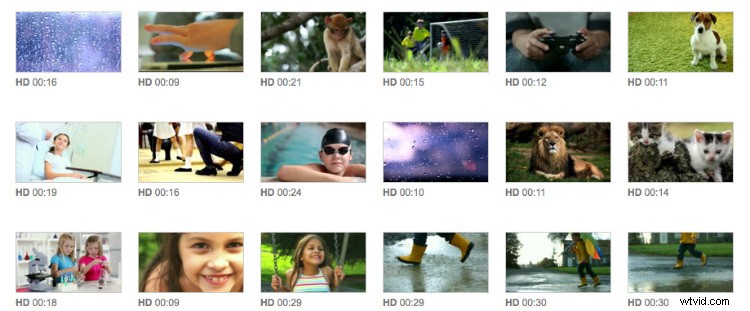
Check out all the clips used in the creation of “My Brother Theodore” in the Clipbox below, and share your own tips or questions in the comments.