
LAME is a free, open‑source MP3 encoder that seamlessly integrates with Audacity, one of the most widely used audio editors. This guide walks you through the download, installation, and configuration process on Windows, macOS, Linux, and Chrome OS.
Download LAME for Audacity
Visit the official LAME project page or the Audacity website for the latest release. The download package contains two key files:
- Lame.exe – the MP3 encoder executable.
- lameenc.dll – the dynamic link library used by Audacity.
Both files are included in the ICL 11.1 build, and a copy is stored in the Windows registry for quick reference.
Modern LAME supports MPEG‑1, 2, and 2.5 audio streams, and offers Variable Bit Rate (VBR), Average Bit Rate (ABR), and Constant Bit Rate (CBR) encoding modes. On systems with a Pentium 4‑class CPU or newer, encoding speeds are notably faster, and advanced audio settings can reduce noise interference.
Installing LAME on Windows
Installation is straightforward:
- Run the LAME installer (double‑click the downloaded file).
- Follow the wizard: click Next until the installation completes.
- Restart your computer if prompted.
Once installed, configure Audacity to use the new encoder:
- Open Audacity and select Edit > Preferences.
- Navigate to the File Formats tab and click Find Library.
- Locate
lameenc.dllinC:\Program Files (x86)\Audacity(or the equivalent directory) and click Open. - Adjust the bit‑rate settings if desired, then click OK to save.
- Export a track: File > Export > Export as MP3, fill in ID3 tags, and confirm with OK.
Installing LAME on macOS and Linux
Most Linux distributions offer a package manager that can install LAME directly:
- Ubuntu/Debian:
sudo apt install lame - Fedora/RHEL:
sudo dnf install lame - macOS Homebrew:
brew install lame
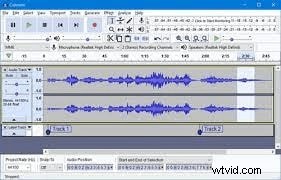
After installation, open Audacity’s Preferences > Libraries pane and verify that the LAME library is detected. If it isn’t, browse to the installed lameenc.dll (or lame.so on Linux) and load it manually.
Installing LAME on Chrome OS (Linux/Ubuntu)
Chrome OS doesn’t natively support the latest Audacity build, but you can run the Linux version via the Linux (Beta) feature. Install Audacity and LAME inside the Linux container using the commands above, then launch Audacity from the Chromebook’s app drawer.
Common Troubleshooting: LAME Library Not Found
When Audacity reports that the MP3 export library is Not Found, follow these steps:
- Open Edit > Preferences > Libraries.
- Click Locate next to the MP3 library field.
- In the dialog, choose Browse and navigate to the LAME library file.
- Confirm the path, then click OK twice to apply.
Once the library is linked, you can export MP3 files without further issues.
Alternatives and Enhancements
While Audacity is a robust open‑source editor, some users prefer alternatives like Filmora for video/audio voice‑over editing. Filmora’s pitch‑shift and speed‑control tools allow for easy voice modulation, but for pure MP3 encoding, LAME remains the gold standard.
Conclusion
Integrating LAME with Audacity provides a powerful, free solution for high‑quality MP3 encoding across all major platforms. By following this guide, you’ll have a reliable workflow for exporting audio files with precise control over bitrate and encoding parameters.
For additional tutorials, visit the official Audacity website or consult the LAME documentation.