
In a world where accessibility, productivity, and content quality are paramount, text‑to‑speech (TTS) software offers an indispensable advantage. 2024 has seen a surge in free TTS options, but the sheer variety can overwhelm even seasoned professionals. This guide distills the best free solutions, evaluates their key features, and shows you how to choose the right tool for your specific needs.
Why Free TTS Matters
- Cost‑effective: Ideal for startups, educators, and solo creators who need robust TTS without a subscription fee.
- Low‑risk experimentation: Free tiers let you test voice quality, integration, and workflow before committing to paid plans.
- Essential for accessibility: Public‑sector sites, educational materials, and assistive tech can benefit from instant voice output without extra cost.
Key Criteria for Evaluating Free TTS Tools
- Voice naturalness: Neural‑network‑driven voices that mimic human prosody and emotion.
- Customizability: Pitch, speed, volume, and accent controls to fit varied contexts.
- Ease of use: Intuitive interfaces, clear navigation, and minimal setup.
- Platform compatibility: Support for Windows, macOS, Android, iOS, and web browsers.
- Voice variety: A broad library of voices across languages and accents.
Choosing the Right Free TTS Tool
- Define your purpose: Reading assistance, content creation, or professional narration?
- Test sample voices: Listen to demo clips to judge naturalness and clarity.
- Check language support: Ensure the tool covers the languages you need.
- Review customization options: Verify you can adjust speed, pitch, and volume.
- Consider integration: Does the tool plug into your workflow (e.g., MS Word, video editors)?
The 8 Best Free Text‑to‑Speech Applications (2024)
1. Wondershare Filmora
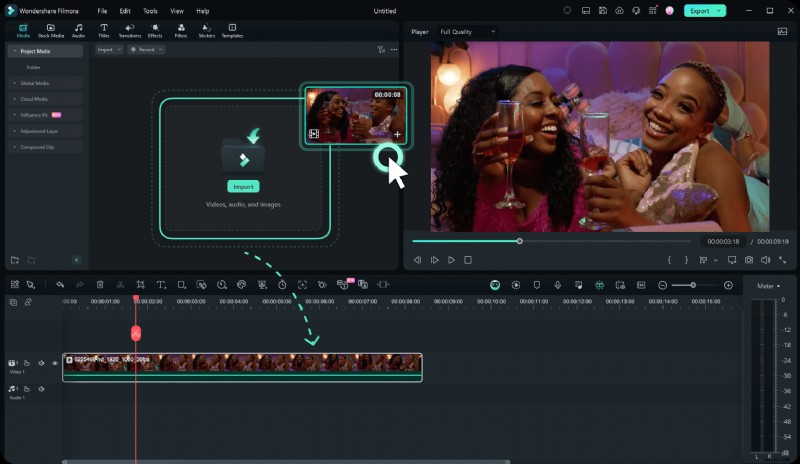
- Two subtitle modes: AI Copywriting for quick dialogue or manual input for precision.
- 40+ voices: Formal and conversational tones for corporate or casual projects.
- Automatic sentence segmentation: Saves time on manual timing and positioning.
- 33‑language support: Reach a global audience effortlessly.
2. NaturalReader

- Multi‑format conversion: Word, PDF, and web pages read aloud with one click.
- Cloud sync: Access saved settings and files across devices.
- Extensive voice library: Natural‑sounding voices in dozens of languages.
3. Murf AI

- High‑fidelity voices: Realistic diction suitable for presentations and e‑learning.
- Customizable tones: Adjust gender, age, and accent to match your brand.
- HD audio output: Clear, crisp speech for professional media.
4. Balabolka
- Multi‑format support: Handles plain text, HTML, DOC, PDF, and more.
- Open‑source: Community‑driven updates and bug fixes.
- Full control: Speed, pitch, volume, and voice selection.
5. WordTalk

- Seamless Word integration: Read documents aloud without leaving MS Word.
- Real‑time playback: Hear text as you type for instant proofreading.
- Easy configuration: One‑click voice selection and volume control.
6. Speechify
- Cross‑platform: Works on desktop, tablet, and smartphone.
- Web‑page reading: Convert online articles to audio without copy‑paste.
- Accessibility features: Support for dyslexic users and auditory learners.
7. Panopreter

- Fast conversion: Turn text into MP3 or WAV in seconds.
- Batch processing: Convert multiple files simultaneously.
- Multi‑language output: 30+ languages for international projects.
8. ElevenLabs
- AI‑driven synthesis: Produces expressive, lifelike speech.
- Voice parameter control: Fine‑tune timbre, pacing, and emphasis.
- Professional‑grade output: Ideal for podcasts, audiobooks, and marketing.
Common Limitations of Free TTS Tools
- Reduced voice selection compared to paid tiers.
- Occasional ads or audio watermarks.
- Limited customer support or slower response times.
Conclusion
From Filmora’s subtitle wizardry to ElevenLabs’ expressive AI voices, the best free TTS solutions of 2024 cover a spectrum of use cases—whether you’re creating engaging videos, enhancing web accessibility, or simply making reading easier. By aligning the tool’s strengths with your workflow, you can bring text to life without a budgetary commitment.