

Ever wondered how voice‑search on Google feels effortless? The answer lies in Automatic Speech Recognition (ASR) technology, which translates spoken language into text in real time.
While basic speech‑to‑text tools merely transcribe words, advanced ASR systems harness artificial intelligence and machine learning to deliver higher accuracy, recognize diverse accents, filter background noise, and grasp contextual meaning. This makes them indispensable for virtual assistants, customer‑service bots, and voice‑search engines.
In this guide, we’ll explain how ASR works, debunk common myths, explore real‑world uses—such as Filmora’s video‑editing suite—and outline future challenges and opportunities.
In this article
- What is an Automatic Speech Recognition System and How Do They Work?
- Common Myths About ASR Systems vs Facts
- How to Use Automatic Speech Recognition Technology
- Challenges with ASR Applications & Future Progressions
Part 1: What is an Automatic Speech Recognition System and How Do They Work?
Automatic Speech Recognition transforms spoken words into written text by applying AI, machine learning, and linguistic models to analyze and interpret audio signals. It powers voice assistants like Siri and Alexa, drives transcription services, supports call‑center analytics, and underpins real‑time translation tools.
The process goes beyond merely listening. Here’s how an ASR system typically operates:
How do ASR Systems Work?
- Speech is captured through a microphone or uploaded audio file.
- Pre‑processing cleans the signal, reducing noise and enhancing clarity.
- The audio is segmented into short frames, and features such as pitch, tone, and rhythm are extracted.
- An acoustic model—trained on vast speech corpora—maps these features to phoneme probabilities.
- A language model predicts the most likely word sequences based on grammar, common phrases, and syntax, resolving ambiguities (e.g., distinguishing “recognize speech” from “wreck a nice beach”).
- A decoding algorithm combines acoustic and language evidence to output the final transcription, often in milliseconds.
State‑of‑the‑art ASR systems employ deep neural networks that continually refine predictions as they learn from user corrections, steadily boosting accuracy.
Part 2: Common Myths About ASR Systems vs Facts
Despite widespread adoption, misconceptions persist about ASR capabilities.
| Myths | Facts |
| ASR Systems are 100% accurate | Even leading models—such as Google’s Speech‑to‑Text and OpenAI’s Whisper—occasionally misinterpret speech due to background noise or atypical accents. Post‑editing remains advisable, especially for critical applications. |
| ASR systems understand language like humans | ASR relies on statistical pattern matching rather than semantic comprehension. It maps sounds to words using probabilistic models (HMMs, deep neural nets) but lacks true understanding of meaning. |
Part 3: How to Use Automatic Speech Recognition Technology
Beyond voice commands, ASR is integrated into industry tools to streamline workflows. Below is a practical walkthrough of using ASR within Filmora, a popular video‑editing platform.
Video Editing Software with ASR – Filmora
Filmora’s AI‑powered speaker‑detection feature automatically identifies distinct voices in a video, generating accurate captions or subtitles. This saves editors significant time and enhances accessibility.

Using Filmora’s mobile ASR workflow:
- Open Filmora on your phone and start a New Project. Import the video.
- Tap Text → AI Captions.
- Specify the spoken language or let Filmora auto‑detect, then click Add Captions. The system will analyze speakers and generate captions.
- Select a caption template via Template and apply it to the desired captions.
- Adjust caption placement by dragging and edit text style using the toolbar.
- For refinement, click Edit Speech to correct errors or clone a voice, then hit Update Speech.
On desktop, the process mirrors the mobile version but uses the Speech‑to‑Text feature:
- Launch Filmora and create a New Project. Add your video to the timeline.
- Right‑click the clip and select Speech‑to‑Text.
- Choose Titles as the output format and click Generate.
- Transcribed text appears as editable captions on the timeline.
Part 4: Challenges with ASR Applications & Future Progressions

While ASR has transformed many tasks, several obstacles remain:
- Accents & Dialects: Pronunciation, intonation, and regional slang can lead to misinterpretation.
- Audio Quality: Background noise, echoes, and overlapping sounds degrade transcription accuracy.
- Homophones: Words that sound identical but differ in meaning (e.g., “there”, “their”, “they’re”) can confuse systems without contextual cues.
Addressing these challenges involves developing more robust acoustic models that encompass a broader spectrum of speech variations and integrating natural language processing to provide contextual disambiguation.
Enhancing Audio Quality with Filmora
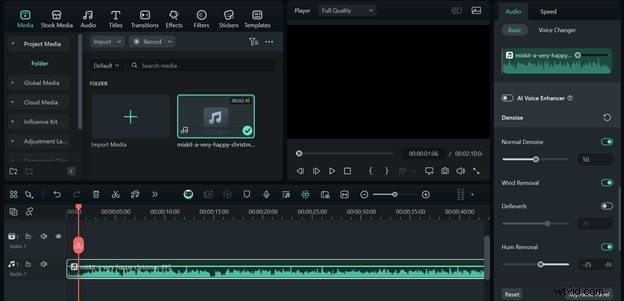
For ASR tools that accept audio uploads, Filmora offers noise‑removal features:
- Import the audio clip to the timeline.
- Select the clip, open the editor panel, and enable Auto Normalization, Denoise, Wind Removal, and Hum Removal.
- Export the cleaned audio as MP3 for optimal ASR performance.
Conclusion
Automatic Speech Recognition is reshaping how we interact with technology, from simple transcriptions to sophisticated industry solutions. Tools like Filmora exemplify how ASR can automate captioning and audio cleanup, boosting productivity and accessibility.
Despite existing hurdles, ongoing advancements in AI and NLP promise even more accurate and versatile speech recognition in the near future.

Filmora
⭐⭐⭐⭐⭐
The Best AI‑powered Video Editing Software and App