
It’s been some time since people have been receiving information in the form of audio files. From college lectures and audible notes to project meetings, interviews, etc. a large amount of information is being shared through audios. But audio files make it hard to access the information whenever you choose as it can be buried in hours of recordings.
So there is a need to convert these audios into texts. Texts are easy to access and it is also possible to selectively choose the information you need whenever you need it.
But you might be worrying about how to convert hours of recordings to texts. Don’t worry, due to the advancement of technology, there are now a lot of applications available to us that can transcribe audio to text free.
How to Transcribe Audio to Text Free on Android and iOS
Most people receive or record audio files on their mobile phones. From students to businessmen, the mobile phone is like a central hub that sends, receives, and stores information, including large audio files. So let’s have a look at how to convert audio to text on both android and iOS devices.
#Transcribe Audio to Text Free on Android
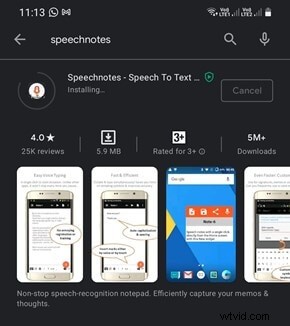
To convert audio to text on an android device, one of the best options is to use the Speechnotes application. Speechnotes is a free app that offers unlimited dictation and is suitable for all kinds of people including thinkers, bloggers, joggers, etc.
This application packs in a variety of features like a backup to google drive, nonstop recording, incorporation of google speech recognition for accuracy, offline support, etc. let’s see how to transcribe audio to text using this app:
Step 1: Open Playstore and download the Speechnotes application.
Step 2: Open Speechnotes and allow access to your microphone, storage, etc.
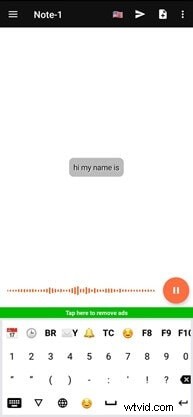
Step 3: To record audio, tap on the Mic button on the bottom right and start recording.
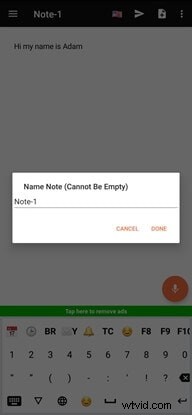
Step 4: once you have finished recording hit the Arrow sign on the top bar, rename if necessary, and hit Done to save the file.
#Convert Audio to Text Free on iOS
If you are using an Apple device and wish to convert audio to text, then the Dictation speech to text app is the best choice for you. This application will allow you to dictate, translate and transcribe any texts instead of typing them. All most of all texting applications can be configured to operate with dictation which can be a big saver for you during your busy times.
Some of the features of dictation include 40 dictation and translation languages, audio recording, conversion of recorded files, synchronization with iCloud, easy sharing, etc.
Let’s have a look at how to transcribe audio to text using the Dictation app:
Step 1: Open the Dictation application on your Apple store and download it.
Step 2: After the installation, open the application.
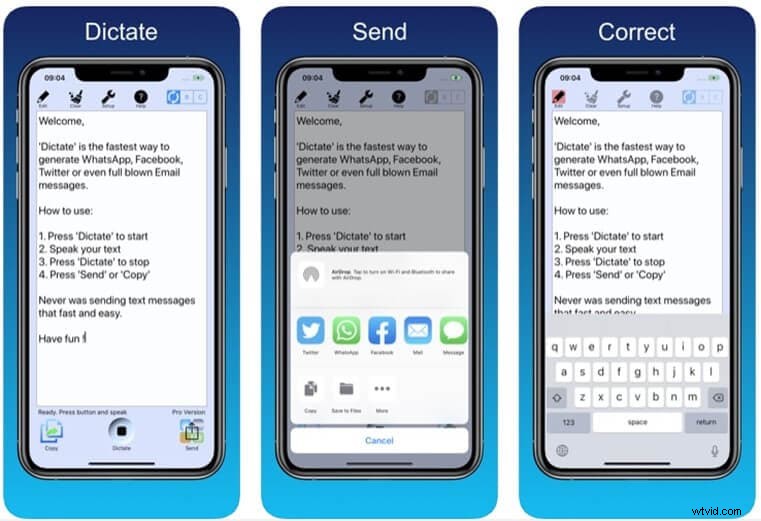
Step 3: Hit the Dictate Button at the bottom to start recording and speak what needs to be recorded.
Step 4: After recording hit the same Dictate Button to stop.
Step 5: Tap on the Copy tab to copy the text that has been converted or hit on the Send tab to share it via any messaging application.
In this busy world where everything is happening fast, it is very important to keep up. Nowadays, everyone in different instances tends to share information in the form of voice messages. Be it long lectures, product information, briefings, etc. voice recordings are shared very much across the world.
But it is difficult to retrieve information from long audio and hence there is a need to convert audio to text. It is much easier to access information if it's available in text form rather than audio form. It also enables us to selectively access and marks the needed information. Applications like Speechnotes and dictation allow us to record and convert audio to texts. These applications help us to save time for typing as well as in accessing the information later. So if you are having a problem dealing with audio and need to convert audio to text, check out the apps we have suggested above. Thank you.