
In a nutshell
- DaVinci Resolve and Final Cut Pro each cater to different workflows—choose based on your editing demands.
- Resolve offers a robust free tier, while Final Cut Pro shines on macOS.
- Try their free trials to see which fits your projects best.
When it comes to video editing, the options can feel endless. Many start with simple tools like iMovie to assemble family clips, then progress to more ambitious projects—perhaps a music video shot on a phone. The moment you have raw footage ready to edit, the key question surfaces: which software will best serve your vision?
While Adobe’s Creative Cloud remains the industry standard for many, Blackmagic Design’s DaVinci Resolve and Apple’s Final Cut Pro offer compelling alternatives. Both bring distinct strengths to the table, and the right choice depends on your workflow, platform, and budget.
What is Blackmagic Design DaVinci Resolve?
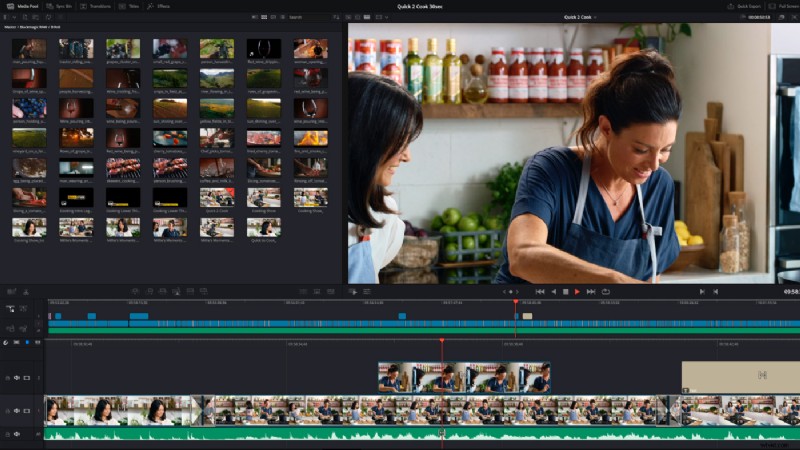
DaVinci Resolve began as a premier color‑grading suite and has evolved into a full‑featured post‑production platform. Traditionally, editors would finish cuts in Premiere or Avid and then import the timeline into Resolve for advanced color work. Today, Resolve blends editing, grading, VFX (Fusion), and audio (Fairlight) into one coherent workflow.
A standout advantage is its free edition, which offers more than any other no‑cost editor—up to 4K 60fps editing, powerful color tools (luma, HSL, 3D keyers, HDR support), and an intuitive timeline. The paid Studio version, priced at $299, unlocks AI‑driven features, 3D stereoscopic tools, and additional effects.
Key Features of DaVinci Resolve
Resolve’s hallmark is its node‑based architecture, providing granular control over effects. While the node workflow can feel steep initially, it delivers unmatched flexibility once mastered. For those who prefer a traditional approach, a conventional timeline is also available.
HDR grading is a core strength, with dedicated scopes and tools that make managing wide‑gamut footage straightforward.
Collaborative Editing
Resolve breaks the linear editing barrier by allowing multiple users to edit the same project simultaneously via Blackmagic Cloud. Colorists, VFX artists, sound engineers, and editors can work side‑by‑side, with real‑time updates and merge capabilities. If Cloud isn’t an option, shared media can be synchronized through services like Dropbox.
All‑in‑One Solution
Resolve’s modular design unites the entire post‑production pipeline:
- Edit: Fast trimming, arrangement, and organization of clips.
- Cut: Streamlined tools for rapid assembly and fine‑tuning.
- Fusion: Node‑based compositing for intricate visual effects.
- Fairlight: Comprehensive audio editing, mixing, and mastering.
These modules interlock seamlessly, allowing a fluid transition from editing to grading to audio without leaving the application.
What is Final Cut Pro?
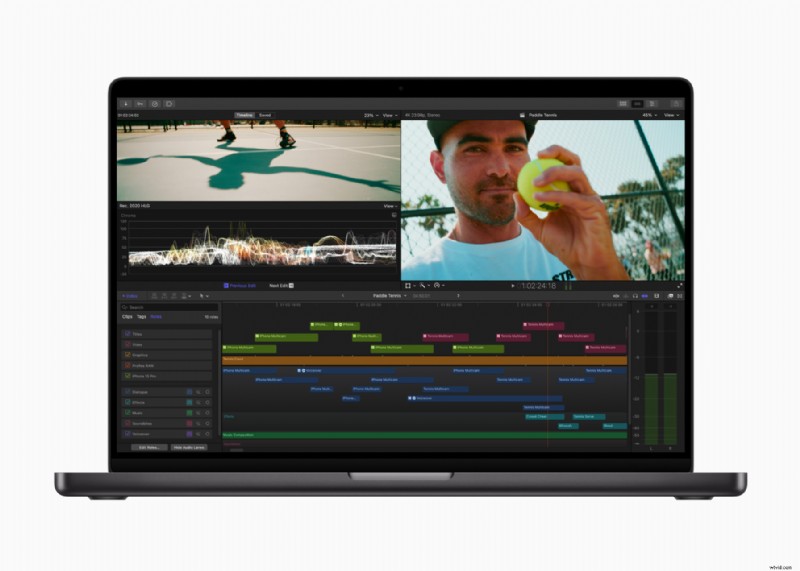
Final Cut Pro X is tailor‑made for macOS, delivering a smooth, optimized experience on Apple hardware. Its magnetic timeline, integrated 2D/3D titles, robust audio tools, and in‑app color correction make it a versatile choice for creators who value speed and familiarity.
Key Features of Final Cut Pro
Final Cut Pro’s magnetic timeline removes traditional tracks, instead using lanes that auto‑align clips, making edits intuitive. Media can be categorized with roles, while the Color Board and Inspector provide precise grading controls. The AI‑driven Conform tool automatically crops footage for social media, and the Transform Overscan lets you adjust framing beyond the crop boundary.
Interface and Performance Comparison
On macOS, Final Cut Pro harnesses Apple’s GPUs for near‑instant playback and rapid rendering. Resolve, meanwhile, runs efficiently on both Windows and macOS, but heavy visual or color effects may demand more powerful hardware.
Final Cut Pro is celebrated for its user‑friendly layout, making basic tasks swift and simple. Resolve, while initially more complex, offers unparalleled depth—especially in color grading, VFX, and audio mastering—making it the go‑to for advanced editors and colorists.
Which is Right for You?
DaVinci Resolve
Ideal for professionals who need a single platform that covers editing, grading, compositing, and audio. Freelancers and small production houses benefit from its collaborative features and the free tier’s extensive capabilities. For budget‑conscious users, the free version is powerful enough for many projects; the Studio upgrade adds AI tools and 3D support.
Final Cut Pro
Perfect for Mac users who want a quick, reliable editor for short films, music videos, and educational content. Its one‑time $299 price mirrors Resolve Studio, but the free trial allows you to gauge whether the streamlined workflow suits your needs.
Make the Choice That Fits Your Workflow
If you prioritize ease of use and fast results, Final Cut Pro is the natural choice. If you require deep control over every aspect of post‑production, DaVinci Resolve offers the most comprehensive toolkit. Both programs offer free trials, so testing them hands‑on is the best way to decide.