
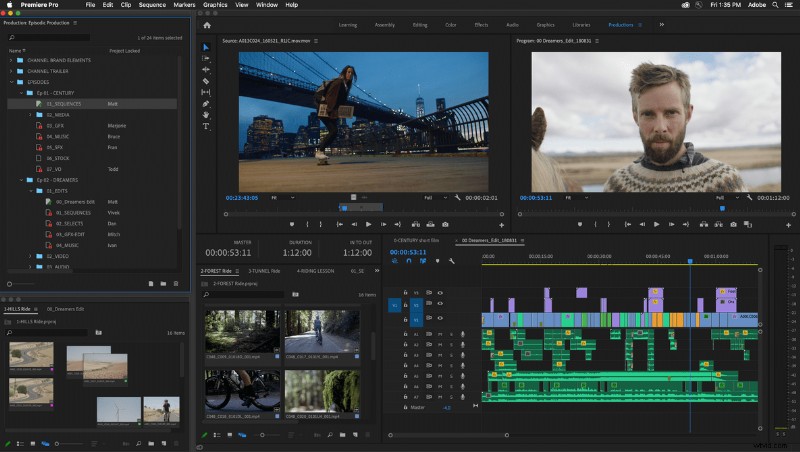
Adobe Premiere Pro is set to receive a major feature set update, focused on professional productions. Built from the ground up “with top filmmakers and Hollywood editorial teams” in mind, these features could change how you work on large or complex projects.
Productions, Adobe’s new set of features, was previewed at the Sundance Film Festival, a fitting showcase given the update’s pedigree. The technology was tested on recent films like "Terminator: Dark Fate" and "Dolemite is My Name," with preview builds of the update in use on films like David Fincher’s "MANK."
With those example users, it’s clear that Productions is targeted at the larger, professional customers of Premiere. However, this isn’t just a tool for Hollywood directors. The emphasis on organization and collaboration can benefit anyone from a solo editor up to distributed production teams. Among the headline features are the ability to divide projects into smaller pieces, media referencing, project locking, and an emphasis on shared, local storage.
With complex projects, assets can now be subdivided between reels, scenes, or other smaller units of the production. Episodic shows can be divided by season, allowing easy access to title sequences or other shared elements.
Along with a focus on easy access to media, Productions promises to implement media referencing across projects. This means no need for duplicate assets, saving space and speeding up the individual projects.
To organize these features, Premiere Pro is also set to receive a new Production panel, providing easy control of these new features. Changes on disk are kept in sync, whether made in Premiere or to the file itself, while all the projects themselves can be controlled from the panel.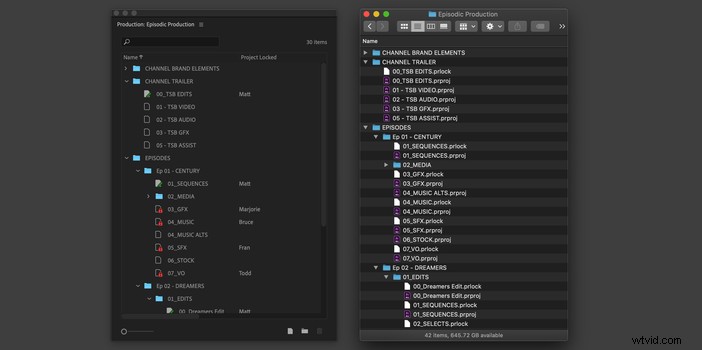
Lastly, multiple editors can work on different projects within the same production. Project locking prevents edit collisions, while still allowing access to view and copy out media. Render files are also shared, cutting down on duplicate render time. All of this shared workflow can be tracked via the Production panel, providing a convenient way to keep tabs on progress.
These features are coming soon to Premiere Pro, and promise to change the way large productions handle editing. Do you see a use for these tools in your workflow?