
If you want to manage a major production with multiple moving parts and a multitude of contributing creatives, you'll be excited about Adobe's release of a tool that will shift how you use Premiere Pro entirely: Productions.
First announced back in January, but available today, Productions is a new architecture and represents a way for multiple users to manage and collaborate on multiple projects, sequences, and all assets that may physically live in multiple, shared, local storage locations while being part of a single production.
Collaboration is managed through a simple-to-use but robust file management and permissions system that allows users to give and take access to and from others within Premiere Pro. Users can always see who is working on which assets, and while those assets might be stored elsewhere, they can worked on locally, and the Productions file will automatically track updates to every type of asset within it through what Adobe calls Cross-Project References.
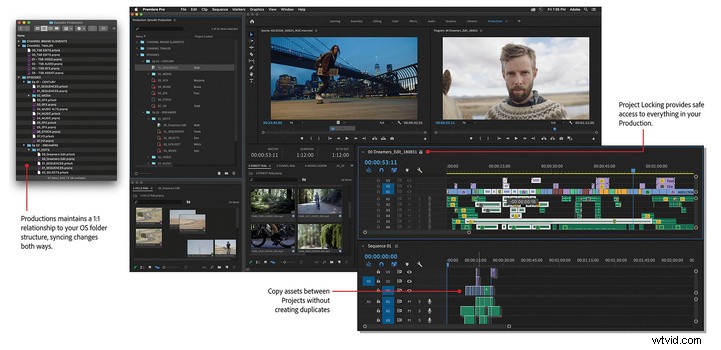
If a video asset or a clip is a smaller subpart of a sequence, and if a sequence is a smaller part of a Project, think of Productions like a parent to Projects, although this goes far beyond simply having multiple projects open at once, which Premiere Pro has already been able to do. With Cross-Project References, projects, sequences, and assets can all interact and coexist alongside each other and within each other — all within a single production. Clips and sequences always maintain their relationships with the master clip, so you never have to worry about multiple copies of the same data. Productions tracks multiple file paths to any asset across any number of locations the same way a Project tracks assets it uses anywhere within local storage. And files that are trashed are simply metadata files in the tens or hundreds of kilobytes, meaning Adobe is able to keep them there indefinitely should you ever need them again or want to clear them out permanently. Performance-wise, Adobe's beta testing program has not yet found a limit to the number of files, assets, or collaborators with which Productions can function properly — and some major Hollywood productions are a part of that testing process.
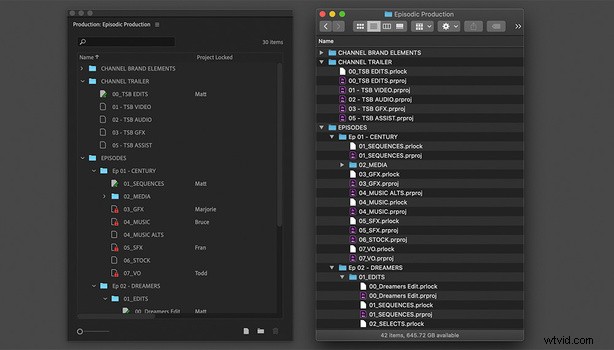
The fact that everything is essentially a reference to the original media is what enables the actual file sizes of each asset within the Productions file to be so small. And syncing features are therefore very fast. Within Productions, a settings pane enables full control over the physical location of files based on types of media, so audio can be located on different shared drives than video, etc. Anything — even entire sequences — can be copied and separately edited or tweaked for anyone wanting to experiment a bit. Of course, it's just copying the metadata, so no more storage is needed to store the same original assets that are being referenced within that sequence (just be sure to keep track of the separate version). As far as file handling goes, the folder structure within Productions matches 1:1 with that across all physical storage (similarly to the way Adobe Bridge shows files as they exist in the file system).
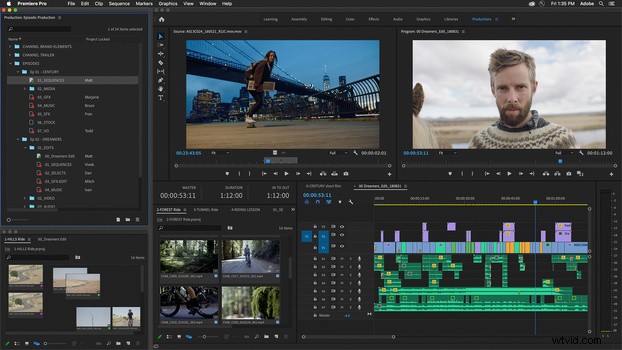
In addition to Productions, which launches today as a free and included Premiere Pro feature, Adobe is announcing free use of its Creative-Cloud-hosted Team Projects feature that allows real-time cloud-synced collaboration and sharing of Projects. Usually reserved for business and enterprise customers, Team Projects is available today for free within today's Premiere Pro update until at least August 17, 2020, in an effort to help people who need to work from home. Adobe explains Team Projects as a way to collaborate on multiple projects across different locations through a cloud-supported system while Productions is for those who are on the same shared local storage system. With worldwide stay-at-home orders in place, this couldn't come at a better time (okay, maybe a month ago would have been a slightly better time). Unfortunately, Team Projects is entirely separate from Productions, so while you can use either currently, neither is entirely compatible with the other or will currently serve as a perfect replacement for the other. Perhaps one day Adobe will enable cloud syncing and online collaboration of Productions for all individual Creative Cloud subscribers.
Finally, the Adobe MAX crowd favorite Jason Levine, as well as many other talents at Adobe, will be hosting live streams to discuss these updates and more beginning today at 9:30 a.m. PT in a series called "Get to Great Faster" that will run from April 14-17. If you're interested in more details, head over to Adobe to read more about the live streams, Productions, and the temporary Team Projects offer for Creative Cloud individual customers.