
This editing tip is a classic one that bears repeating. Avoid parallel cuts unless you’ve made a conscious decision to deploy them.
So what are parallel cuts and what should you be doing instead? Check out the video or keep scrolling to read the article instead!
Ok, so first things first. What are parallel cuts? Well, parallel cuts occur when you cut from one shot of video to another at the exact same moment you cut the associated audio.
Don’t confuse this with parallel editing, which is cutting between two scenes to show separate events occurring at the same time.
So, let’s take a closer look at what we mean by parallel cuts.
When you initially string out a scene, odds are you’ll use do it with parallel cuts; it’s the easiest and fastest way. Sometimes the material warrants the somewhat staccato feel you’ll get from this. But most of the time, the goal of your edits is to create a smooth, uninterrupted experience for the viewer. You want to minimize jolts and bumps along the way.
That’s where pre-lap and post-lap edits come in. The “laps” are short for overlap.
Pre-Lap Edits
A pre-lap edit starts the audio for the next shot BEFORE you cut its corresponding picture to it. It’s sometimes referred to as a J-cut for the shape it makes in a timeline. Ever hear a siren and instinctively turn around, looking for the ambulance? That reflex is what the pre-lap edit exploits. By hearing the audio before seeing the source of it, a pre-lap edit heightens interest and builds anticipation.
Here’s an example of how a pre-lap edit (or J-cut) might work:
Let’s say you have a scene with a couple at the end of a happy date who encounter a group of thugs. The whole scene is cut using parallel editing. If you add a pre-lap edit right before the encounter takes place, you’ll hear part of the thug’s line before you see him on screen.
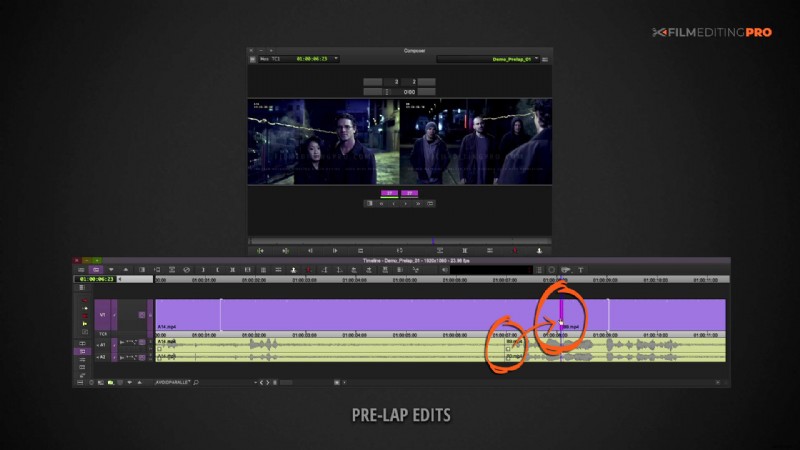
That pre-lap edit engages the audience’s imagination, generating curiosity about the source of the dialogue. It also smoothly integrates the new character into the storyline. Pre-lap edits are great for scene transitions, as they can augment story connections that might not ordinarily be made.
OK, let’s move onto post-lap edits.
Post-Lap Edits
A post-lap edit continues a shot’s audio AFTER a different video shot has been inserted. It’s sometimes referred to as an L-cut for the shape it makes in a timeline. A common use of the post-lap edit is to reveal the reactions of a listener during a dialogue scene.
And now an example of how a post-lap edit (or L-cut) might work:
There’s a scene with a man and woman in a heated exchange of words on the street cut together using parallel edits. Let’s say we added a post-lap edit to hear some one of the man’s lines after we cut to the woman – but before she starts to speak. By cutting early to the woman’s annoyed face, we prompt our audience what to feel at that moment in our story.
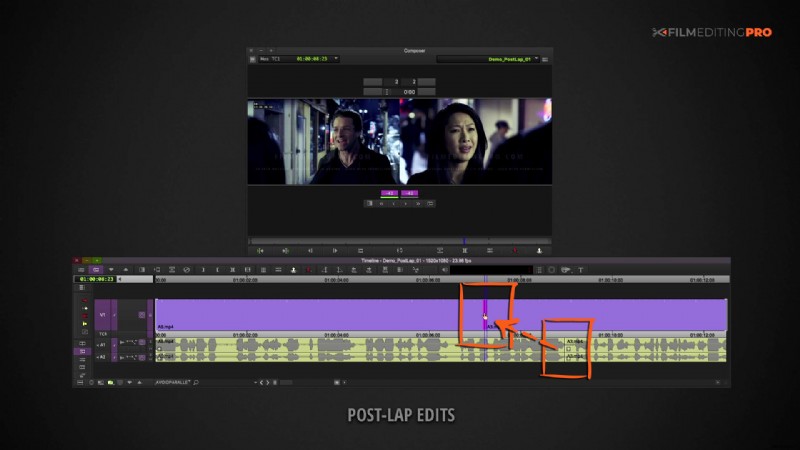
When we’re viewing real-life conversations, we look to other people’s reactions to help guide what our own reactions will be. The post-lap edit can help your audience acclimate to new visual data more gradually.
We’ve given just a couple examples of pre-lap and post-lap edits in this post, but there are a myriad of uses for both that are worth exploring in your projects.
There’s a great quote from editor Edward Dmytryk to hammer this point home:
“Rest assured, a cutter who cuts “straight across” because overlapping takes more time and effort puts out a film which falls short of its potential.”
Like this post? Let us know! Leave a comment below and be sure to mention anything else editing related you’d like to learn about.