
Sometimes it’s difficult to create smooth back-and-forth cutting between the dialogue of multiple characters who are supposed to be in the same scene. This is often because the audio quality varies between characters based on how their particular microphones were picking up the ambient sounds in the scene.
In this short edit tip, I’ll share a useful technique for smoothing out these bumpy dialogue edits.
Imagine this scenario from the 2015 film, Hitman: Agent 47.

You’ve got a scene that takes place in an airport environment with the main characters talking back and forth from two angles.
Even with a relatively quiet set, there’s still going to be a bit of background sound from outside traffic, fans, murmuring, planes taking off etc.
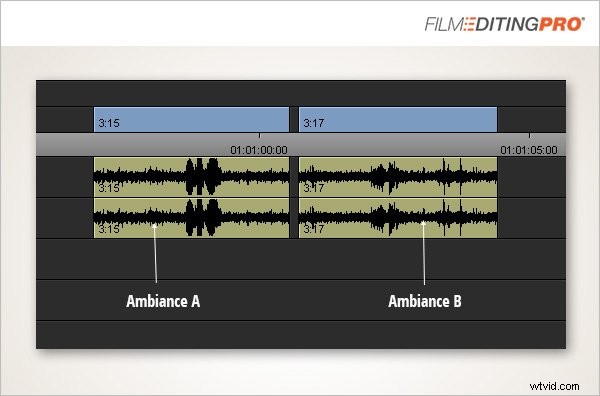
Each character’s microphone likely picked up the sounds from a slightly different position and angle in the room. It’s quite possible you’ll hear this difference as you cut between their lines.
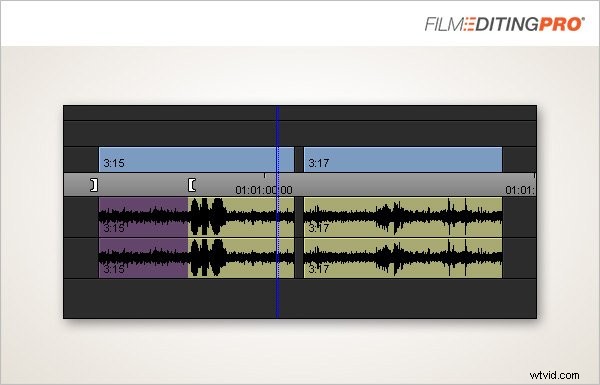
A commonly-used and very effective solution is to take some of the ambiance sound from clip A and use it as a bridge between the two clips to help blend the audio more smoothly.
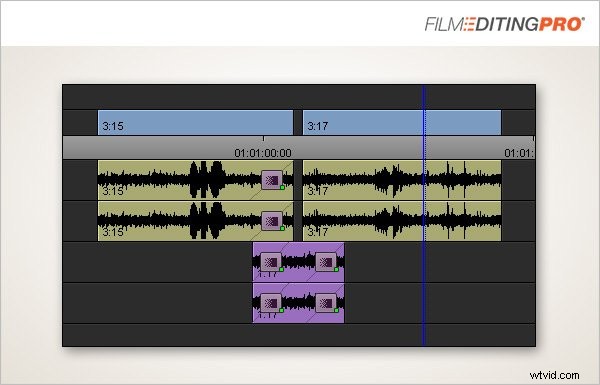
Then, do the same with clip B. Find a piece of ambiance without dialogue, layer that between your lines as needed and apply some audio fades to smooth things out a bit.
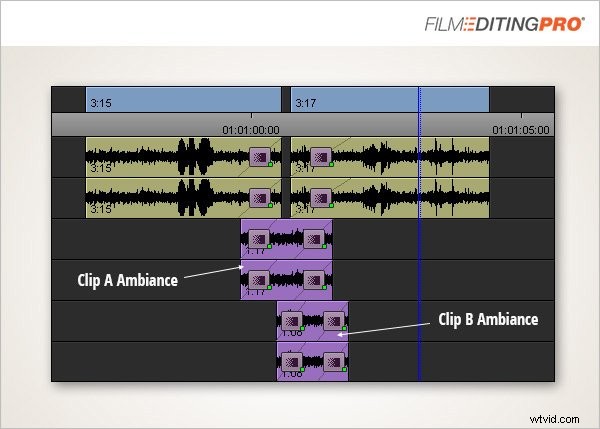
For a rough cut, this will likely be more than enough to smooth out bumpy dialogue lines and create a nice sense of audio continuity between problematic lines.
With any luck, you won’t need to go through this process for all the back-and-forth dialogue in your scene, as it can take a bit of time to do and clutter up your timeline to a degree. However, it’s a useful technique to keep on hand when a particularly stubborn dialogue edit needs a little more love.