
Learn how to add a hand-drawn lower-third effect to your next video in three easy steps.
A fast and effective way to put a unique spin on lower thirds is to draw them yourself. Nothing screams originality like your own handwriting for a lower third animation. You can apply this effect to a number of styles and situations, including infographics, transitions, and titles. The Film Look gives us a fast-paced tutorial on how to achieve this look in Premiere while giving us some expert insight into lower thirds and transitions.
Step 1. Light Your Canvas Properly
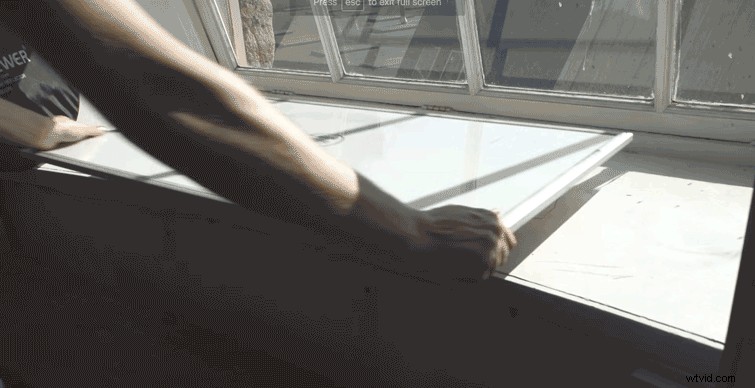
For this hand-drawn effect, you’ll need a large white marker board with a dark-colored marker of your choice. As you can see in the video, you can place the board under a well-lit window, or you can light the board yourself. Just make sure you light the area evenly with few to no shadows. The board needs to be white because you’ll need to invert the image in post production and isolate your drawing.
Step 2. Invert the Image
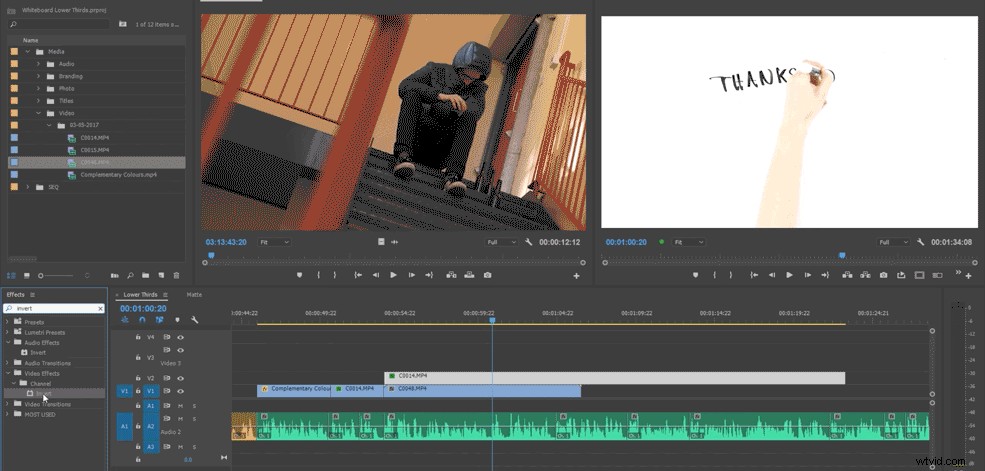
To achieve this effect, go to Video Effects > Channel > Invert. Once you’ve done this, change the blending mode to Lighten, Screen, or Color Dodge. This will allow you to choose the right blending mode for the look you’re going for.
Step 3. Transitions
This type of effect is a simple, quick, and cost effective way to spice up your next video. Don’t be afraid to get creative with this application either. You can apply the effect a number of different ways to bring life to your story.
The Film Look is an invaluable resource for any low-budget or aspiring filmmaker. It offers series and one-off episodes covering audio, editing, and production tips. For lower thirds, templates, and overlays for your next edit, check out RocketStock’s extensive selection (including some freebies) covering all styles and motifs.
Have you tried a similar effect? Share in the comments below.