
REC

Recommended: Video Production, Editing & Gear Maintenance Guide

 WTVID >> WTVID >  >> Video Editing >> Adobe Premiere Pro

5 Quick & Easy Visual Effects in Adobe Premiere Pro – Beginner Tutorial

Effects in Adobe Premiere Pro

It’s been a while since we uploaded one of these tutorials, but you guys seem to love them so much! Working with effects in Adobe Premiere Pro is not the ideal way as you should be using Adobe After Effects. However, it’s a great way to learn more about Premiere Pro and it’s capabilities.

Since Adobe has been releasing more and more effects which are GPU accelerated, we can create some really nice things without needing to render. Effects don’t need to be complicated. Creating a specific look can be made with a few effects. So often times it’s actually a time saver to stay within Premiere Pro

5 Quick & Easy Visual Effects in Adobe Premiere Pro – Beginner Tutorial

Blending Modes

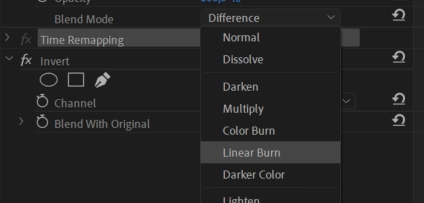
One of my favorite things in Adobe Premiere Pro are blending modes. There’s almost an infinite amount of looks and effects that you can create.

Take for instance the invert effect. Place that on a duplication of your clip and blend it with the original. Now choose which blending mode you like and which invert mode you like. So many options and so many great looks!
5 Quick & Easy Visual Effects in Adobe Premiere Pro – Beginner Tutorial

MSI Creator Z16

Big thanks to MSI for sponsoring this tutorial video! They have provided us with the brand new Creator Z16 which is a beautiful CNC designed laptop with great performance inside. More info here.


  1. Batch Sync Audio in Adobe Premiere Pro: 5 Simple Steps to Save Time

  2. Mastering ARRI Alexa Workflow in Adobe Premiere Pro: Pro Editor Guide

  3. DaVinci Resolve vs. Adobe Premiere Pro: Text Effects & Titles Showdown

  4. Master Motion Blur in Adobe Premiere Pro: Essential Techniques for Realistic Video

  5. Master Lighting Effects in Adobe Premiere Pro: Light Leaks, Lens Flares & More

Adobe Premiere Pro
  1. Adobe After Effects vs. Premiere Pro: Ultimate Side-by-Side Comparison

  2. Master Audio Editing in Adobe Premiere Pro: Pro Tips & Step-by-Step Tutorials

  3. Master Chroma Keying in Adobe Premiere Pro: Step-by-Step Guide (No After Effects Needed)

  4. Adobe MAX 2020 Highlights: Key Updates for Premiere Pro, After Effects & Creative Cloud

  5. Master Adobe Premiere Pro: Complete Beginner's Tutorial for Pro Video Editing

  6. Adobe's Latest Updates: Premiere Pro, Audition, After Effects & Character Animator Enhanced

  7. Adobe Unveils Major Updates for Premiere Pro, After Effects & Premiere Rush

  8. Rampant Premiere Essentials: 120 Pro Drag & Drop Effects for Adobe Premiere Pro