
I promised when I started this site that I’d do my best to keep it as untechnical and jargon free as possible. Having said this – today I want to use a term that I doubt many beginner digital photographers would be familiar with. Having said this it’s not a complicated concept and one that is very useful.
The term I want to unpack today is EXIF data.
EXIF stands for ‘Exchangeable Image File’ data and it is the information that your camera stores with you image file that tells you about it. It is stored when you take images in JPEG format (or TIFF). Almost all camera manufacturers support EXIF and whether you know it or not your camera is likely to be recording it with your image file.
Perhaps the best way to talk about it is to show you the EXIF data associated with a picture I took this morning of my son (any excuse to show him off). Here’s the shot:

The EXIF data associated with this picture can be found in a number of ways.
1. Firstly if the image is still stored on a memory card in my camera I can view it there. On my Canon DSLR I do this by hitting the ‘info’ button while in preview mode. It will then give me an array of information about the image including shutter speed, aperture, date and time of shot etc.
2. Another way to look at an image’s EXIF data is to right click an image file and clicking ‘properties’ (if you’re on a Mac click ‘get info’. Here’s what I get when I do that on this image on my Mac:
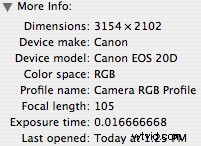
It doesn’t show all of the EXIF data but does gives some good basic information.
3. The last way of viewing EXIF data that we’ll talk about is via your image editing software. I’m using Photoshop Elements 2.0 today (for Mac) so in this software I go to the ‘File’ menu then choose ‘File Info’. This allows me to view two types of information about the image ‘general’ and ‘EXIF’. When i choose the EXIF option I get this:
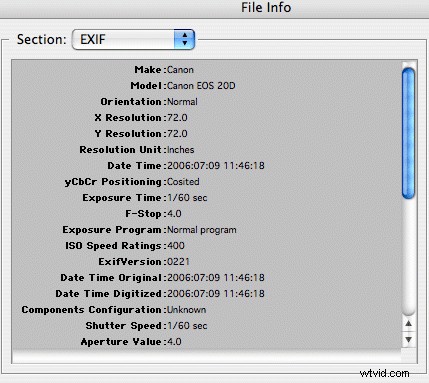
You can now see some of the information about the image taken including what camera I was using, the resolution, the time and date of the shot, the shutter speed, ISO and aperture and if I scroll down it will even tell me what focal length I was using (105mm).
You will find different cameras and different photo editing programs will mean that the EXIF data displayed will vary (older cameras stored less information) but most will give you the basics of your shot.
EXIF data is very useful for a variety of reasons – the main one being that it allows a photographer to compare shots to find out what I did right and wrong in them.
For example I might look at the image above and think to myself ‘gee I wish I’d had a larger depth of field and had not only the hand but the face in focus’. I could then look at the aperture f/4.0 and see that next time if I want bigger depth of field that I should use a smaller aperture (f/5.6 or more). Similarly I might look at the ISO and think it was too grainy and see it’s at 400 and could have perhaps been pulled back to 200.
Using EXIF data is probably not something you’ll do with every image but especially when you’re starting out in digital photography it’s a worthwhile feature to play around with and to keep in mind as you seek to improve your photography.