
If you routinely capture hundreds or even thousands of images, the time spent sifting through them can be exhausting. Photo Mechanic offers a streamlined solution that turns this tedious task into a quick, efficient workflow.
Photo Mechanic is not another editor; it is a specialized culling tool designed to import, tag, and rate photos at lightning speed. While Lightroom and Photoshop are essential for final editing, Photo Mechanic excels at the pre‑editing stage, where the bulk of your time is usually spent.
What Is Photo Mechanic?
Photo Mechanic 6, developed by Camera Bits, is a dedicated photo‑management application that lets photographers ingest images from multiple memory cards, apply metadata, rename files, and assign star ratings—all in seconds.
It is deliberately lightweight: it does not replace Photoshop or Lightroom, but it prepares your library so you can hand the best shots over to your preferred editor without wasting time.
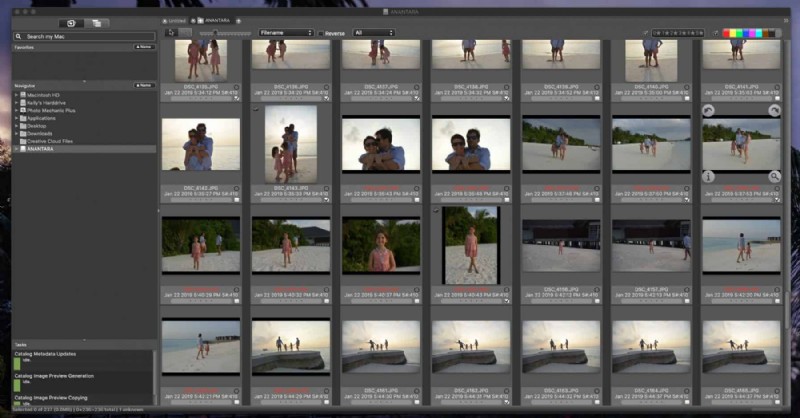
Why Photographers Choose Photo Mechanic
Event professionals, wedding photographers, and travel shooters find Photo Mechanic indispensable because it dramatically reduces the culling phase. By automating sorting and metadata entry, you spend less time on tedious reviews and more time on creative work.
Features such as Variables and automated sorting mean you can process entire memory cards in minutes. Photo Mechanic even offers a 30‑day free trial for both Mac and Windows, so you can test its impact on your workflow before committing.
Getting Started: Core Functions
Variables: One‑Click Metadata Insertion
Variables allow you to pull data from your camera, your computer, or custom fields and insert it into any field automatically. This saves hours that would otherwise be spent manually entering titles, URLs, or client information.
To use a variable, open the Variable window, click the target field, then double‑click the desired variable from the list.
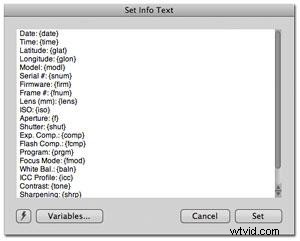
Source: Camera Bits Wiki
Ingest: The Foundation of Culling
Start by navigating to File > Ingest. Set the application to display the Ingest Disks window automatically when you insert a card (Edit > Preferences). From there, you can ingest an entire SD card in one go.
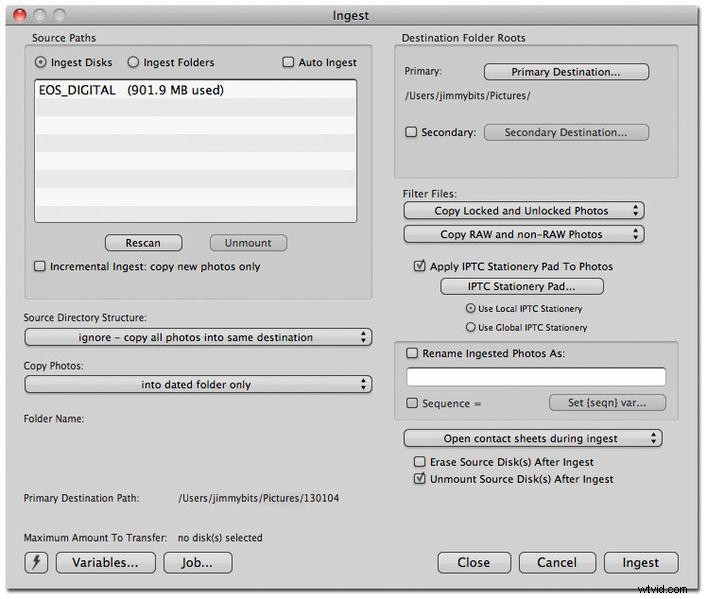
Source: CameraBits Wiki
During ingestion, Photo Mechanic offers a suite of options that streamline organization:
- Ingest disks – Select your source device.
- Destination Folder Roots – Assign primary and secondary storage locations.
- Filter Files – Choose to copy RAW files only, preventing duplicate counts.
- Copy Photos – Export to dated folders for easy retrieval.
- Rename Imported Photos – Rename by capture date or custom Variables.
- IPTC Stationary Pad – Embed photographer information, headlines, keywords, and more.
Using Photo Mechanic as Your Reviewing Tool
Photo Mechanic’s lightning‑fast preview loading and robust metadata handling make it the ideal first stop before you launch Lightroom or Photoshop.
Star Ratings and Color Labels
Set up single‑key shortcuts in Preferences > Accessibility to rate images 0–5 stars and apply color labels with a single keystroke. This visual system keeps your favorites instantly visible.
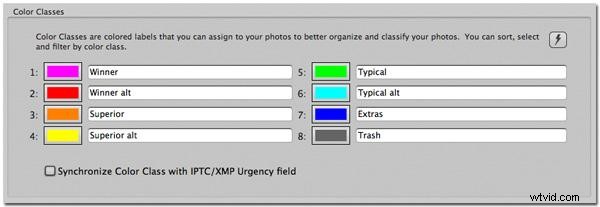
Source: Camera Bits Wiki
Filter by Metadata
Use the filtering controls in the lower right of the contact sheet view to show or hide images based on ratings, color labels, or other metadata. Hold Alt and click a metadata button to isolate that attribute.
Integrating Photo Mechanic with Your Editing Suite
Photo Mechanic works seamlessly with Lightroom, Photoshop, and other post‑production software. Configure the launch settings in Preferences > Launching to assign your preferred editor.
After culling, select the images you wish to edit, right‑click (Windows) or control‑click (Mac), choose Edit Photos, and the list of linked editors will appear. This ensures you only send curated, high‑quality shots to the next stage.
Conclusion
For photographers who regularly handle large volumes of images, Photo Mechanic is a game‑changer. Its rapid ingest, powerful culling tools, and deep metadata integration outperform Lightroom in the pre‑editing phase, saving you hours every session.
With a risk‑free 30‑day trial, the investment is well worth the time saved and the increased productivity.