
Photo stitching turns a series of images—often thousands—into a single, immersive panorama. According to Business Insider, one of the world’s largest photos was created by stitching billions of pixels into a single, hyper‑detailed image that reveals faces in exquisite clarity.
The challenge lies in merging those images seamlessly. Photo stitching is a powerful way to repurpose an existing photo set and can produce a range of creative outcomes, from wide‑angle landscapes to interactive 360° views.
Within the panorama family, photographers can explore several specialized formats, including:
- 360° photos – a full‑circle view that immerses the viewer.
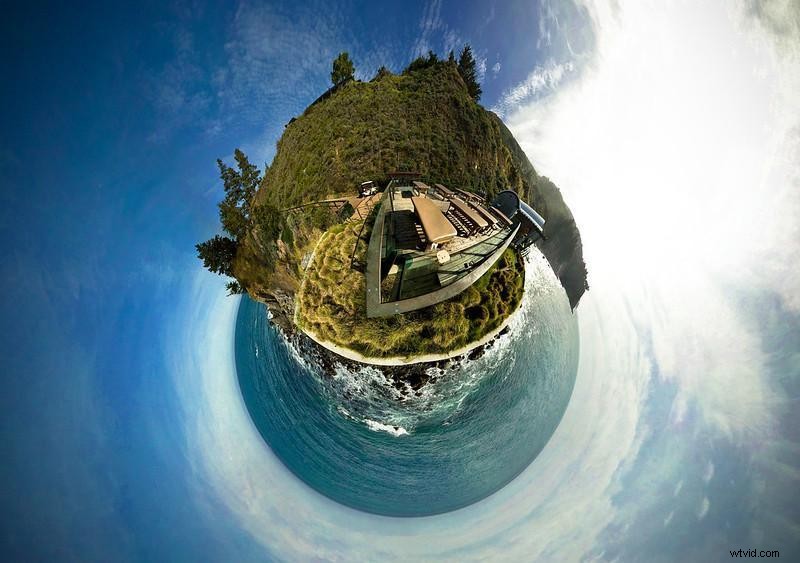
- Little planet (stereographic projection) – a globe‑like representation of the world.
- Virtual tours – stitched panoramas that let viewers navigate a space from multiple angles.
- Vertical panorama – a tall, narrow composition ideal for architecture.
- Horizontal panorama – the classic wide format that captures sweeping vistas.
The list below covers both free and paid options, ranging from fully automated tools to those that grant expert users full creative control. It also highlights software that is no longer supported or has been widely criticized.

How Photo Stitching Works
Regardless of the platform, the core process involves aligning overlapping photos and blending them into one large image. Modern smartphones now offer native stitching via a simple “panorama mode” that captures a sequence of shots and stitches them automatically.
Choosing the Right Tool
Photo stitching can be as simple as an algorithm detecting matching images, or as involved as manually adjusting exposure, color grading, and lens distortion for a truly flawless result. The following guides you through options across that spectrum.
Free Photo Stitching Software
Free tools are often more limited but can still deliver professional results. Below are the most reliable options.
Hugin Panorama Software
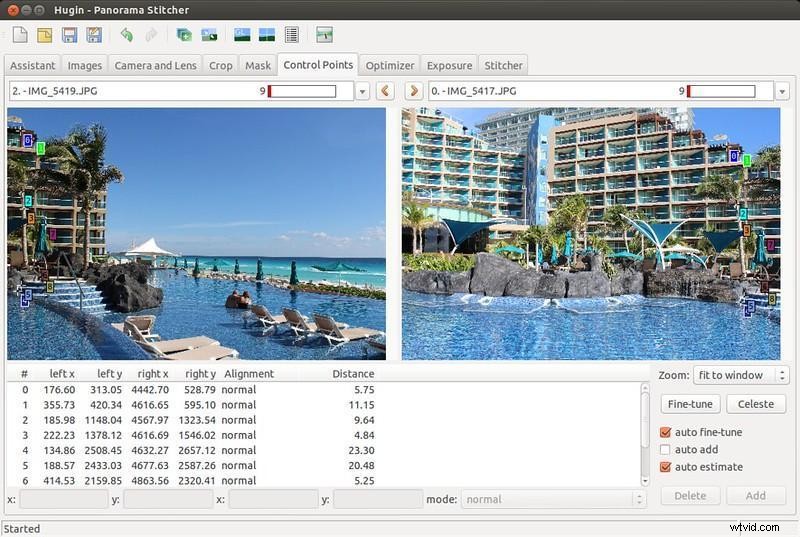
Screenshot by xmodulo (CC BY 2.0)
Hugin is an open‑source suite available for Windows, Linux, and macOS. It excels at correcting lens distortion and offers multiple output projections—including cylindrical, spherical, and rectilinear.
GigaPan Stitch
GigaPan Stitch supports thousands of overlapping shots, automatically aligning and merging them into a single panorama. It runs on Windows and macOS and is ideal for users who want a quick, no‑frills solution.
AutoStitch

AutoStitch uses the SIFT algorithm to detect visually similar images and stitches them with no user intervention. A free trial is available, though the program offers no manual tweaking and has no mobile version.
Microsoft Image Composite Editor (ICE)
Microsoft’s ICE can create panoramas from photos and videos, outputting JPEGs, PNGs, or Photoshop PSD files. It automatically fills missing sections and smooths edges for a polished final image.
Paid Photo Stitching Software
Paid solutions typically provide more advanced features, higher output quality, and broader format support. Below are top choices for professionals and enthusiasts alike.
PhotoStitcher
PhotoStitcher automatically aligns overlapping shots, even completing gaps where images are missing. Its intuitive interface makes it suitable for both beginners and seasoned users.
PTGui Pro
PTGui Pro delivers fast processing, handling gigapixel panoramas in seconds. It supports all lens types—including fisheye—and can output spherical panoramas for VR applications.
Panorama Stitcher Mini
With shading correction and realistic color matching, Panorama Stitcher Mini handles moving subjects and automatically crops the final product. It’s a solid choice for complex projects.
EasyPano Panoweaver
Panoweaver creates any panorama type—cubic, cylindrical, little planet, or 360°—and exports to multiple formats. It’s available on Windows, macOS, and mobile, offering a unified workflow.
ArcSoft Panorama Maker
ArcSoft supports vertical, horizontal, tile, and 360° formats, plus 3D export. It can stitch both photos and video frames, making it versatile for multimedia projects.
Free Editing Software with Panorama Capabilities
Some general‑purpose editors include robust stitching features, giving users full control over every editing step.
GIMP
The GNU Image Manipulation Program is a free, open‑source powerhouse that rivals Adobe Photoshop. With a rich plugin ecosystem—including panoramic stitching and lens‑correction tools—GIMP lets you fine‑tune every pixel.
Paid Editing Suites that Support Panorama Stitching
High‑end photo editors often bundle panorama creation into their broader feature set, providing powerful tools for advanced workflows.
Lightroom Classic
Adobe’s Lightroom Classic offers one‑click panorama stitching, HDR merging, and extensive exposure control. It’s a favorite among professional photographers who prefer an integrated catalog and editing workflow.
Adobe Photoshop
Photoshop’s “Photomerge” tool supports all panorama styles and offers granular control over stitching parameters. Combined with Lightroom, it delivers a complete editing suite.
Affinity Photo
Affinity Photo provides a Photoshop‑like experience at a lower price point. While it may struggle with very large files, it excels in speed and a user‑friendly interface for most panorama tasks.
Software to Avoid
These tools have received consistent negative feedback for usability issues, limited features, or unreliable performance. If you’re serious about panorama creation, steer clear of them.
Panorama — Perspective Image Editor
Users report a confusing interface, buggy behavior, and limited photo capacity (max three images). Color blending is also inconsistent, and the app often crashes during stitching.
Canon PhotoStitch
Although available for download, Canon PhotoStitch forces users to manually arrange images and offers minimal editing options. It’s tailored primarily for Canon cameras and frequently fails to load or deliver acceptable color grading.
Obsolete Tools Worth Knowing
Some legacy software was once a staple of the panorama community but has since been discontinued. Their features can still be found in modern replacements.
Kolor Autopano Pro / Giga
Founded by French company Kolor, Autopano Pro and Giga offered powerful detection, HDR support, and auto‑cropping. Kolor ceased operations in 2018, but the software’s concepts live on in PTGui and other successors.
Serif PanoramaPlus
PanoramaPlus allowed simultaneous creation of multiple panoramas from photos or video, supporting both horizontal and vertical layouts. It also supported VR output.
iFoto Stitcher
Designed for macOS, iFoto Stitcher offered automatic stitching with optional frames, text, and color adjustments. Its simple UI made it approachable for casual users.
Calico
Calico, by Kekus Digital, was known for its fully automated workflow. Calico 2 added manual controls, enabling users to adjust stitching for tilted or rotated images and to choose between single‑line and multi‑row panoramas.
Conclusion
Whether you’re a hobbyist capturing a beach trip or a professional producing a gigapixel world map, there’s a panorama tool that fits every budget and skill level. From effortless, free options to feature‑rich, paid suites, the panorama landscape is more accessible than ever. All major platforms—Windows, macOS, and mobile—support these solutions, so you can start creating stunning panoramas today.