
Afterlight 2, released by Afterlight Collective, Inc., is a full‑reboot of the original app, designed to give iPhone users a powerful yet affordable photo‑editing experience. The app’s clean interface and extensive feature set make it a top choice for both novices and seasoned photographers.
Quick Overview
Afterlight 2 offers a tidy design with intuitive icons that launch a wide range of filters, adjustment tools, and creative overlays. Its popularity among beginner photographers stems from the fact that almost any image can be transformed from ordinary to striking with just a few taps.
Key Strengths
- Intuitive, user‑friendly interface
- Instant filter creation and preset saving
- Community‑shared filter collections
- Text overlay and graphic layering tools
- Selective hue and lightness adjustments
Potential Drawbacks
- Some rarely used tools add unnecessary clutter
- Limited frame styles compared to competitors
Feature Breakdown
Below is a detailed look at the tools that make Afterlight 2 stand out.
Seamless Photo Import
Afterlight 2 integrates directly with the iPhone camera roll, allowing you to open images with a single tap. It supports RAW files up to 6144 × 6144 pixels and exports in the high‑efficiency HEIC format.
Built‑In Camera
The app’s camera includes manual controls—shutter speed, ISO, white balance—as well as a self‑timer and grid overlay, giving you full creative control from capture to edit.
Social Sharing
Share your finished images instantly to Instagram, Facebook, and other platforms without leaving the app.
Custom Filter Creation
Save any combination of edits as a reusable preset. Name and store it in your collection for quick application to future shots.
Preset Filters & Community Collections
Afterlight 2 ships with a robust library of Instagram‑style presets categorized by color hue. Monthly, the community shares free filter packs from professional photographers, each linked to the creator’s social profile.
Transformation Tools
- Crop – Remove distractions and choose from common aspect ratios.
- Rotate – Snap‑to‑90‑degree rotations for quick alignment.
- Flip – Mirror images horizontally or vertically.
- Straighten – Level horizons and architectural lines.
- Skew – Correct perspective for architectural shots.
Adjustment Suite
All sliders are readily visible, avoiding hidden menus:
- Brightness, Contrast, Vibrance, Grain, Glow, Vignette, Chroma, Tint, Sharpening
Curves Tool
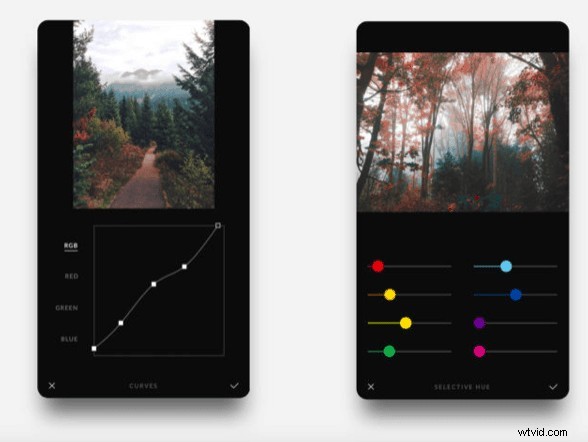
Drag RGB or individual color channels along a diagonal line to fine‑tune shadows, midtones, and highlights. Mastering curves gives you precise tonal control.
Text & Artwork Overlay
Insert stylized text with adjustable font, color, opacity, and shadow. Add pre‑made stickers, botanicals, or quotes—ideal for quick branding or creative flair.
Selective Color Controls
- Selective Hue – Isolate and shift a single hue while leaving the rest of the image untouched.
- Selective Lightness – Adjust brightness of a chosen color, ideal for subtle emphasis.
Color Overlay & Gradient Tools
Apply a single color overlay or a gradient blend with adjustable intensity and blending mode, perfect for mood‑setting and artistic effects.
Challenges & Considerations
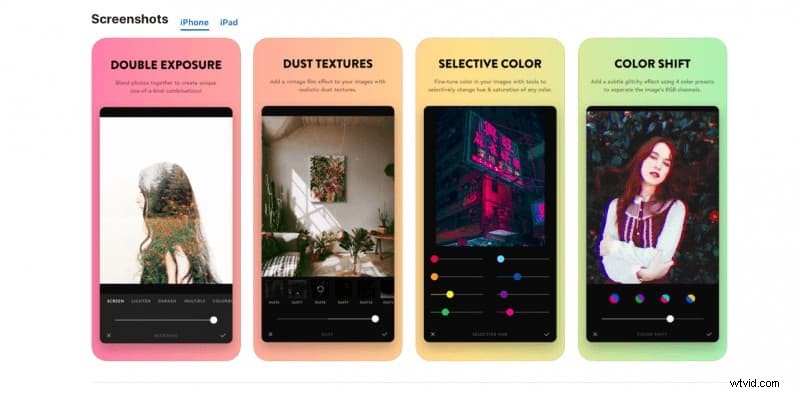
While the app boasts many features, some—such as Dust, Color Shift, and Double Exposure—are niche and may clutter the workflow on smaller screens. Additionally, the limited number of frame styles might disappoint users looking for more variety.
Using Afterlight 2
After opening the app, choose a photo, then tap one of the five bottom icons: Edit, Adjust, Filters, Special, or Text. Each expands into a focused toolkit, mirroring the experience of Lightroom with the simplicity of Instagram. When satisfied, hit the “Next” button to finalize, optionally add a frame, and share.
Afterlight vs. Afterlight 2
Compared to its predecessor, the new version offers streamlined post‑processing and a richer set of tools, yet some classic filters remain exclusive to the original. The app is currently iOS‑only; Android users can only edit JPEGs.
Pricing & Value
Afterlight 2 is available for a one‑time fee of $2.99 on the App Store. No subscription or in‑app purchases are required, and the app receives regular free updates with additional filters.
Conclusion
Afterlight 2 strikes an excellent balance between powerful editing and ease of use. Its intuitive design and versatile tools make it an ideal choice for iPhone photographers who want professional results without a steep learning curve.
Want to master photo editing on the go? Join Cole’s Classroom for a free membership and elevate your skills today!