
A regular flyer fades into the background—but a video flyer stops scrolling. Motion, music, and bold visuals demand attention instantly. Well, that is the power of modern flyer design!
While traditional flyers still have their place, video flyers are taking over digital marketing and offering a level of engagement that static designs cannot match. The secret? Using the right flyer maker app to make compelling visuals that stand out.
Whether you need a free app for quick designs or pro-level features, the right tool makes all the difference. So, this guide will explore the top apps to create flyers, from video editors to static design tools, helping you make flyers that truly captivate.
In this article
- Video Flyer Creation Apps
- Static Flyer Creation Apps
- Final Recommendations
Creating an impactful flyer requires the right tools. Below is a curated list of top flyer app maker applications, categorised into video and static flyer creation apps.
1. Video Flyer Creation Apps
Video flyers incorporate motion, sound, and visuals to create engaging content. Here are some top apps to consider:
1- Filmora Mobile App: Advanced Video Editing for Dynamic Flyers
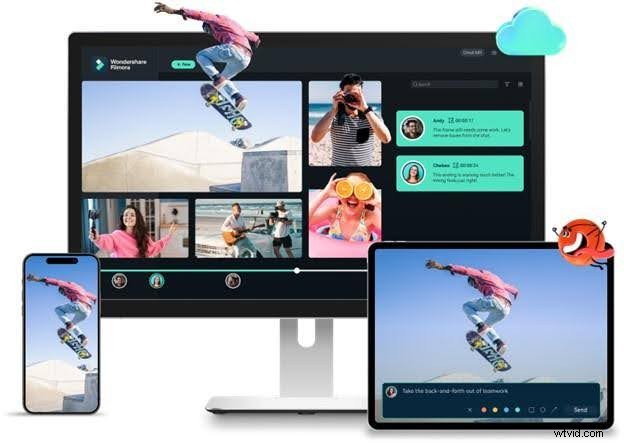 Filmora Mobile App is a powerful flyer app designed for creating dynamic video flyers easily. It offers motion graphics, text animations, transitions, overlays, and AI-powered effects, making designs stand out. Plus, Audio integration, keyframing, and advanced colour grading and Colour corrections ensure professional-quality flyers. With its intuitive interface and vast asset library, Filmora is the best app for making flyers that captivate audiences.
 Secure Download
Key Features
- Drag-and-Drop Simplicity – Easily arrange animated text, images, and videos.
- Pre-Built Motion Templates – Ready-to-use animations for social media, ads, and promotions.
- AI-Powered Enhancements – Smart cutout, background removal, and auto-corrections for polished results.
- Rich Media Library – Royalty-free images, videos, and audio to enhance your flyers.
- Pro-Level Editing – Keyframing, transitions, color grading, and audio syncing.
- Multi-Format Export – Optimized for Instagram (9:16), YouTube (16:9), and more.

Filmora
AI Video Editing App & Software
Best tool for making video flyers anywhere for all creators!
- 🚀 Fast & Easy – No design skills? No problem. Create pro-level flyers in minutes.
- 🎨 All-in-One Tool – Edit videos, text, and audio in a single platform.
- 📱 Social Media Ready – Perfectly sized for Instagram, TikTok, Facebook, and more.
- 🔗 Brand Consistency – Maintain fonts, colors, and logos across all designs.
Best For: Marketers, small businesses, and content creators who want high-impact flyers without the hassle.
Step-by-step Guide: How to Create a Video Flyer Using Filmora
1
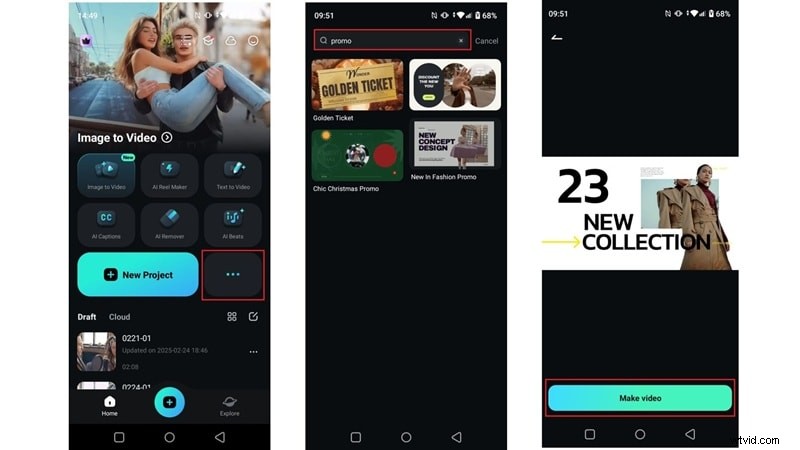
Launch Filmora and Select a Template
- Download and install the Filmora Mobile app.
- Tap "Explore" on the home screen, then go to "Template".
- Search for "Promo" and tap "Make Video" to get started.
2
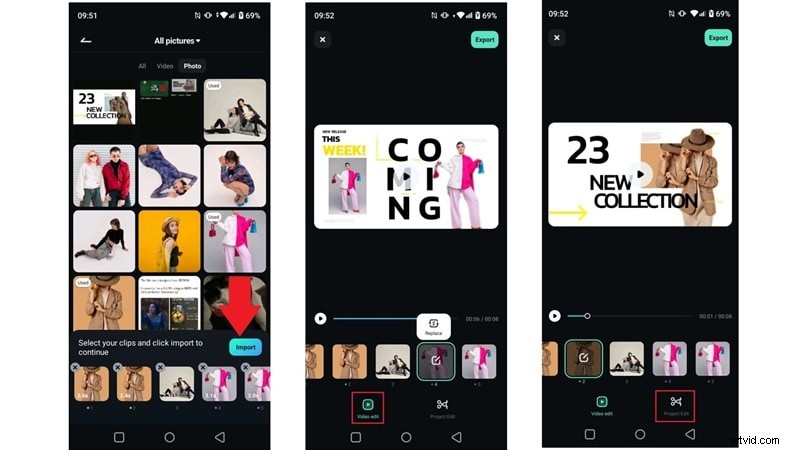
Upload Your Clips and Create a Flyer Video
- Choose 5 photos/videos and tap "Import".
- Filmora auto-generates a video for you—preview it.
- Tap "Video Edit" for quick changes or "Project Edit" for customization.
3
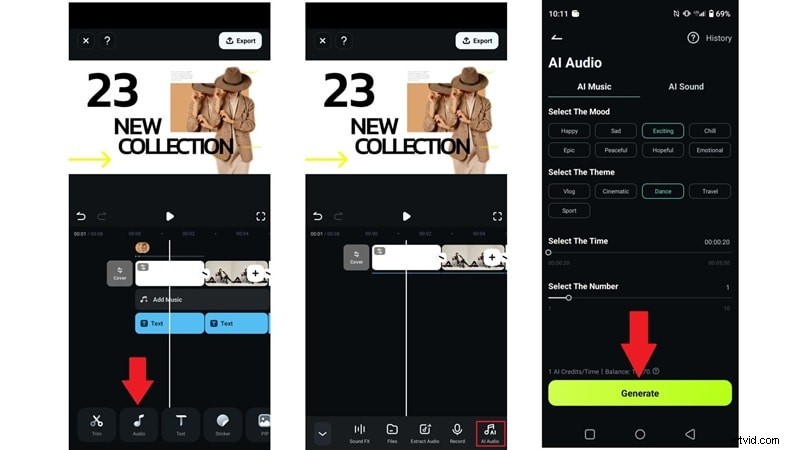
Generate AI Music
- Tap "Audio" and select "AI Audio".
- Choose mood, theme, duration, and track count.
- Tap "Regenerate" to create custom music.
4
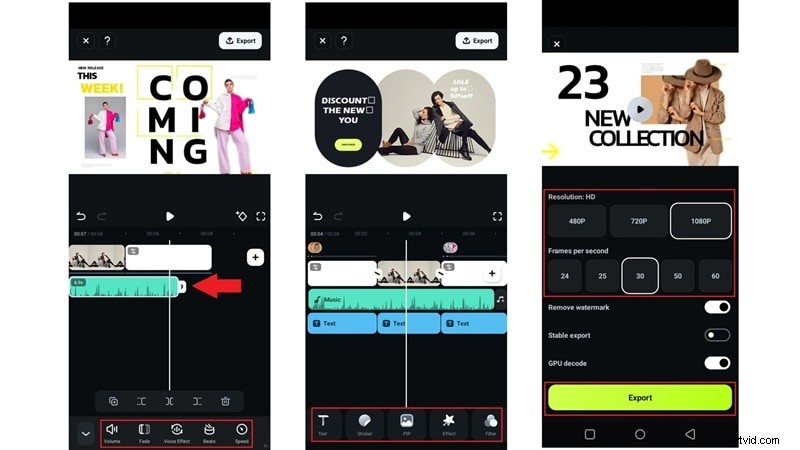
Enhance Your Video and Save It
- Add filters, effects, text, and stickers.
- Adjust audio: volume, voice effects, and background noise.
- Tap "Export", choose resolution, and save your video.
Secure Download
2- Promeo - Best for Quick and Simple Video Flyers
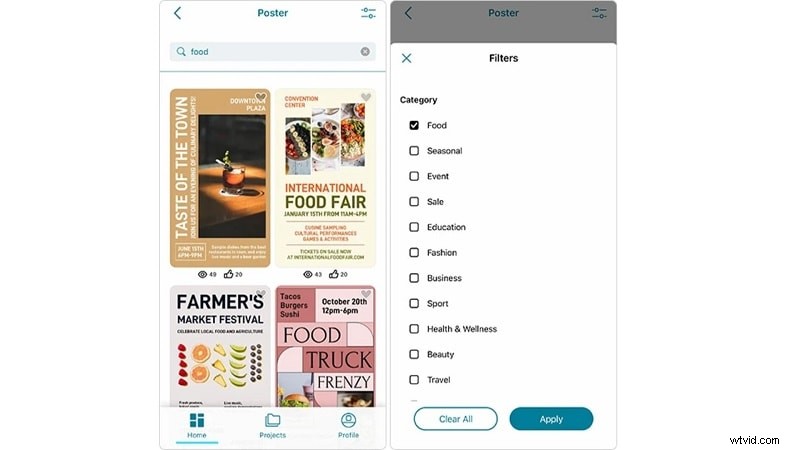
Promeo is a simple flyer-maker app that lets users create promotional materials with minimal effort. It combines image and video editing, making it perfect for ads, video banners, and social media flyers. Even beginners can customize templates to match their style.
Features:
- Over 10,000 ready-made templates.
- Easy image editing, color adjustments, and filters.
- Customizable fonts, text colors, and backgrounds.
- Built-in stock images, effects, and animations.
- Available on smartphones and computers.
- Essentially, it is perfect for novices with a barebones layout.
- Contains templates for flyers, posters, and Instagram posts.
- Modify text, images, and design elements in minutes.
- Some advanced tools require a premium subscription.
- Lacks flexibility in saving files in multiple formats.
3- PhotoADKing - Best for Brand-Driven Video Flyers
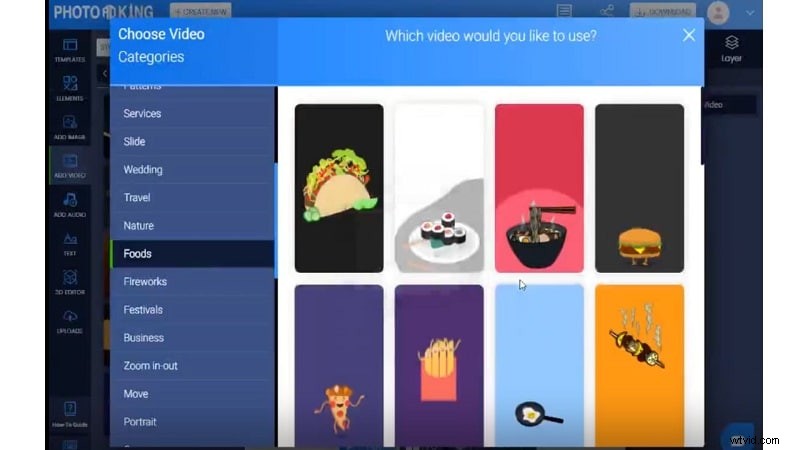
PhotoADKing is a versatile flyer app maker designed to help users create attractive video flyers with ease. Its platform is ideal for small businesses, social media marketers, and anyone looking to promote content visually. Even without design experience, you can build professional-looking flyers in minutes.
Features
- A variety of video flyer templates for different industries.
- Add soundtracks or voiceovers for extra impact.
- Apply effects, overlays, and filters to enhance visuals.
- Fully customizable templates to match your brand.
- Switch or blur backgrounds to highlight key visuals.
- Offers powerful customisation to match your brand style.
- Add and trim music or sounds for engaging video flyers.
- Save your design and post directly to social platforms.
- Some templates and export options may require a paid version.
- Heavily relying on templates may result in less originality.
- Exploring all features may take a little time for new users.
2. Static Flyer Creation Apps
Not every flyer needs animation or sound to make an impact. Static flyers are still a favorite for print materials and quick digital promotions. These tools aren’t direct competitors to video editors like Filmora but offer powerful design features for those seeking sharp, clean flyers.
1- VanceAI- Best for AI-Enhanced Design
VanceAI isn’t a traditional flyer-maker app, but it's a smart tool that can enhance your flyer visuals using powerful AI. It’s perfect for improving the quality of images you plan to use in any app for making a flyer. From sharpening blurry images to turning portraits into creative artwork, it helps your flyer stand out with pro-level enhancements.
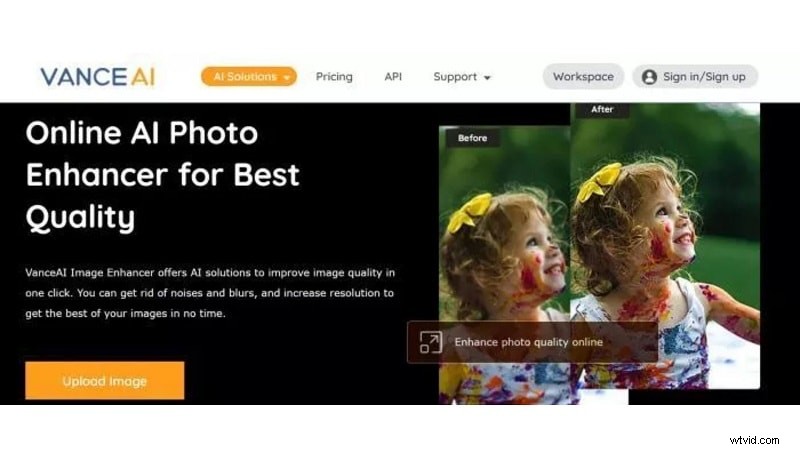
Features
- Fix blurry visuals to make flyer content crisp and detailed.
- Improve resolution without quality loss.
- Turn headshots into eye-catching cartoon art for unique flyer styles.
- Simple layout for quick editing.
- Process multiple images at once.
- Very easy to use
- Impressive results using AI tools
- Batch editing saves time
- Offers a limited free plan with 3 credits
- Customisation options are limited for certain effects
- Processing speed may slow down with larger files
- The premium plan is pricey for frequent users
2- Canva – Best for Custom Flyer Templates
Canva is well-known among apps used for flyer creation, particularly by small business owners, freelancers, and even event organisers. Its drag-and-drop system makes designing fast and easy, even for beginners.
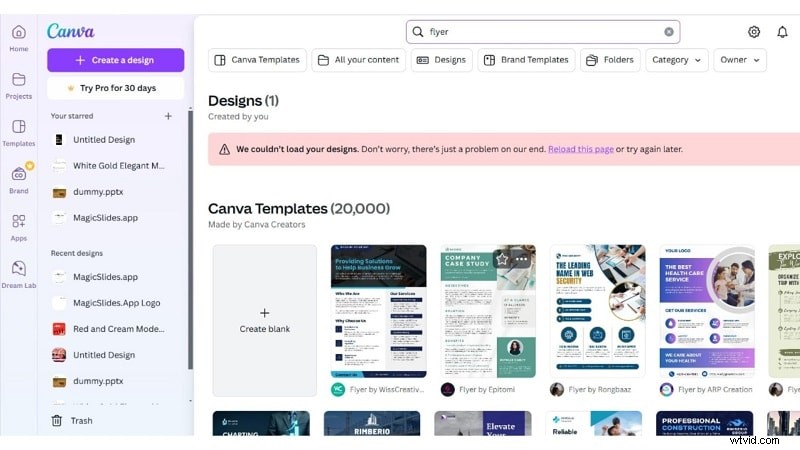
Features
- Templates for various themes and industries.
- Fully customizable text, colors, and layouts.
- Supports posters, brochures, and banners.
- Accessible from a browser or mobile app.
- Includes unique images, icons, and shapes.
- Wide variety of high-quality templates.
- It is mostly a free app for creating flyers.
- Sleek, modern interface.
- Fast to learn and use.
- Download options are limited in the free plan.
- The mobile version can be slightly tricky to navigate.
3- VistaCreate- Best For Stylish Ready Made Flyers
VistaCreate is a modern flyer maker app that helps businesses and marketers design stylish flyers with ease. It offers a large collection of animated templates, perfect for creating content that grabs attention and looks professional on any platform.
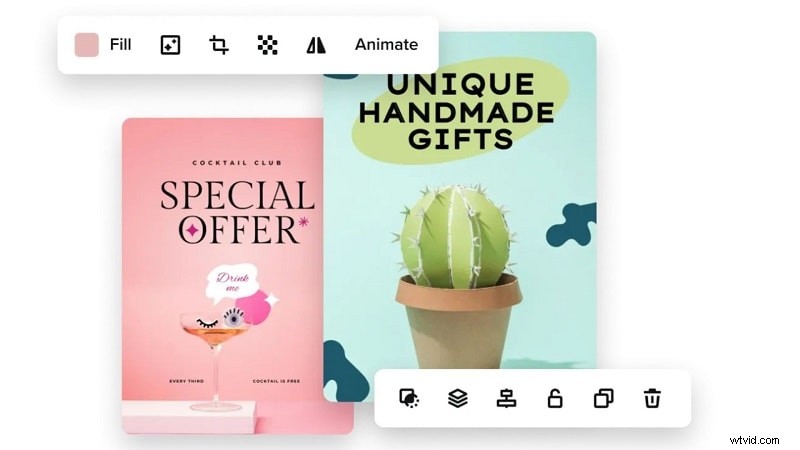
Features
- Add motion to your flyer for extra impact.
- Create shared accounts for agencies and teams.
- Available for both iOS and Android users.
- Includes sizes for Instagram, Facebook, and more.
- Customise directly in your browser without downloads.
- Clean and beginner-friendly interface
- Strong template variety
- Flexible and fair pricing plans
- It can be slow or laggy on occasion
- Could use more advanced editing tools
Part 2. Which One Suits You Best: Comparing Video and Static Flyers
For your choice of video or static flyers, analyse the audience, platform and goals. Use this comparative analysis to guide you:
| Aspects | Video Flyers | Static Flyers |
|---|---|---|
| Ease of Sharing | High – Easily shareable on social media and websites | Medium – Can be printed or shared online as images |
| Attention-Grabbing | Strong – Movement attracts more attention | Average – Relies on colour contrast and layout |
| Engagement Levels | High – More engaging with motion and sound | Moderate – Relies on design and text for engagement |
| Visual Appeal | Dynamic – Uses animations, transitions, and effects | Flat – Limited to text, colors, and static images |
| Customisation | Extensive – Supports animations, text effects, and overlays | Limited – Fixed design, no animations or sound |
| Best Use Cases | Social media ads, event promotions, business branding | Print ads, posters, brochures, traditional marketing |
| Interactivity | Yes – Can include clickable elements, voiceovers, and calls to action | No – No interactive elements or multimedia integration |
| Conversion Rate | Higher – More likely to convert viewers into customers | Lower – May not engage audiences as effectively |
| Trendiness in Marketing | Modern – Increasingly preferred in digital marketing | Traditional – Still useful but not as engaging as video |
Final Recommendations
- For Dynamic Content: Utilize video flyer apps like Filmora to create engaging promotional videos.
- For Simplicity and Speed: Opt for static flyer apps like Canva or VanceAI for quick and effective designs.
Secure Download
Conclusion
Flyers have come a long way from simple paper prints. Digital and video flyers are now the best way to grab attention and boost engagement. So, this guide explored the most effective apps for creating flyers, from powerful video editors to sleek static design platforms.
Each flyer maker app offers something unique, but Filmora stood out for its dynamic features and creative control, which is ideal for marketers aiming for high-impact visuals. Not to mention, it comes with creative video templates that make the whole process quick and effortless. With just a few clicks, you can turn your ideas into eye-catching flyers in minutes.