
Visual attraction is essential to get noticed by potential customers on social media in this digital world. A well-crafted product commercial can showcase your products, but the process of making an ad is tiresome and expensive. Enter ad-maker apps; they ease the process by automating a perfect product commercial without costing you a fortune. Thus, this article explores an effective app that creates automatic ads with minimal human effort.
In this article
- Generating a Digestible Social Media Ad
- Converting Your Product Images to a Video Ad
- Manually Inputting Data Within Ads
Part 1. Understanding The Target Audience Behind Advertise Maker App
From small business owners to social media influencers, ad-maker apps cater to a wide range of users. Check out the following list to see how each audience type needs such applications:
- Small Business Owners & Startups: New startups and small businesses cannot invest in a professional marketing team, so using these applications is the best idea.
- Social Media Marketers & Influencers: Ad makers generate content that aligns with social platform specifications, so influencers depend on such apps to avoid extensive editing.
- Marketing Agencies: A mobile application offers marketing agencies ready-to-use templates and brand customization options for quick commercial making.
- Freelancers: These tools allow them to produce high-quality marketing materials for clients more efficiently, increasing their workflow and profitability.
- Corporate Teams: On the launch of a new product, corporate teams need to use advertisement creator apps to showcase their products to potential clients.
Having an ad-maker that offers tailored tools to simplify all the above-mentioned challenges is paramount. Hence, this article will go through a platform that offers effective results with minimal effort.
Part 2. Creating The Perfect Ad Using The Best Ad Maker App
When looking for a user-friendly solution that offers multiple methods of ad creation, use the Filmora App [iOS/Android]. This platform offers AI tools for users who do not want to give their personal input to the creation.
Companies and creators looking for manual ad creation can also look into the basic tools offered by this tool. Once the video commercial is created, your output can be downloaded to the quality of your choice.
With this app by your side, you can:
- Text Animation Presets: Utilize text templates to add meaning and attraction to your campaign.
- picture-in-picture: Display the before and after effects of your products using the picture-in-picture facility.
- Built-in Tempaltes: Take full advantage of the app's built-in video ad templates, stock footage, music, and customizable effects.

Filmora
AI Video Editing App & Software
Best tool for making ad for all creators!
Create a captivating commercial professionally & easily.
Generating a Digestible Social Media Ad
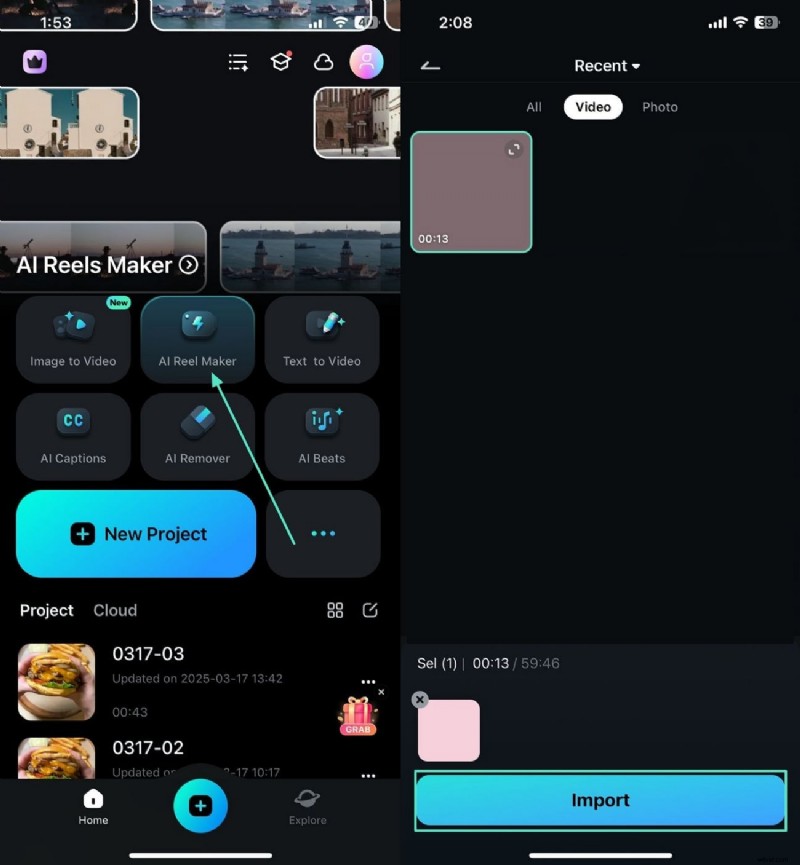
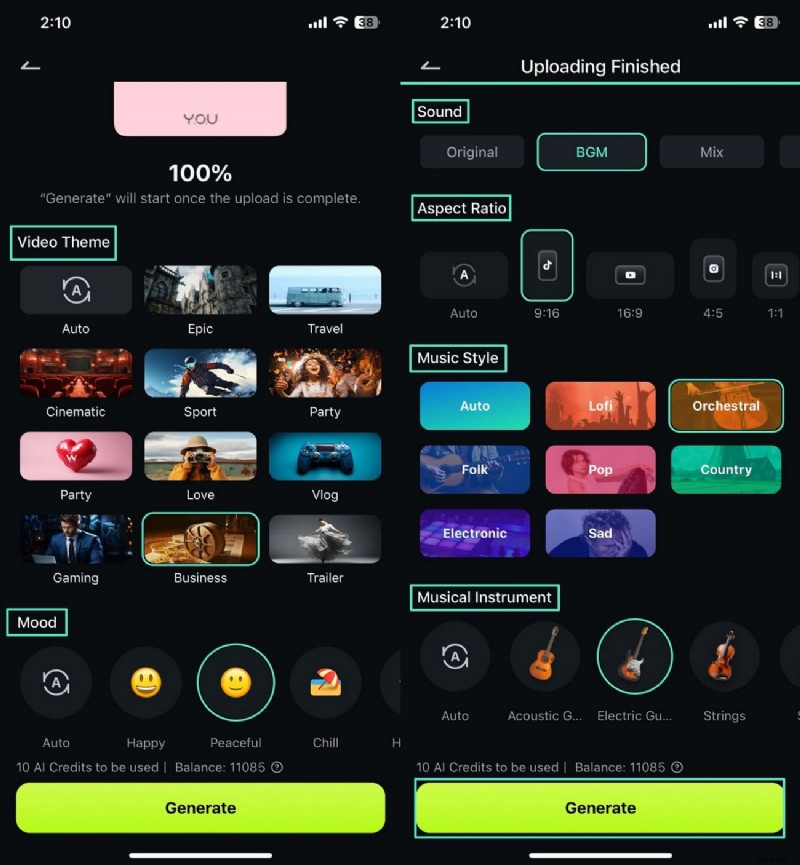
When you have a raw commercial video on the phone, you can use the AI Reel Maker to transform it into a YouTube Short or an Instagram Reel. By entering the intended mood of the video, you can get relevant background music for the ad. Follow the guide below to learn how to create a captivating commercial using this advertise maker app:
 Secure Download
Step 1 First, open the app and select "AI Reel Maker" to import the advertisement video from your device.
Step 2 Select the provided video settings and tap the "Generate" button to create the ad on the following screen.
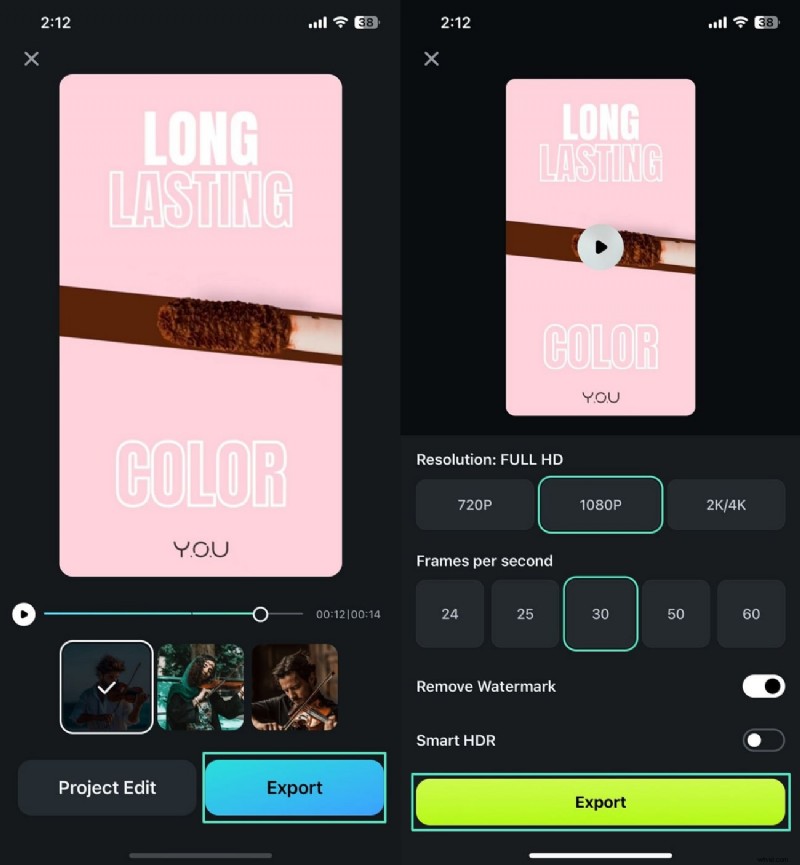
Step 3 Once the ad is generated, select the "Export" button and use the next interface to "Export" the video in your desired settings.
Converting Your Product Images to a Video Ad
Users who have images of their product can import them on this app and convert them into creative video ads. The Image to Video feature lets you transform images into videos by providing an extensive template collection. The following guide features a stepwise tutorial on using the best app to make ads to generate advertisements from an image:
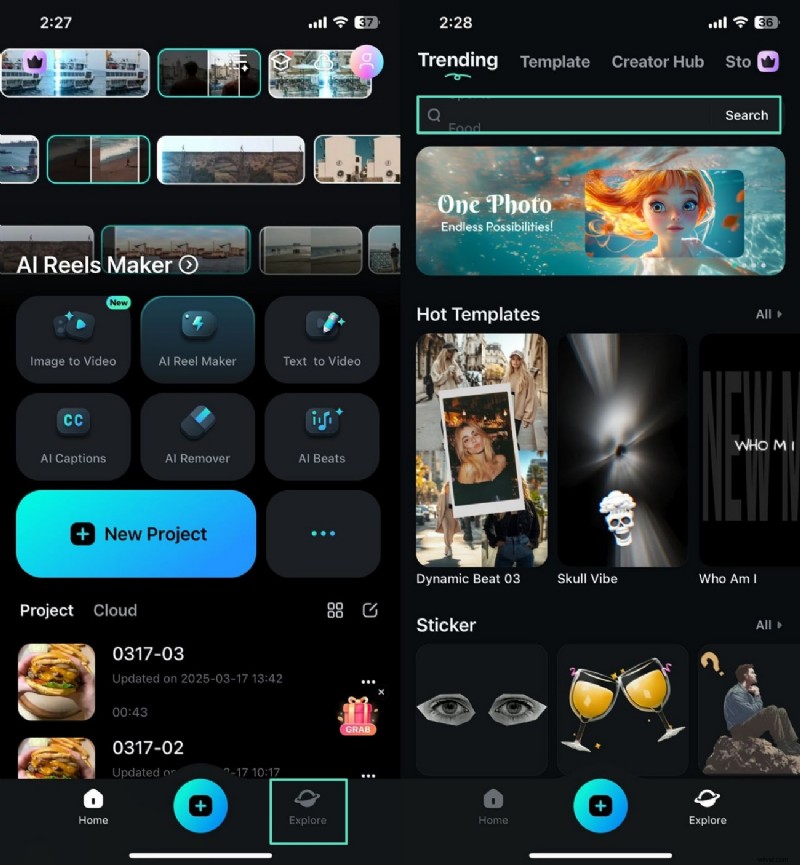
Step 1 To start, open the Filmora App and use the "Explore" tab to type Advertisement in the designated search bar on the next screen.
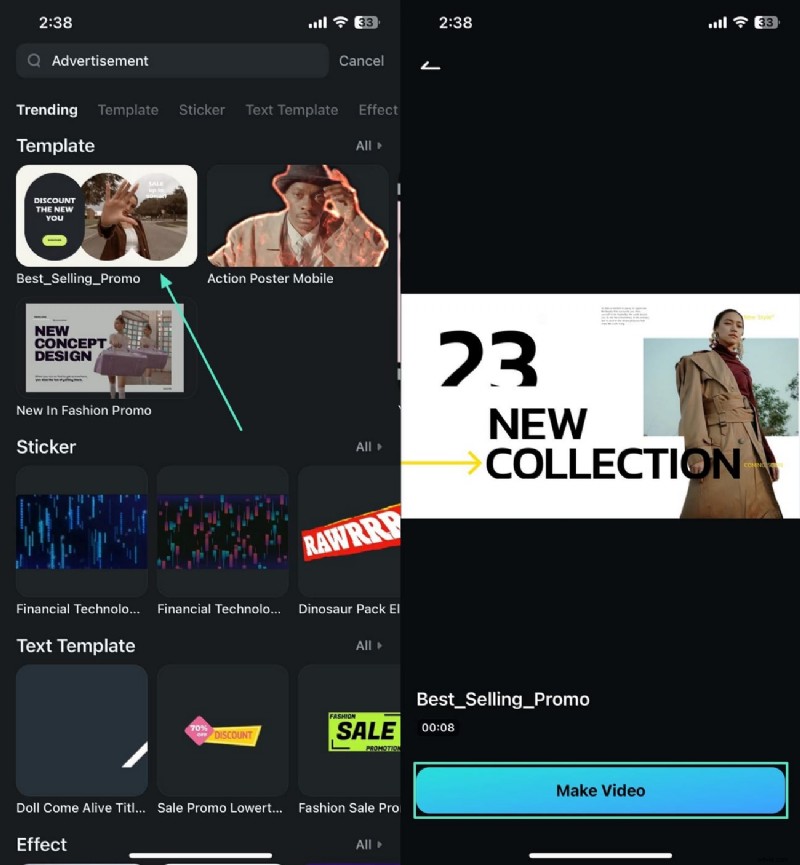
Step 2 When the searched templates appear, select the desired option and tap "Make Video" to import your product’s image.
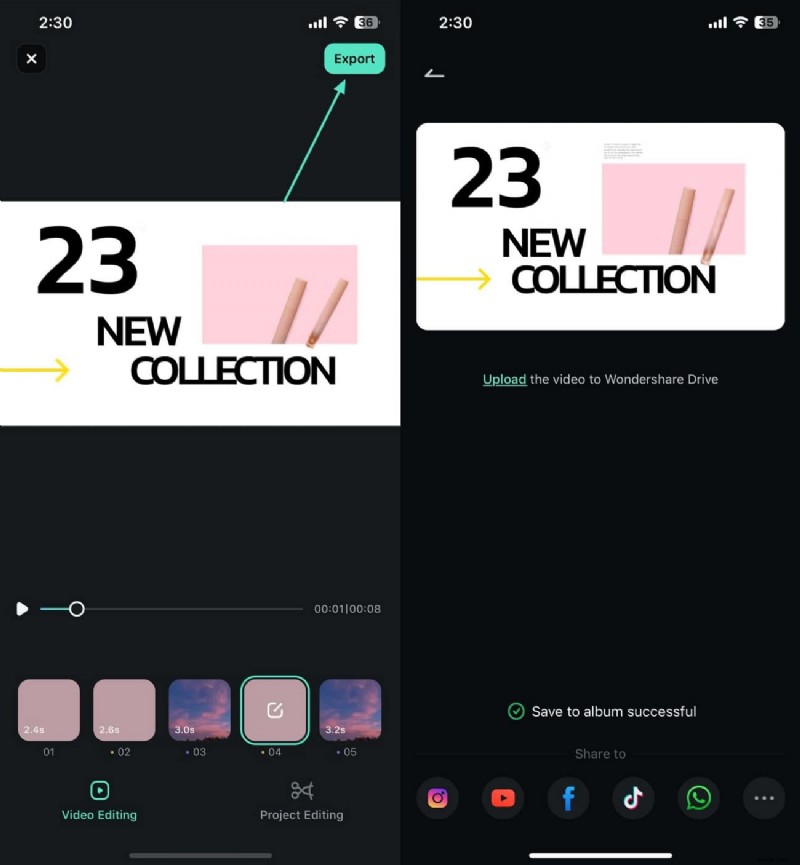
Step 3 Once the ad has been generated, tap "Export" from the top right to save it on the device or share it on social media directly.
Manually Inputting Data Within Ads
This best app to create ads also offers some manual functionality to create a customized ad. Using this method; you can add text and captions to your videos for better understanding. It allows you to remove the background of your product image and replace it with a new one. Read the following guide and learn how you can manually create an ad using the Filmora App:
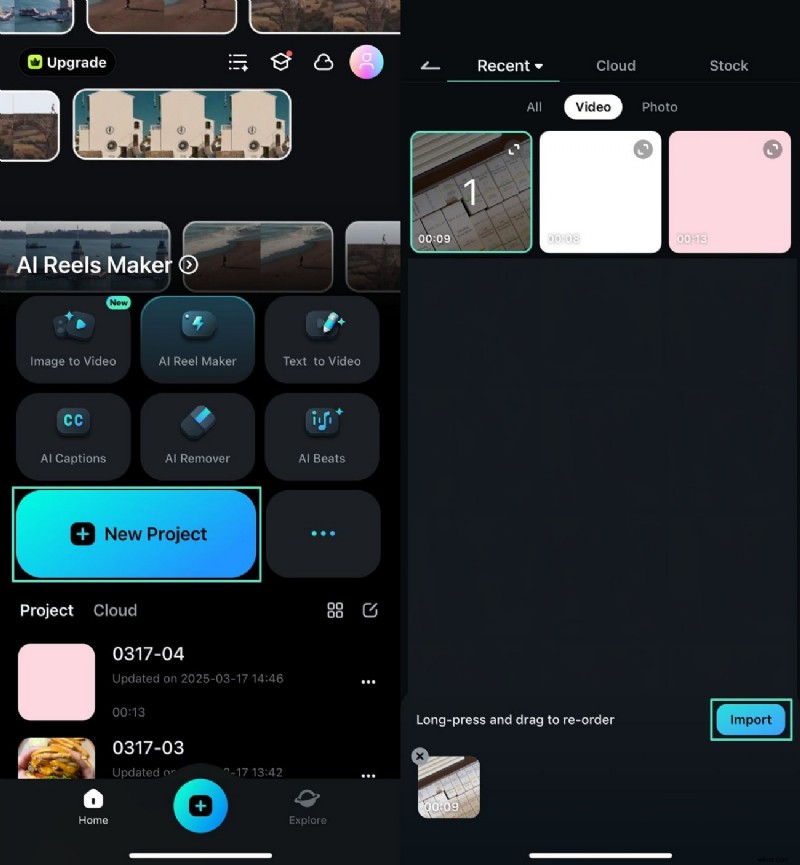
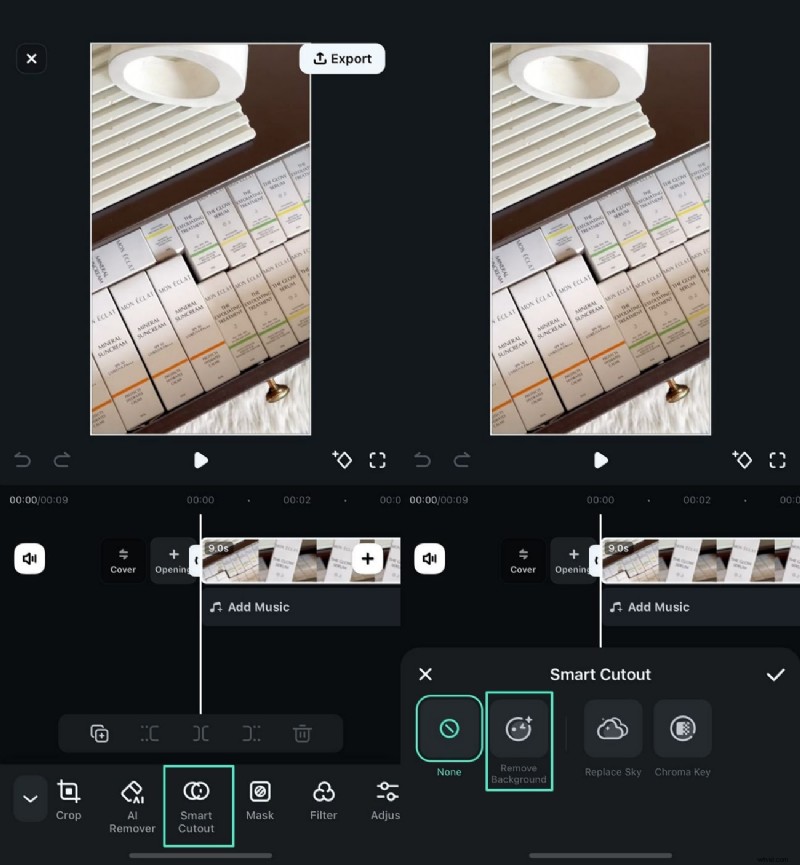
Step 1 Firstly, start a "New Project" and "Import" a raw video ad from your device.
Step 2 When the video is imported, tap the video timeline to select the "Smart Cutout" feature from the bottom to "Remove Background."
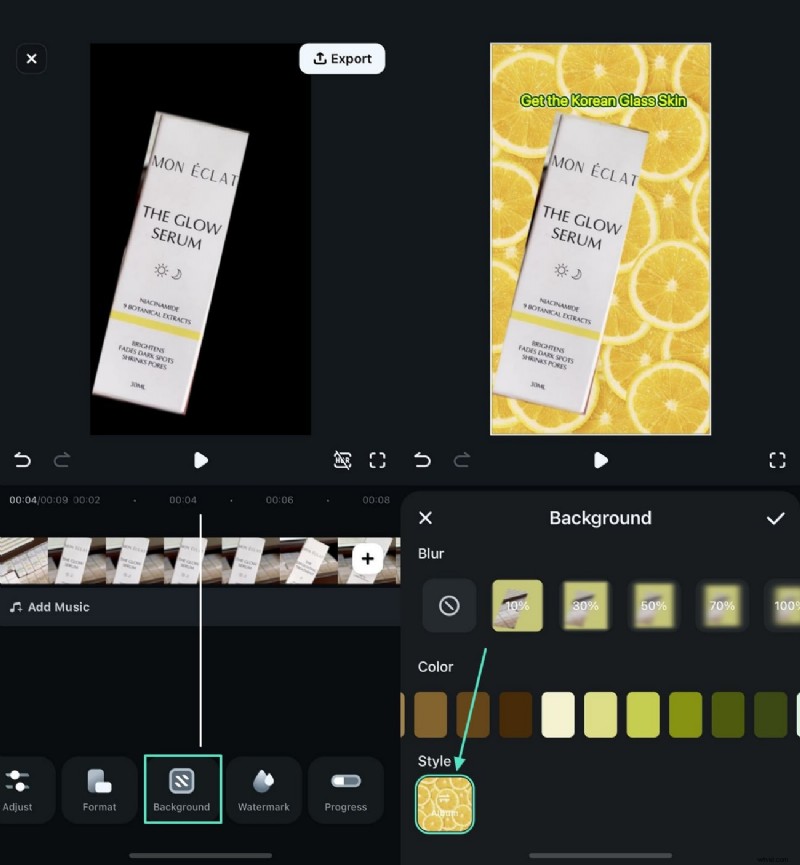
Step 3 Access the "Background" tab from the bottom and select the desired background after the background is removed. You can also import a pre-existing image and use it as a background.
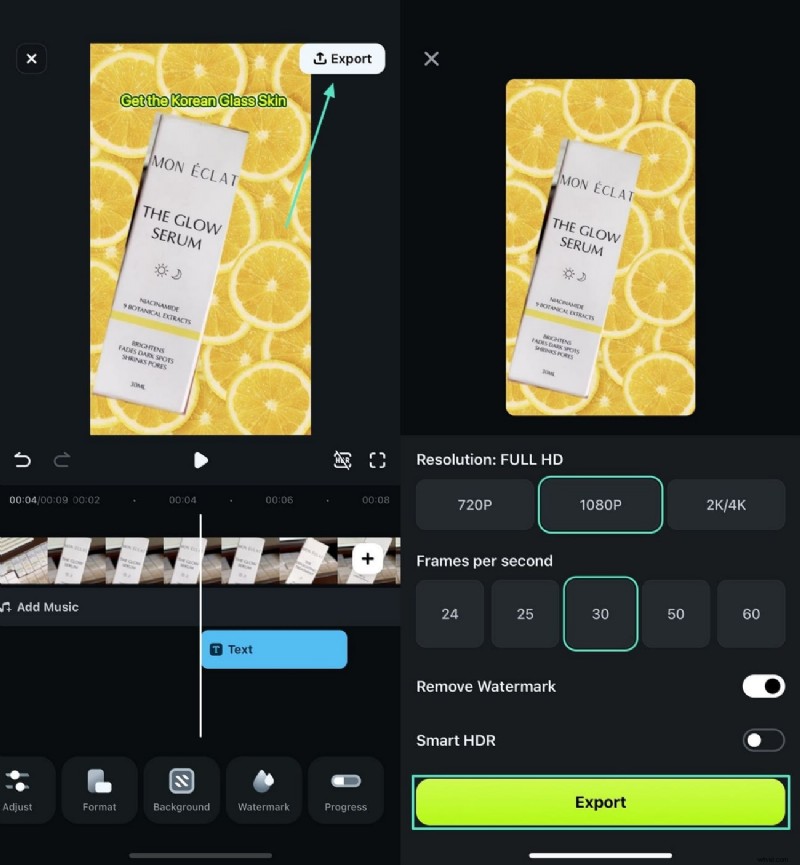
Step 4 Once you have used all relevant features to create the ad, tap the "Export" button at the top right to save the video.
Secure Download
Part 3. Future Enhancements To Support in Ad Making
As digital advertising continues to evolve, ad-making apps need advanced integrations to enhance user experience and efficiency. The following are some of the key future enhancements that can revolutionize ad creation:
- AI-Based Ad Copy Generation: This automation reduces the time spent on content creation while ensuring ads remain engaging and effective. By analyzing industry trends, customer behavior, and past performance data, AI can suggest compelling headlines, descriptions, and call-to-actions.
- Ad Previewing Ability: Augmented Reality will allow users to preview their ads in real-world environments before launching them. This feature ensures better ad positioning and engagement for higher conversion rates.
- Collaboration Tools for Teams: Future ad apps should introduce real-time collaboration features, allowing multiple team members to edit designs simultaneously. Role-based access and in-app commenting can streamline workflows for agencies and corporate teams.
- Integration With CRM and Email Marketing Tools: Ad-making apps can become more powerful through the integration of CRM systems and email marketing platforms. This will enable people to create targeted ads based on customer data, ensuring a data-driven marketing approach.
Conclusion
In summary, ad maker apps overcome the challenges faced while creating a video ad. This article explored the Filmora App as the most reliable ad-maker. With its exciting 3 methods, it gives users complete control over their campaigns. After looking into this app, we discussed the future prospects of ad-making apps for a smoother experience.