
Generative AI is reshaping how we create video content. While tools like OpenAI’s Sora, Runway, and Pika deliver impressive results, Higgsfield AI distinguishes itself with a laser‑focus on cinematic control and a mobile‑first workflow. It promises filmmakers, marketers, and social‑media creators the power to direct virtual cameras and craft professional‑grade shots directly from their phones.
Our Testing Process
To ensure an objective assessment, our team dedicated more than 15 hours to evaluate Higgsfield AI across four core dimensions:
- Video quality and realism
- User‑friendliness
- Feature richness, especially camera‑control options
- Value for money
Quick Take
Higgsfield AI excels in providing cinematic camera controls on mobile devices, making it a top choice for social‑media creators and indie filmmakers. Character consistency still lags, but the platform’s strengths outweigh its shortcomings.
- Overall Rating: 4.5/5
- Best For: Social media marketers, indie filmmakers
- Pricing: Free tier with daily credits; paid plans start at ~$10/month
What Is Higgsfield AI?
Higgsfield AI is a generative platform that transforms text prompts and source images into high‑fidelity video clips. Its unique selling points are a mobile‑first design and a sophisticated suite of AI camera controls that emulate professional filmmaking techniques. This blend appeals to marketers needing rapid, thumb‑stopping content and filmmakers looking to execute complex shots without a Hollywood budget.
Key Features
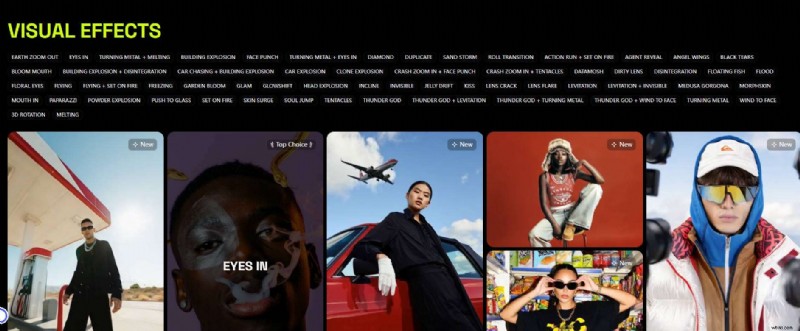
Cinematic Camera Control – The Director’s Chair
Unlike other tools that simply generate a clip, Higgsfield AI offers a virtual camera rig. Its motion controls include:
- Crash zooms – dramatic, rapid zooms in or out
- Dolly movements – smooth pushes and pulls on a track
- 360° orbits – sweeping circular shots around a subject
- Crane shots – dynamic vertical lifts
- Bolt‑cam angles – high‑speed, precision tracking
These options empower users to shape the visual language of their projects, turning a prompt into a fully directed sequence.
Lifelike Motion & Video‑to‑Animation (V2A)
Built on advanced diffusion transformers, Higgsfield AI delivers fluid, natural human movement, reducing uncanny‑valley artifacts and inconsistent physics. Its image‑to‑video technology excels at animating static characters with believable motion.
Personalized Models & Character Consistency
The platform’s mobile Diffuse app lets creators build personalized video content using their own likeness. While the technology shows promise, achieving perfect consistency across long sequences remains a challenge for the industry. Expect multiple takes to assemble a cohesive narrative.
Mobile‑First Workflow
The Diffuse app prioritizes on‑the‑go creation, enabling marketers, journalists, and influencers to produce high‑quality AI video directly from their phones. A web version is also available for desktop users.
Pricing Overview
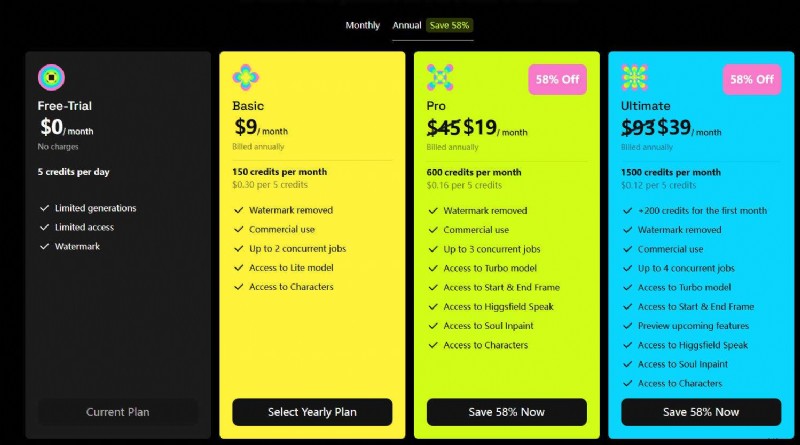
Higgsfield AI operates on a credit system. Credits are consumed based on resolution and complexity. One‑time credit packs are available for top‑up.
| Plan | Free Trial | Basic | Pro | Ultimate |
|---|---|---|---|---|
| Annual Cost | $0 | ~$10 | ~$20 | ~$40 |
| Credits / Month | 5/day | 150 | 600 | 1500 |
| Ideal For | Feature testing | Hobbyists & light commercial use | Professional creators & marketers | Power users & small studios |
Pricing is subject to change; visit the official Higgsfield AI website for the latest information.
Competitive Landscape
Higgsfield AI vs. OpenAI’s Sora
| Feature | Higgsfield AI | OpenAI Sora |
|---|---|---|
| Core Strength | Cinematic control & mobile‑first | Hyper‑realism & complex scenes |
| Best For | Stylized shots & social media | Long‑form photorealistic scenes |
| Accessibility | Public app & tiered plans | Limited access, not public yet |
| Learning Curve | Accessible entry, mastery takes time | Prompt engineering focus |
Other Competitors
Runway, Haiper, and Kling offer strong image quality and prompt adherence, but none provide the granular, film‑centric motion control that Higgsfield delivers. This makes Higgsfield uniquely valuable for creators who want to impose their directorial vision.
Pros & Cons
- Pros
- Unmatched cinematic camera controls
- High‑quality, fluid character motion with fewer artifacts
- Mobile‑first workflow for on‑the‑go creation
- Cons
- Advanced motion features require practice
- Character consistency across multiple clips can be challenging
- Premium features are behind higher‑tier plans
- Free version includes a watermark
Ideal Users
- Social media marketers & influencers – create dynamic, thumb‑stopping content from a phone
- Independent filmmakers – achieve dolly zooms, crane shots, and other complex movements without expensive gear
- Digital artists & AI creators – a new canvas that offers directorial agency
- Casual creators – free Diffuse app for fun, personalized clips
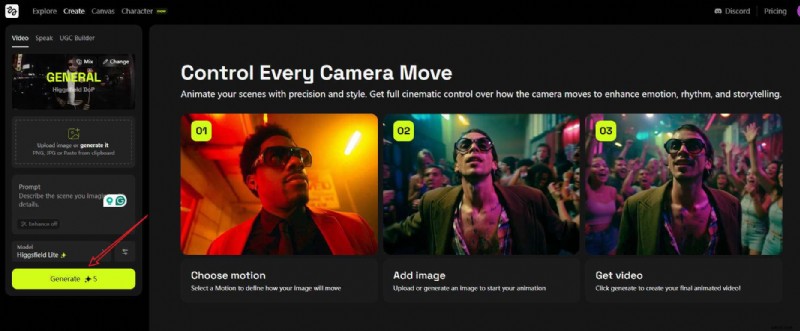
How to Use Higgsfield AI
- Visit the official website.
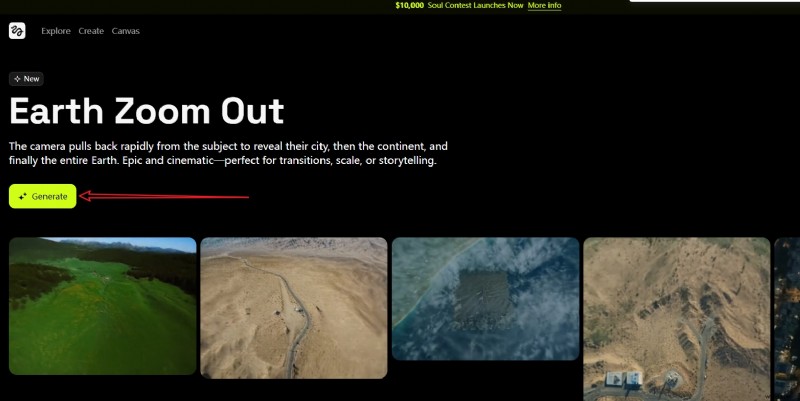
- Select the desired AI effect and tap Generate.
- Upload an image, add prompts, and optionally tap Enhance to refine your description.
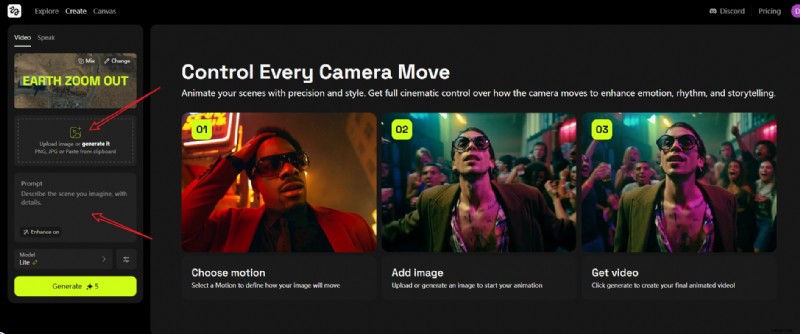
- Tap Generate to start rendering and preview the video.
Post‑Production: Pairing with Filmora
Higgsfield AI excels at generating stunning clips, but a finished video requires assembly, color grading, sound design, titles, and final polish. Filmora offers a robust, AI‑powered editing suite that complements Higgsfield’s output.
- AI Enhancer for upscaling clips
- AI Audio Denoise to clean background noise
- AI Smart Cutout to isolate subjects
- AI Music Generator for royalty‑free soundtracks
- Built‑in library of transitions, animated titles, and stock media
- AI Image‑to‑Video templates for expressive animation
By generating clips in Higgsfield and importing them into Filmora, creators can color‑grade, add music, and export a polished final product in a streamlined workflow.
Final Verdict
Higgsfield AI carves out a distinct niche in the crowded AI video market. Its strength lies not in replicating Sora’s photorealism but in offering unparalleled cinematic control. For marketers, filmmakers, and influencers who value directorial intent and need stylized, dynamic content, Higgsfield AI is a compelling choice. Combined with an accessible editor like Filmora, it unlocks an efficient, creative pipeline that can elevate any project.
Frequently Asked Questions
- Is Higgsfield AI better than Sora?
They serve different needs. Sora excels at hyper‑realistic, long‑form scenes; Higgsfield shines with cinematic camera control for shorter, stylized clips.
- Is Higgsfield AI really free?
Yes – the Diffuse mobile app offers a free tier with daily credits. Watermarks and advanced features require a paid plan.
- How good is Higgsfield AI for character consistency?
Progress is being made, but maintaining perfect consistency across multiple shots remains a challenge. Multiple takes may be necessary.