
Discover why DALL‑E 3 remains a cornerstone of AI image creation in 2026. This guide explains how to access it for free, master prompts, compare it to newer models, and transform static art into engaging video.
1. What Makes DALL‑E 3 Stand Out
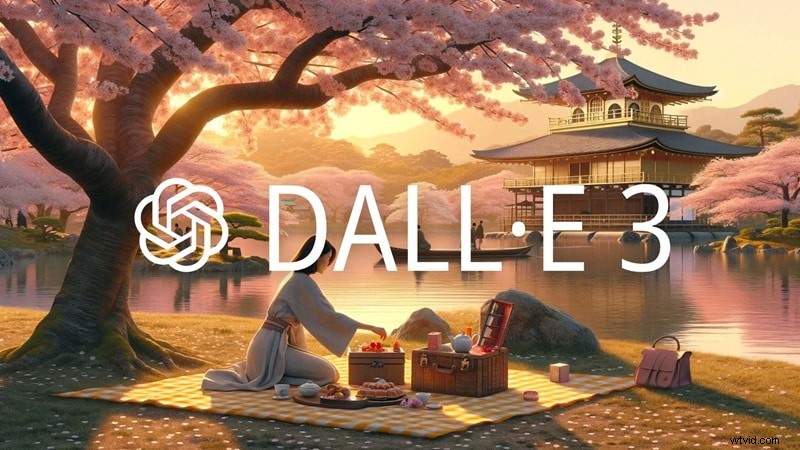
DALL‑E 3, launched by OpenAI in October 2023, delivers natural‑language‑to‑image synthesis with resolutions up to 1792 × 1024 pixels. Compared to its predecessor, it offers sharper detail, more accurate text rendering, and tighter prompt understanding.
At its peak, the model served 1.5 million users and produced roughly 2 million images daily, according to Companies History.
- Natural‑language comprehension: No technical jargon needed; everyday descriptions are enough.
- ChatGPT integration: Seamless access inside ChatGPT for non‑technical creators.
- Improved text rendering: Better placement of readable text, though longer passages still challenge the model.
- Safety controls: Enhanced filters reduce the risk of generating harmful or inappropriate content.
2. Accessing DALL‑E 3 for Free
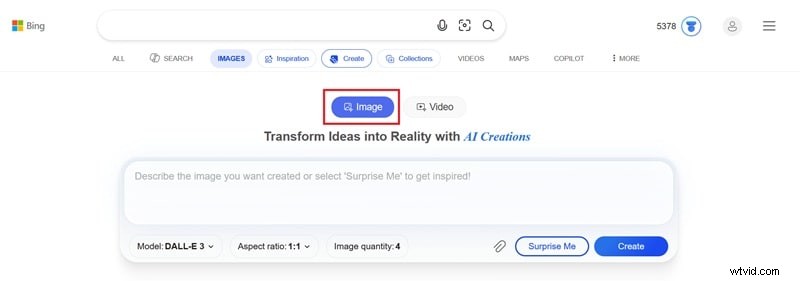
The most reliable free path remains Bing Image Creator, which still offers DALL‑E 3 alongside GPT‑4o and Microsoft’s MAI‑Image‑1.
Step‑by‑step:
- Open Bing Image Creator and select DALL‑E 3 as the model.
- Choose an aspect ratio, enter your prompt, and click Generate.
- Review the returned variations, select the best match, and download.
Free tier: 15 fast generations per day (reset daily). Unlimited standard‑speed generations are also available at no cost.
Can I Still Use DALL‑E 3 Inside ChatGPT?
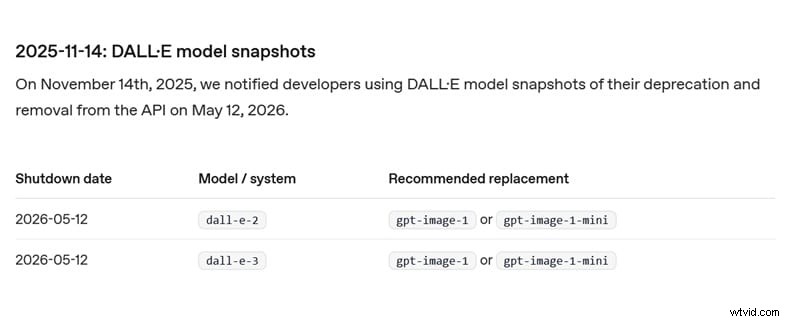
OpenAI announced the deprecation of DALL‑E 3 on its API as of May 12 2026. New ChatGPT image generation defaults to gpt‑image‑1 or gpt‑image‑1‑mini. Direct access to the original DALL‑E 3 model is no longer possible through ChatGPT.
3. Mastering Prompts for Optimal Results
High‑quality images hinge on precise prompting. Follow these proven techniques:
- Clarity & specificity: Detail setting, objects, colors, mood, and quantity. Avoid cluttering with irrelevant data.
- Structured approach: Break prompts into Subject, Style, Composition, Lighting, and Mood & Color.
- Limit text inside images: DALL‑E 3 can render short phrases but struggles with longer text.
- Maintain consistency: Repeat key descriptors for each image to achieve uniformity.
Example prompt:
A futuristic city skyline at night, neon lights, cyberpunk style, wide‑angle shot, reflective wet streets, cinematic lighting.
4. How Does DALL‑E 3 Compare to Other Generators?
Below is a quick comparison with Midjourney and Stable Diffusion.
| DALL‑E 3 | Midjourney | Stable Diffusion | |
|---|---|---|---|
| Prompt Accuracy | Good; closely follows detailed prompts | Good; looser interpretation for aesthetic flair | Moderate; depends on version and settings |
| Customization & Control | Limited | Style parameters & version controls | Fully customizable via LoRAs and extensions |
| Pricing | Free via Bing AI Image Creator | Starts at $10/mo (Basic Plan); no free tier | Open‑source (free); paid hosting options exist |
| Best For | Concept art, simple illustrations, text‑heavy images | Stylized artwork, fantasy scenes | Photorealistic images, character design, niche styles |
GPT‑Image vs. DALL‑E 3
OpenAI positions GPT‑Image as the next evolution, but users report mixed results:
- Color bias toward yellowish tints.
- Higher skill required to coax quality results.
- Limited stylistic range for unconventional concepts.
- Loss of painterly depth and layered lighting.
- Not a direct one‑to‑one replacement.
5. Turning AI Art into Video with Filmora
Wondershare Filmora’s AI Image to Video feature turns still DALL‑E 3 creations into dynamic clips. The workflow is straightforward:
- Open Filmora and choose AI Image to Video from the main menu or Toolbox.
- Upload your image, pick the AI model, and describe the desired animation in a prompt.
- Adjust resolution, duration, and aspect ratio; enable the AIGC Usage Agreement to remove the watermark. Click Generate.
- When finished, drag the output to the timeline, add music or voice‑over, and export.

Video content significantly boosts engagement and shareability compared to static images.
Conclusion
Even after its deprecation in ChatGPT, DALL‑E 3 remains a powerful tool for creators who value prompt precision and high‑quality output. Coupled with Filmora’s video tools, it can elevate AI art into compelling, shareable stories.
FAQ
Is there a truly free DALL‑E 3 AI image generator?
Bing AI Creator offers a fully free DALL‑E 3 generator. ChatGPT’s free tier now defaults to GPT‑Image, but users can still generate images at no cost within usage limits.
Can I use DALL‑E 3 images for commercial projects?
OpenAI’s Terms of Service grant you ownership of the output, allowing commercial use. However, note that AI‑generated images lack copyright protection, and you must avoid misrepresentation or infringing existing IP.
Can I still use the DALL‑E 3 image generator on Microsoft Designer?
Microsoft Designer no longer hosts DALL‑E 3; it now employs newer OpenAI models, so manual selection of DALL‑E 3 is unavailable.