
Remember the time when you went to the cinema to watch the first-day show because its trailer looked amazing? Yes, nearly all of the users rely on trailers;
Therefore, the trailer of your movie also needs to stand out, and it isn't possible without using the best editing tools. To make it easier for you, this article discusses the best movie trailer apps you can use for refining your trailers.
In this article
-
- Key Features
- Detailed Guide
- Supplementary
-
- iMovie
- VN- Video Editor & Maker
- LumaFusion
- Adobe Premiere Rush
Part 1. Best Movie Trailer App To Consider For AI-Influenced Video Making
You're all set to release your movie trailer, but something is missing. It does not look influenced by AI because you're not using the right application to edit your trailer. You need Filmora App [iOS - Android] to add cinematic transitions and effects to your movie trailer.
Moreover, with this trailer maker app, you can perform advanced editing, such as changing the voice of different characters with AI.

Filmora
AI Video Editing App & Software
Best tool for making videos anywhere for all creators!
Your Perfect First Video Edit Starts Here - No Experience Needed
Key Features
- 🎬 Kickstart your trailer with ready-made templates - simply swap in your clips to tell a cinematic story in minutes.
- ⏱️ Control the pace with speed ramping - slow down key moments or add bursts of energy with a tap.
- 🎙️ Ensure crystal-clear dialogue - Filmora auto-adjusts music levels when speech is detected.
- 🌍 Teleport your scenes anywhere - easily swap the background to mountains, cities, or fantasy worlds.
- 💬 Auto-generate captions with AI - perfect for social sharing and improving accessibility.
- 🧙 Change character voices with AI to add drama, humor, or fantasy elements to your story.
Detailed Guide to Edit Your Movie Trailer Using the Filmora App
The following is a detailed guide that you can follow to edit your movie trailer using the Filmora App:
1
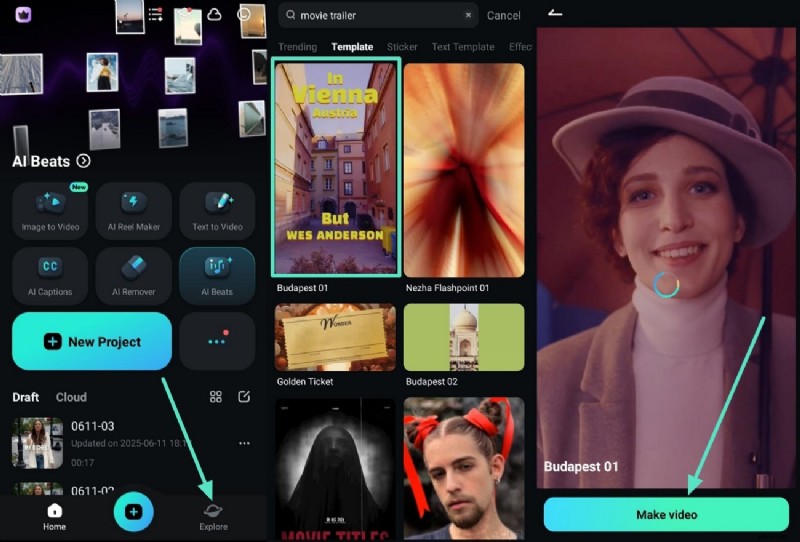
Choose the Trailer Template
- Open the Filmora App and tap "Explore" from the bottom right.
- Browse the template options and tap "Make Video" to begin editing.
2
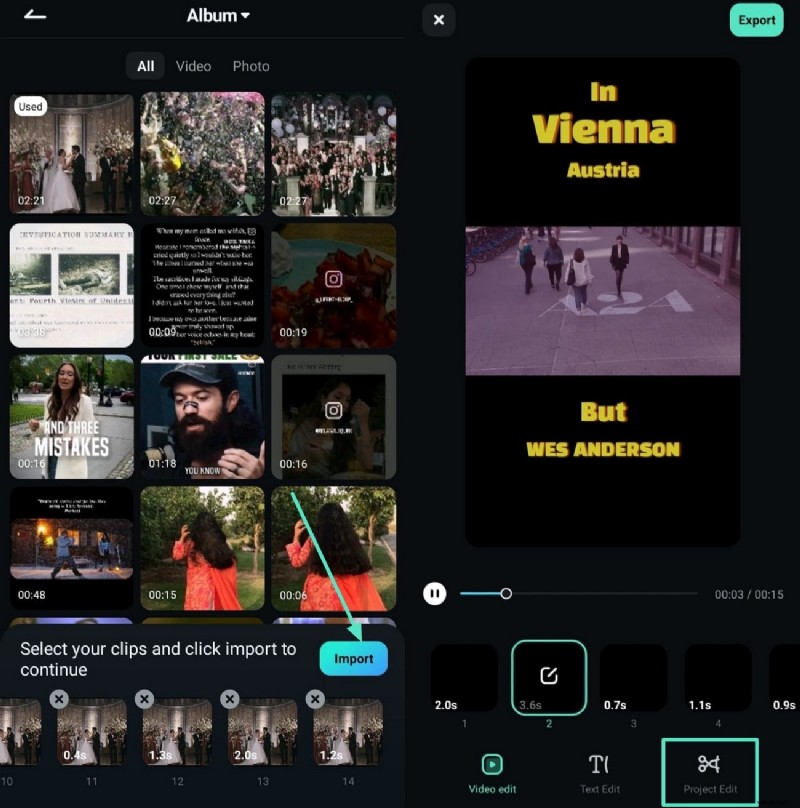
Add Your Video Clips
- Select video clips from your gallery.
- Use the "Import" and "Project Edit" options to bring them in.
3
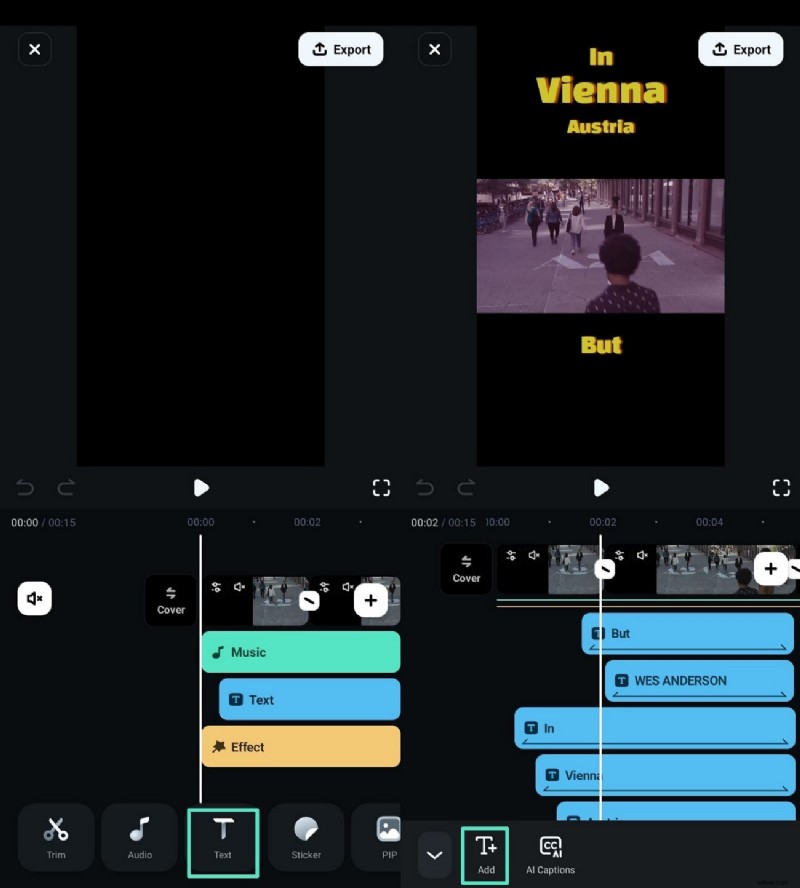
Use AI Captions
- Tap "Text" at the bottom toolbar to access text options.
- Select "AI Captions" to generate subtitles automatically.
4
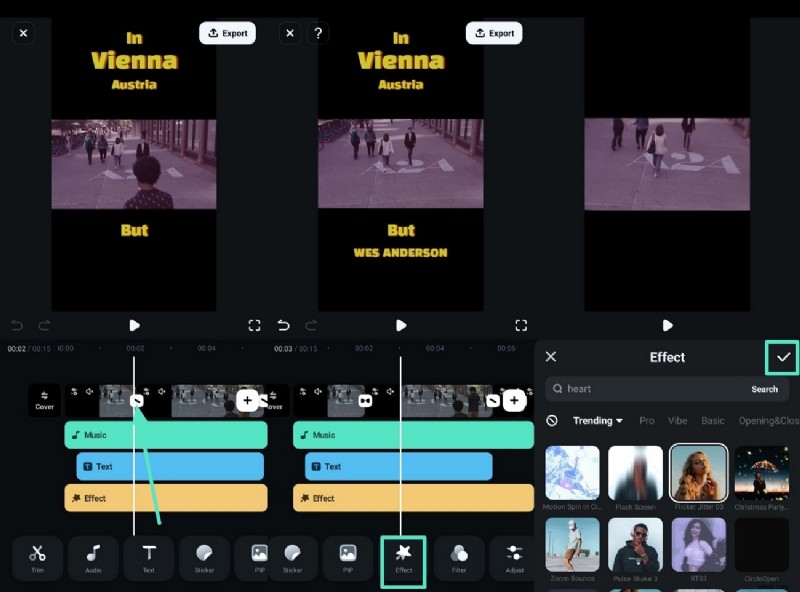
Apply Transitions and Effects
- Tap the slanted line between scenes to apply cinematic transitions.
- Use the "Effect" option and confirm with the checkmark.
5
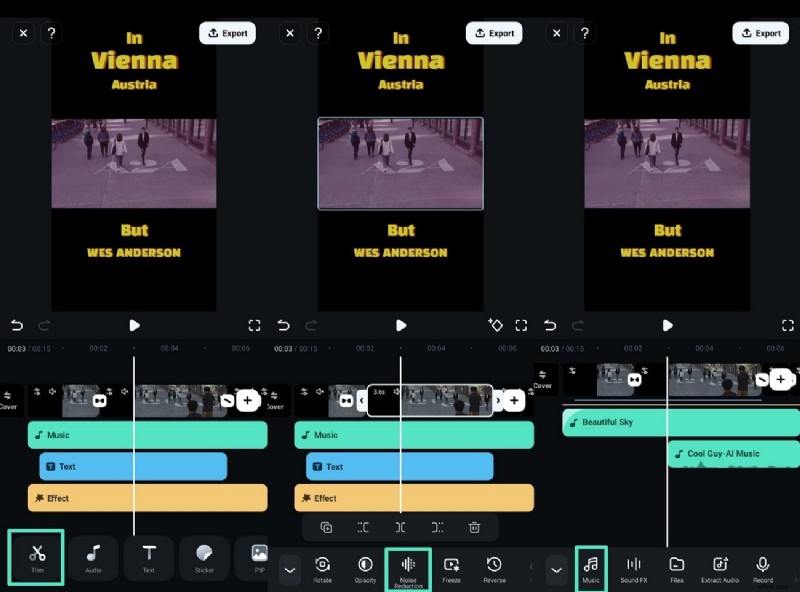
Reduce Noise and Add Music
- Use the "Trim" button to access noise reduction tools.
- Tap "Music" to add background audio that matches your trailer tone.
6
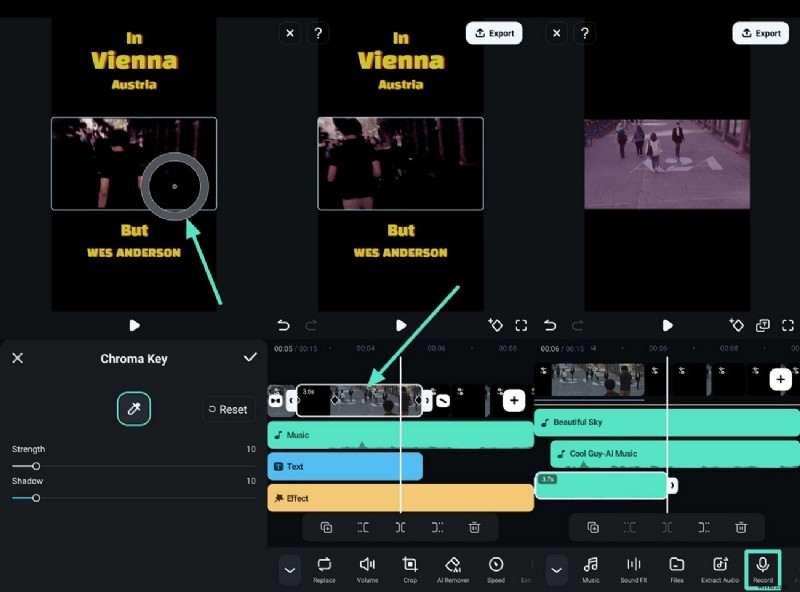
Use Advanced Edits
- Apply Chroma Key to transport your characters to new environments.
- Set keyframes to animate elements like effects or motion.
- Use voice changer during recording for creative storytelling.
7
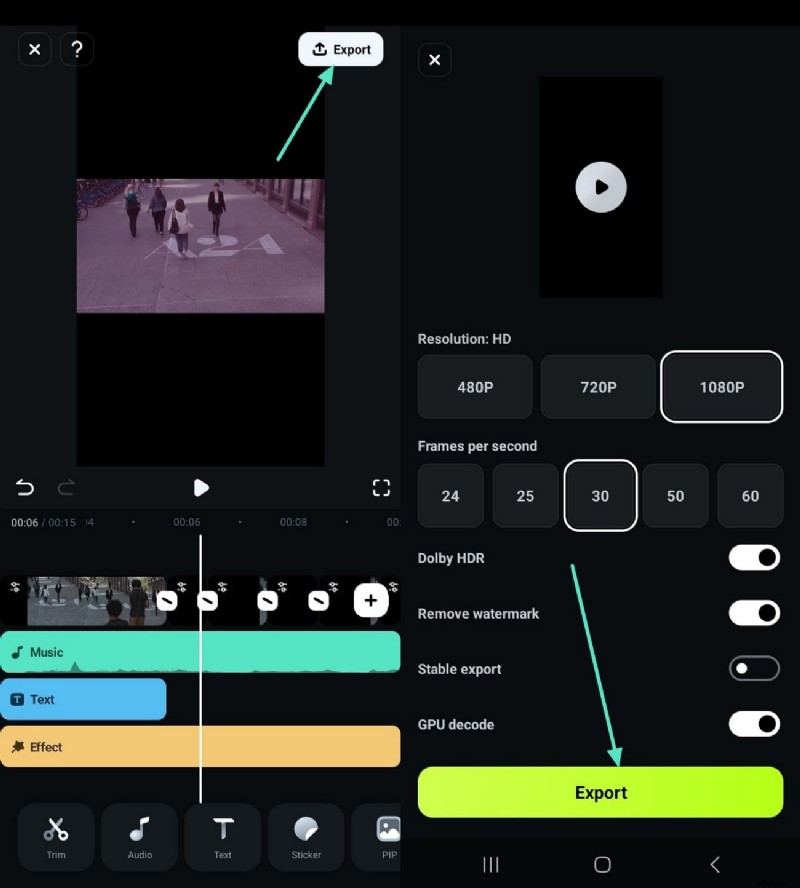
Export the Trailer
- Review your trailer thoroughly to ensure quality and flow.
- Tap "Export" in the top-right and choose resolution to save to your device.
Edit Your Movie Trailer Like a Pro with Filmora Desktop
Users can also do advanced editing of their trailers with the Wondershare Filmora's desktop version. The tool can be downloaded on your device for free, and here are the major features of the Filmora desktop:
Key Features
- 🎬 LUTs (Color Presets): Quickly change the video's mood with one click by using different filters, such as horror.
- 🎯 Motion Tracking: Make the text or images follow a moving object smoothly in your trailer.
- 🖥️ Split Screen: Show two or more screens at the same time for comparison.
- 🧭 Keyframing: Use keyframes to control animations or effects by setting how they change with time.
Part 2. 4 Alternative Movie Trailer Apps for Every Creator
Here is a list of apps to create movie trailers that every creator can use to make the visuals in the trailer look perfect:
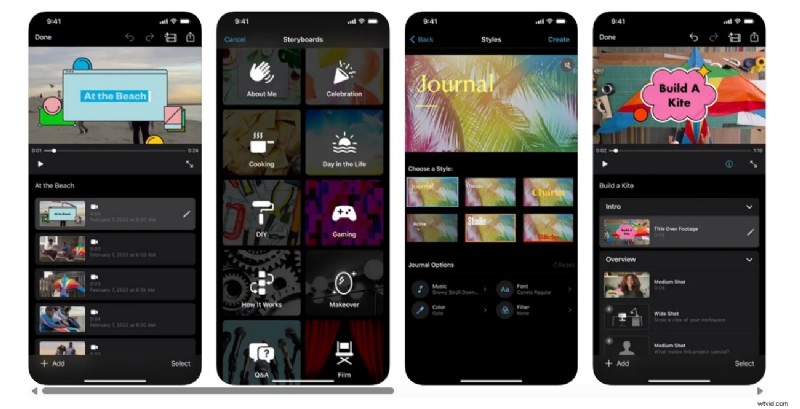
1. iMovie
This is an application that is already installed on iPhones and enables Apple users to create an engaging trailer right from their phones. There are a total of fourteen trailer templates, and you can choose from them or add clips from your photo library to make a movie trailer. Moreover, users can also record videos right away and then add them to their trailer in iMovie.
 Pros
Pros
- Pros
- Use the designed video filters by Apple to give your movie trailer the right look.
- Create your own narration and refine it first before adding it to the movie.
- Cons
- Users with only iPhone XS or later can utilize iMovie.
Pricing Plans
Free
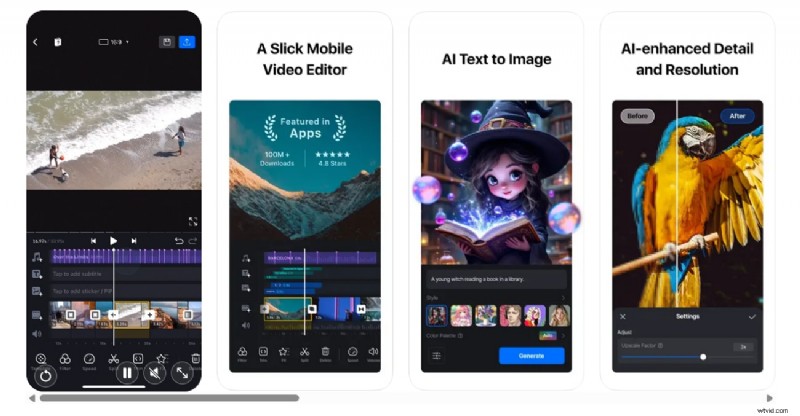
2. VN- Video Editor & Maker [Android/iOS]
VN is a user-friendly trailer maker app that offers you all the features essential for making high-quality film trailers. Additionally, the tool makes zooming and keyframe adjustments precise, so you can select scenes in trailers and edit them precisely. In VN, you can save drafts and undo your actions anytime without destroying the original file. For action movie trailers, make the speed fast and let them stand out online.
 Pros
Pros
- Pros
- With VN, users can download their movie trailers for free without a watermark.
- Delete and reorder tracks in your trailer according to the requirements.
- Cons
- In VN, you can only import your files in bulk through Zip files.
- The tool's collection of stickers and fonts isn't extensive and can be improved.
Pricing Plans
Free
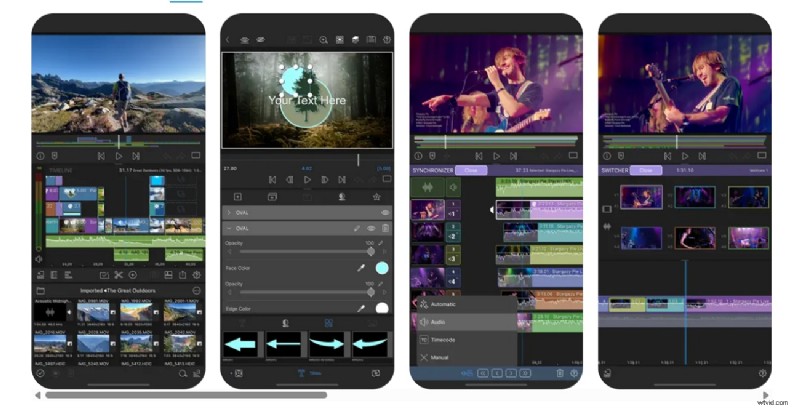
3. LumaFusion [Android/iOS]
LumaFusion is one of the best app that makes movie trailers and offers you a touch-screen editing experience. Users can benefit from LumaFusion to work on multiple layer edits and smoothly handle 4K ProRes. The tool has its own collection of several transitions that you can add to your movie trailers and make them engaging. It also helps users to remain organized by using markers and notes wherever needed.
 Pros
Pros
- Pros
- Use the external monitor preview to check how your trailer will look on a big screen.
- In LumaFusion, you can record your voiceover while playing the movie trailer.
- Cons
- The tool demands extensive knowledge of colors and chroma keys for editing.
- To use LumaFusion, you need to purchase its subscription.
Pricing Plans
$29.99
4. Adobe Premiere Rush [Android/iOS]
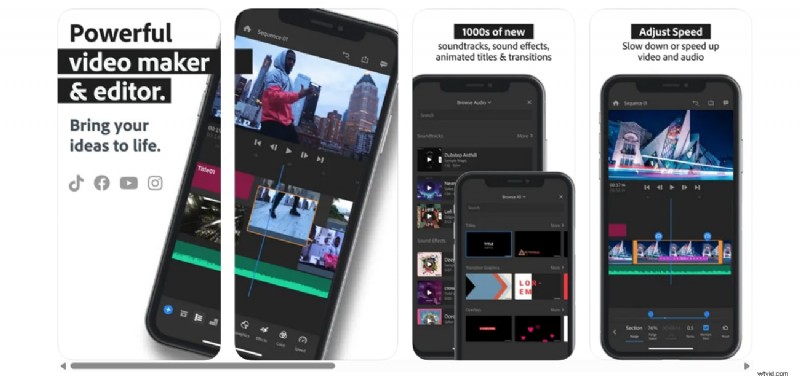
If you're looking for a create movie trailer app that enables you to share results on social media directly from the app, pick Adobe Premiere Rush. You can also give some shots from your trailer a cinematic look by creating pan and zoom effects for them. The tool enables you to make your trailers pop by choosing the starting and end points on your still images.
 Pros
Pros
- Pros
- Users can enjoy unlimited trailer exports in the free version of Adobe Premiere Rush.
- Pick sounds from the royalty-free and effects to add life to your trailers.
- Cons
- The tool does not contain any AI tools, such as generating sounds.
- Users can only access a few transitions and effects in Adobe Premiere Rush.
Pricing Plans
$59.99
🎬 Movie Trailer App Comparison Table
| App Name | Platform | Template Availability | AI Features |
| Filmora | iOS / Android / Desktop | Rich library of trailer templates | AI Captions, Voice Changer, Beat Sync |
| iMovie | iOS / macOS | 14 trailer templates | None |
| VN Video Editor | iOS / Android | No built-in trailer templates | None |
| LumaFusion | iOS (Android in beta) | No trailer templates | None |
| Adobe Premiere Rush | iOS / Android / Desktop | Limited template support | None |
- If you want rich templates and AI tools, choose Filmora.
- If you prefer simple trailer templates, go with iMovie.
- If you don't need templates, try VN, LumaFusion, or Premiere Rush.
Choose the app that best fits your editing style and workflow!
 Secure Download
Part 3. Pro-Level Creative Moves You Can Try in Trailer Apps
Having discussed the app to create movie trailers above, let's explore the creative moves you can add up:
- Change the voice of the character using AI, such as the hero with the villain, to surprise viewers.
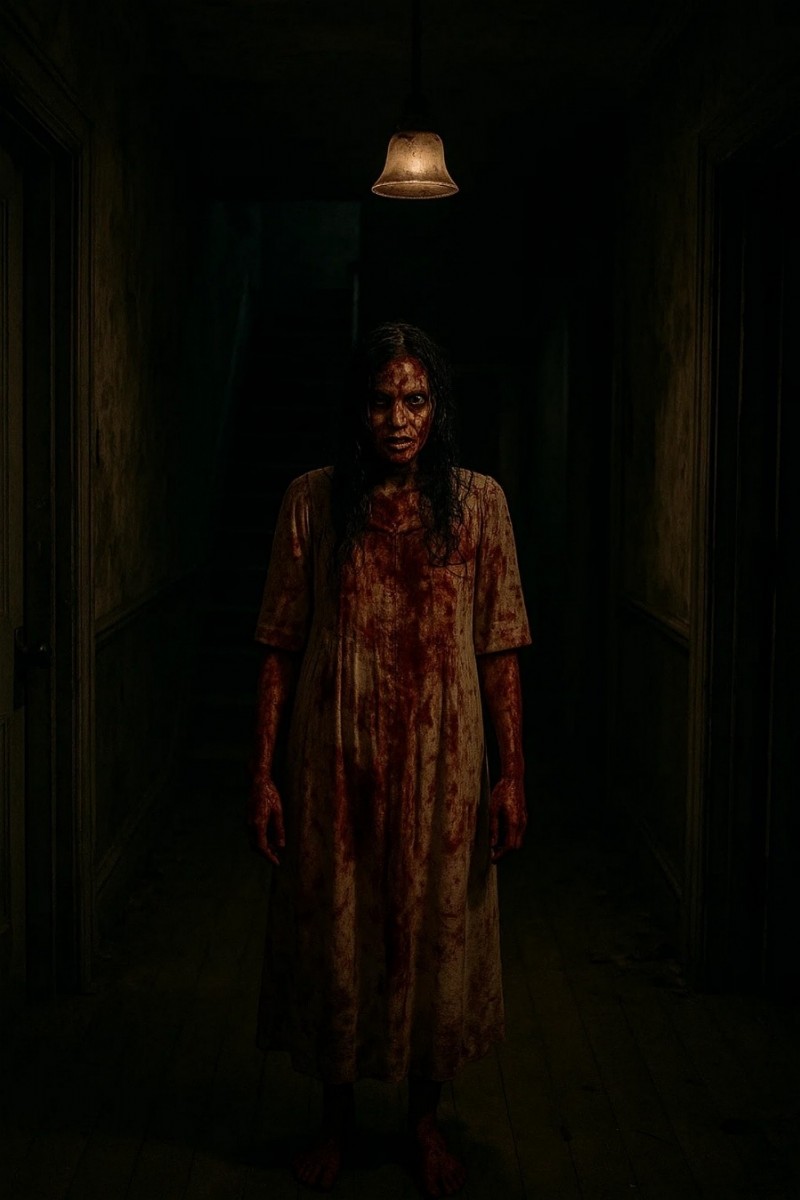
- If you're making a horror movie, then use dark shades to make it look frightening.
- Add bold and big text on the screen to grab attention and build excitement.
- Use a shaky look in your movie trailers to make it look dramatic.
- Set the mood in the trailer by using soft sounds like wind.
- Make use of split screens to show different actions at the same time.

- Play the scenes backward in your trailer to create mystery or surprise.
Conclusion
To conclude, this article discussed a list of movie trailer apps that you can use to make the visuals in your movie trailers stand out. It also elaborated on a tool, Wondershare Filmora, that users can utilize for adding cinematic effects and transitions in their trailers. With Filmora, users can change the voices of the characters and add new sounds according to emotion by generating them with AI.
Secure Download