
Finding a good video cutter for Mac can be difficult compared with the products available for Windows. Fortunately, there are some video editing apps that can help you cut, edit, and share videos easily on Mac.
The best video cutting software for Mac, or any operating system, strive to balance a number of different characteristics, including complexity, basic and advanced features, and price. We've taken several video editing software tools for Mac for a test drive, and here are the three that came out on top:
Top 1. Wondershare Filmora for Mac
Wondershare Filmora for Mac not only has a free version with all functions accessible, but also balances price, sophistication, and capabilities almost perfectly. It's elegant and easy to learn. Filmora provides users hundreds of video effects and transitions, almost all of them accessible with a simple drag & drop interface. Export options are robust and include specific files or device types. This video editing program for Mac also offers direct uploading to a variety of social sharing networks. Besides cutting mp4 files on Mac, you can also cut mp3 files on Mac with Filmora. And most of all, it’s compatible with the newest version of macOS.
- Pros: Free version is available with all functions accessible. Low price beats virtually every other professional video editing software available. An intuitive, simple interface creates a very gentle learning curve, suitable for inexperienced users. Modest system requirements are extremely accessible. The free version is available with all functions accessible.
- Cons: Does not offer the most advanced features that true professional users might desire.
Check the key features of Filmora for Mac:
- Wide support for different formats, including MP4, AVI, MOV, AVCHD, MKV, and more.
- Enables you to crop, trim, cut, split, and combine videos in a few clicks.
- Intuitive user interface & powerful video editing features.
- Trim without any quality loss and with surprisingly fast speed.
- Apply markers, color correction, effects, transitions, and more to up to 100 multimedia tracks.
- Amounts of stunning effects for different niches at your choice, including motion elements, animated titles, royalty-free music, and transitions.
- Burn videos to DVD, upload them to YouTube or transfer them to any popular portable devices.
Top 2. VideoPad
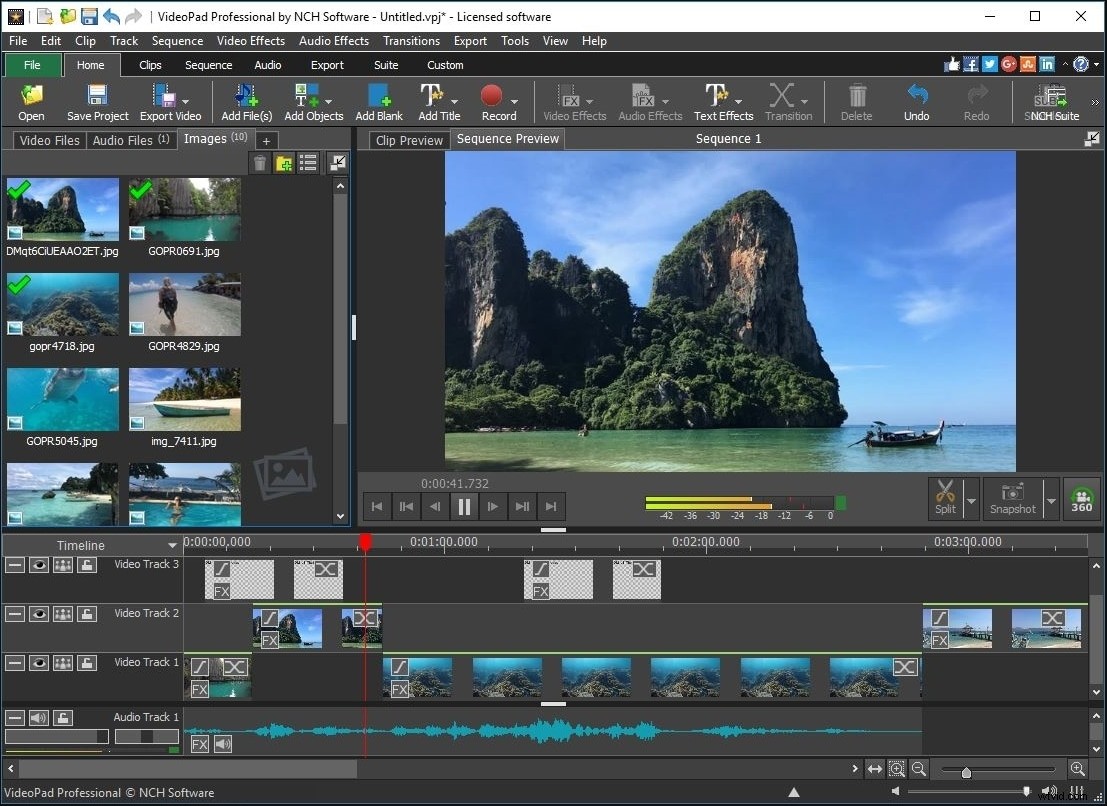
Video editing software can be intimidating and frustrating to new users, VideoPad largely succeeds in reversing expectations of complexity. Suitable for anyone interested in learning the basics of nonlinear video editing, VideoPad contains all the basic tools needed and even a carefully chosen selection of more advanced tools and features. Supported import file types include WMV, AVI, ASF, XviD, MPEG, MP4, MOV, and more. Burn movies to DVD, Blu-ray, CD, or HD-DVD. VideoPad can also render 3D by using a stereoscopic conversion on 2D files during the export process.
- Pros: Great tool for beginners looking for an easy entry into video editing. Supports all common file types.
- Cons: Only have a free demo version. Lacks a full range of effects and transition types, even novice users may quickly outgrow this software tool. Relatively high price.
Top 3. Adobe Premiere Elements
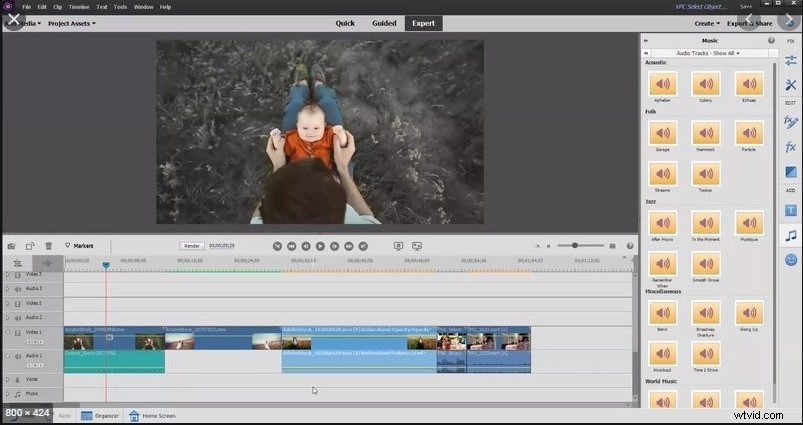
Straddling the line between home and professional products, Adobe Premiere Elements offers tremendous functionality to users who put in the time required to master this complex video editing tool for Mac. Adobe Premiere Elements offers an extra-large canvas for work (much appreciated for complex tasks) and three work modes: Quick, Guided, and Expert. Even in Quick mode, the interface is a bit cumbersome and counter-intuitive: this program works great, but getting from A to B can be a challenge. Features are numerous, export options plentiful, and Adobe Premiere Elements offers users direct uploading to a variety of social channels, as well as the ability to burn movies to optical discs.
- Pros: Offers near-professional level capabilities for advanced users.
- Cons: Steep learning curve may intimidate new users. Somewhat inefficient operation. Relatively high price. 30-day free trial.
Top 4. Media.io Online Video Trimmer
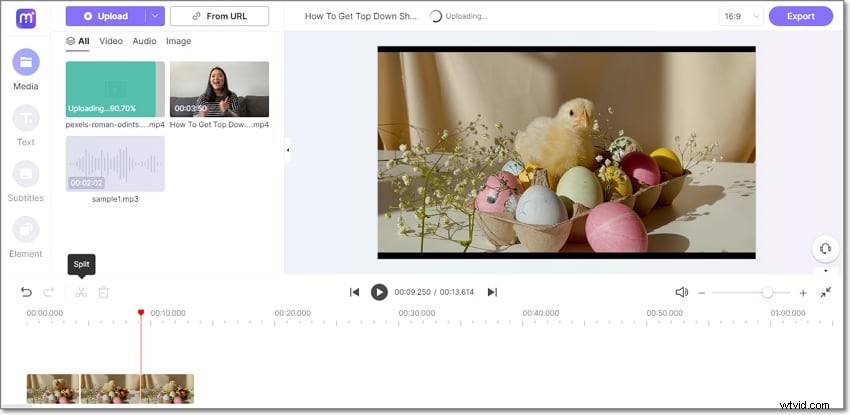
Lastly, use Media.io to trim video on Mac or Windows. Unlike the other apps like Adobe, this video cutter for Mac boasts a straightforward user interface without sacrificing functionalities. Here, you can trim videos uploaded from your local folders or load a YouTube URL link. Excitingly, this online video trimmer boasts an inbuilt screen and webcam recorder for capturing videos before trimming, splitting, copying, deleting, and merging. It doesn't end there. Media.io allows users to customize their trimmed videos with texts, shapes, subtitles, and background audio. Then after doing enough trimming, set the aspect ratio for any social media platform before exporting the new video to multiple HD resolutions.
- Pro: Perfect for beginners who want to trim videos on Mac, Windows or Linux.
- Con: It doesn’t support batch rendering temporally.

Our best advice:
consider your needs carefully, including your willingness to invest time in learning a new program. A little planning will help you make the best choice for a video editing software tool. Filmora is known for its extremely low learning curve and user-friendly. Just watch the video below about its features and try it for free now!
You may also like: Best M4A Format Cutters, Best TS Format Cutters