
In this in‑depth review, we examine Synthesia—its pricing, capabilities, and overall value—to determine whether it’s a worthwhile investment for your business in 2026.
According to recent research, 80% of marketers already leverage AI tools to produce marketing content. Adopting a new AI solution requires a clear understanding of its strengths and limitations, which this review aims to provide.
Let’s explore how Synthesia can streamline video production and whether it meets the needs of modern enterprises.
TL;DR
Synthesia is an intuitive AI video generator that transforms text into studio‑quality videos in minutes, featuring realistic avatars in over 130 languages. Ideal for customer service, training, sales, security, and marketing.
What Is Synthesia?
Synthesia is a cloud‑based platform that converts written scripts into animated videos. With a user‑friendly interface, creators can produce high‑quality videos in minutes rather than hours.
Key attributes include:
- Realistic AI avatars that simulate natural delivery.
- Support for 130+ languages and accents.
- More than 160 pre‑built avatars, plus the option to create a custom digital likeness.
Who Should Use Synthesia?
Anyone needing rapid, polished video content can benefit—from small startups to large enterprises. Typical use cases include:
- Learning & Development – engaging e‑learning modules.
- Sales Enablement – onboarding and product demos.
- Customer Service – FAQ and troubleshooting videos.
- Information Security – compliance training.
- Marketing – brand storytelling and ads.
The platform’s extensive language options and avatar variety make it adaptable across industries and regions.
Getting Started: User Experience
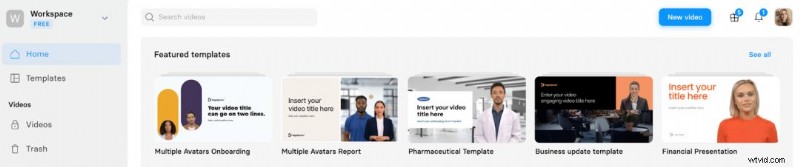
After logging in, you’ll land on a dashboard offering templates or a blank canvas. Selecting “Start from scratch” prompts you to choose a video size and an avatar (which you can change later).
Enter your script into the text‑to‑speech box, add silent scenes if needed, pick gestures, and choose a voiceover. You can further personalize the video with custom assets, fonts, and brand colours.
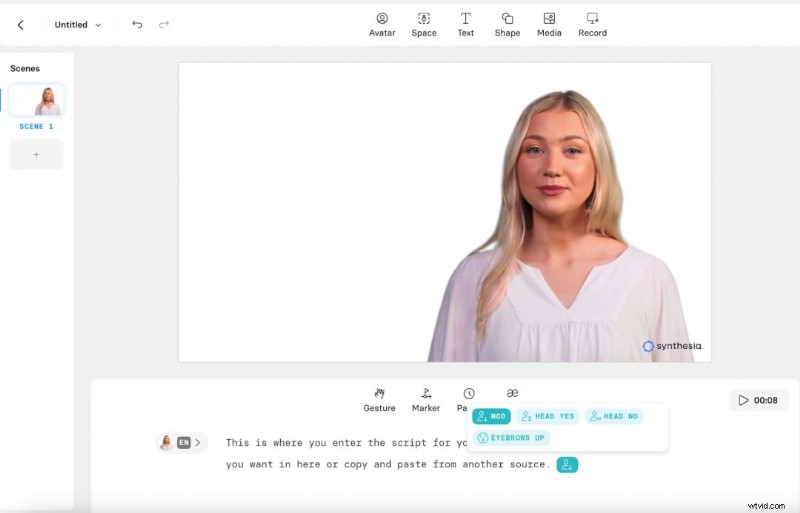
Rendering is required before you see the avatar in motion, so it’s advisable to finalize all edits beforehand.
Top Features
1. Micro Gestures
Enhance realism by selecting subtle movements—like nodding or raised eyebrows—to emphasize key points.
2. AI Script Assistant
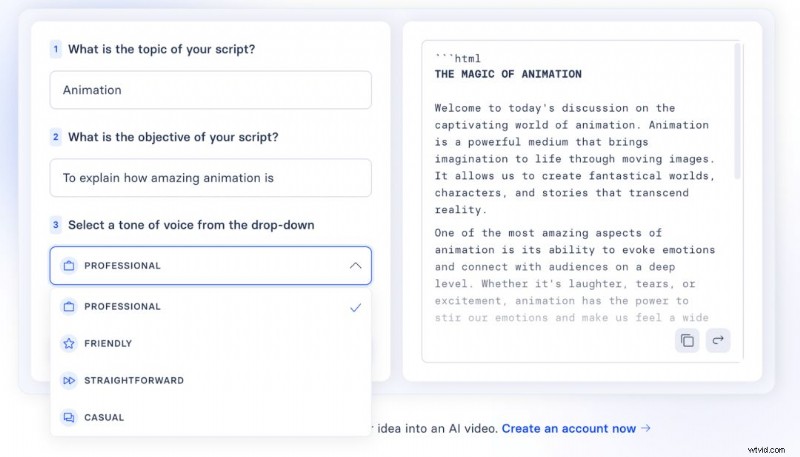
Stuck on a script? Input your topic, objective, and tone, and the AI generates a polished draft. (Available on paid plans.)
3. Collaborative Commenting
Team members can leave feedback directly on the video, streamlining the revision process.
Pros & Cons
Pros
- Cost‑effective – Produces videos for a fraction of traditional production budgets.
- Efficiency – Faster turnaround from script to final video.
- Customisation – Fine‑grained control over language, avatar age, attire, and branding.
Cons
- Authenticity gap – While avatars are realistic, they cannot fully replicate the nuance of a live presenter.
- Uncanny valley – Some viewers may find the avatars slightly artificial.
Pricing
Synthesia offers four tiers: Free, Starter, Creator, and Enterprise. The following table summarises each plan’s key benefits.
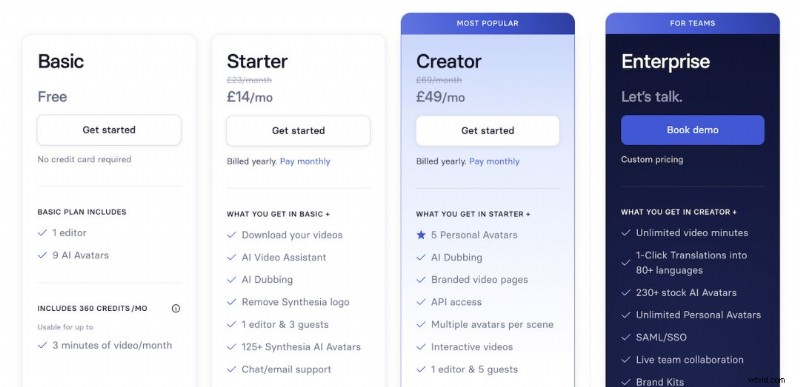
- Free – 3 min/month, 6 avatars, core features, 130+ voices.
- Starter – £14/mo, 10 min/month, 70+ avatars, AI assistant, custom avatar, 3 guest editors.
- Creator – £49/mo, 30 min/month, 90+ avatars, branding & CTAs, 1‑click translations.
- Enterprise – Custom quote, unlimited minutes, 140+ avatars, priority support, full feature set.
Support & Resources
Help is just a click away: the blue chat icon opens a support hub where you can search articles, chat with an AI bot, or contact a live agent.
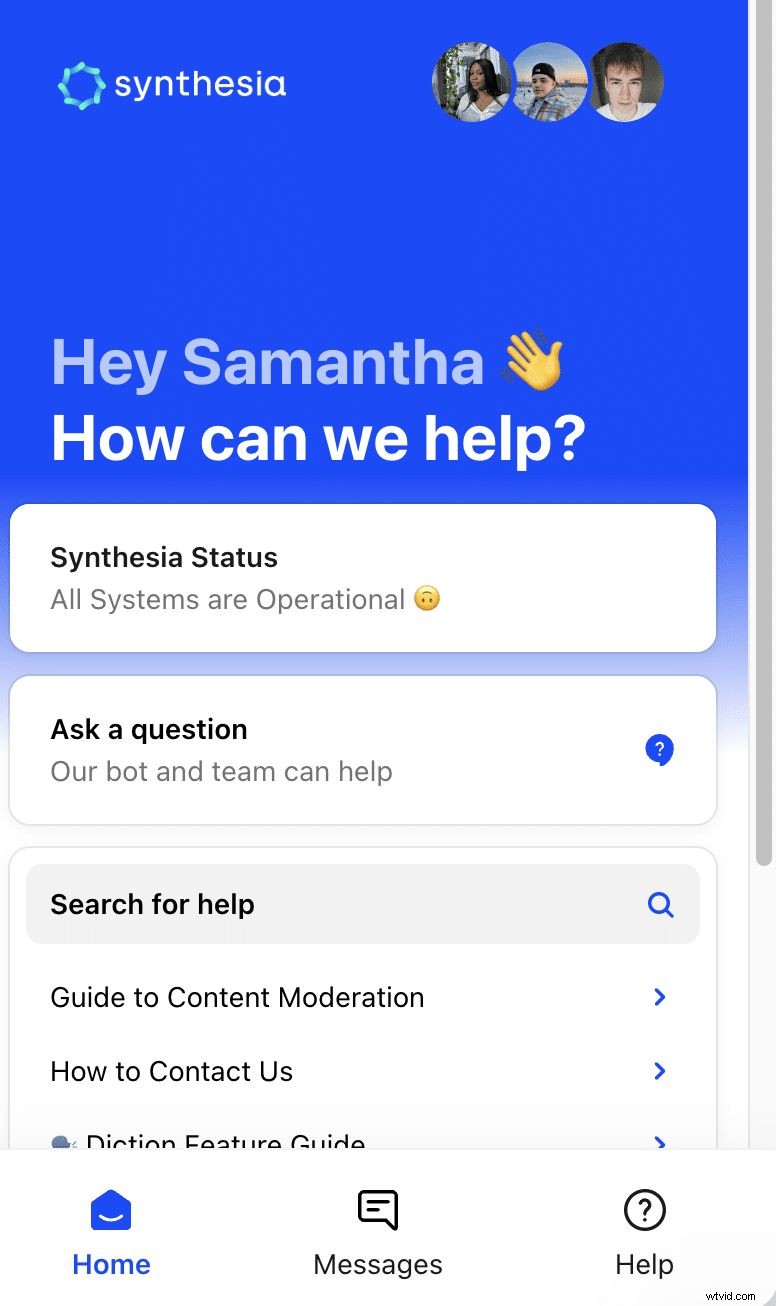
Additional resources include a knowledge base and Synthesia Academy, which offers tutorials and best‑practice guides.
For direct inquiries, email support@synthesia.io.
Alternatives
While Synthesia remains a leader, competitors such as Veed and HeyGen also deliver realistic AI avatars at competitive prices. We’ve evaluated 13 AI video generators for quality, speed, and cost—details available in our dedicated comparison article.

Final Verdict
For teams prioritising rapid, brand‑consistent video production, Synthesia offers a compelling blend of affordability, flexibility, and ease of use. While it may lack the full authenticity of live‑action footage, its feature set and scalability make it a strong contender for 2026 and beyond.

Explore other video tools, such as Wondershare Filmora, to find the best fit for your workflow.
Samantha, Copy Team Manager at Wyzowl – with over 1,000 scripts and countless video marketing articles, she ensures you’re equipped with the latest insights.