
Video producers frequently receive requests to eliminate unwanted background sounds—such as a constant hum, rumble, or HVAC noise. Capturing pristine audio on location is often difficult; ambient noise can drown out dialogue and compromise the overall quality.
Effective noise removal is essential for high‑quality production. It goes beyond sonic cleanup; it ensures your message is delivered clearly, fostering trust and maintaining audience engagement. A pristine soundtrack lets music, effects, and dialogue stand out.
Fortunately, several techniques can effectively eliminate background noise. Whether by layering background music, or applying audio/video editing tools, you can achieve a cleaner sound. This guide explains how to remove background noise from video on Windows, Mac, Android, iPhone, and online—both free and paid options.
In this article
- The Best Way to Remove Background Noise on Windows/Mac [Video Tutorial]
- Remove Background Noise on Mobile
- Remove Background Noise From Audio or Video with Audacity for FREE
- Remove Audio from Video Online Free
- FAQs about Removing Background Noise from Video
You may also like: Top 7 Background Noise Cancelling Software [2026 List]
Way 1: Removing Background Noise on Windows/Mac Using Filmora Video Editor
Among the many available tools, Wondershare Filmora stands out for its intuitive interface combined with professional‑grade features. The latest version offers enhanced waveforms, volume keyframing, and cutting‑edge AI audio tools that simplify and improve noise reduction.

Filmora’s Advanced AI Audio Tools
- AI Audio Denoise: A one‑click solution that identifies and removes steady background noises—hums, fans, or HVAC sounds—across podcasts, courses, and vlogs.
- AI Voice Enhancement: Boosts human vocal frequencies while suppressing ambient buzz, ensuring every word is crystal‑clear.
- Reverb Reduction: Targets echo from large, empty rooms, restoring vocal clarity.
- Hiss Reduction: Eliminates high‑frequency electrical hiss for a cleaner listening experience.
Method 1: Clean Audio Directly in Filmora
Whether you’re working with a raw audio file or a full video, Filmora’s editor streamlines the process. You can detach the audio, fine‑tune it with the Audio Mixer or Equalizer, and export the cleaned audio as MP3.
Step 1: Import your video into the Filmora timeline. Trim or delete any unwanted segments.
Step 2: Right‑click the clip and select ‘Detach Audio’ to separate the sound track.
Step 3: Click the audio track to access the editing panel. Use the Denoise feature to eliminate unwanted sounds.
Step 4: Optionally adjust the equalizer to naturalize the audio. After reviewing, export the cleaned video or audio.
Method 2: Masking Noise with Background Music
Complex noises—like conversations, traffic, or birds—are often difficult to remove entirely. Masking them with background music is an effective strategy that preserves dialogue.
Filmora lets you add a music track from the library, adjust volume, speed, and pitch, and cover the noise without compromising the main audio.
You can also generate AI music that matches the scene’s mood or apply AI sound effects to enhance the overall feel.
Way 2: Removing Background Noise on Mobile
Filmora’s mobile app offers the same powerful noise‑reduction capabilities. Follow these simple steps:
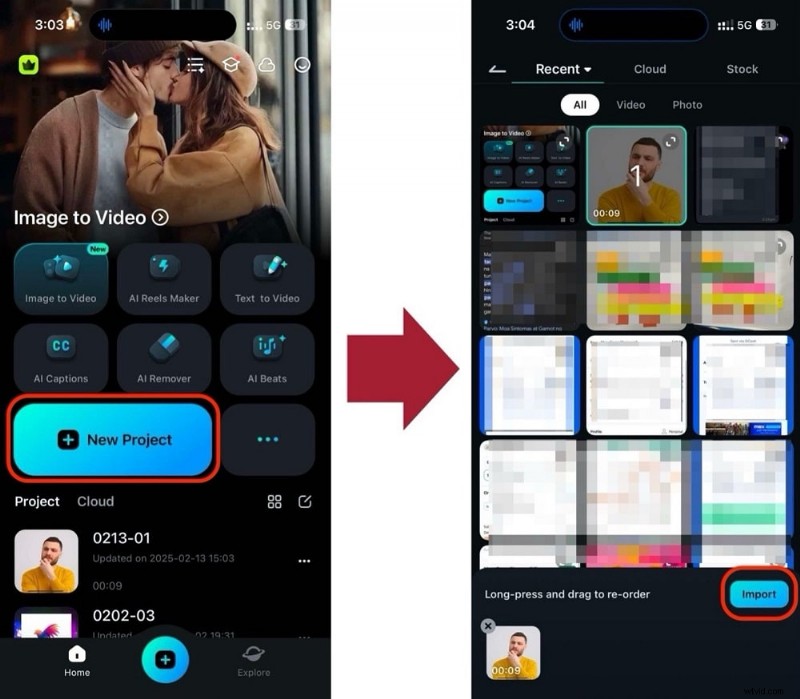
Step 1: Create a new project and import the noisy video.
Step 2: Tap the ‘Noise Reduction’ icon in the toolbar.
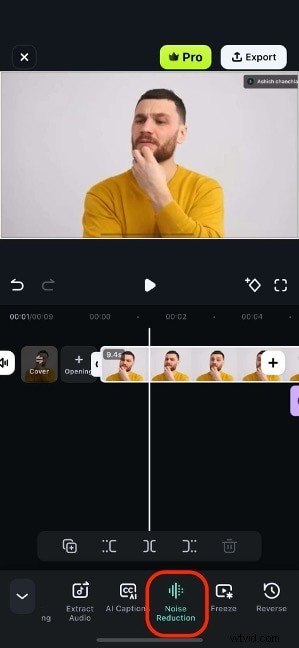
After processing, your audio will be cleaner. The mobile app is ideal for on‑the‑go editing.
Way 3: Removing Background Noise with Audacity (Free)
Audacity is a free, open‑source editor available on Windows, macOS, and Linux. It lets you record, edit, and analyze audio, and perform precise noise reduction.
Step 1: Import your audio or video file into Audacity. If you’re importing a video, install FFmpeg to extract the audio track.

Step 2: Zoom in to identify a segment that contains only background noise. Select it and choose ‘Effect > Noise Reduction’ → ‘Get Noise Profile.’
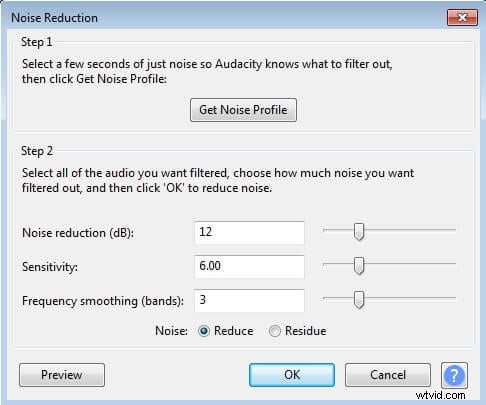
Step 3: Select the entire track, reopen ‘Noise Reduction,’ adjust the amount of reduction, and click OK.
Step 4: Optionally amplify the track to restore volume, preview the result, then export as MP3 or WAV.
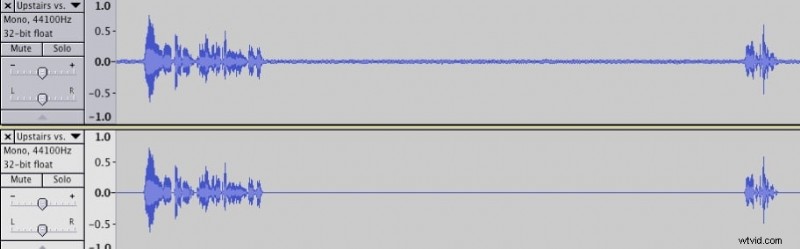
Audacity is effective for steady, predictable noises. For variable sounds, consider a dedicated video editor like Filmora.
Way 4: Removing Audio from Video Online (Free)
If you prefer a quick, no‑installation solution, AudioRemover.com lets you strip audio from video in just two steps. It supports MP4, AVI, MOV, and other formats, with a 500 MB file size limit.
Step 1: Upload your video file.
Step 2: Download the processed file—note that all audio, including voice, music, and effects, will be removed.

FAQs about Removing Background Noise from Video
1. What’s the difference between Normal Denoise and AI Voice Enhancement in Filmora?
Normal Denoise targets steady, constant background sounds like hums. AI Voice Enhancement specifically boosts human vocal frequencies while reducing competing noises, making dialogue stand out.
2. Can Audacity remove complex noises like people talking or cars?
Audacity’s Noise Reduction works best on consistent noise patterns. Variable sounds such as speech or traffic are difficult to isolate without affecting the main audio. In such cases, a tool like Filmora’s AI features or masking with music is preferable.
3. How do I remove background noise from a YouTube video?
Download the original file, edit it with Filmora or Audacity to clean the audio, then re‑upload the corrected version to your channel.
4. Is it better to use an online tool or desktop software?
Desktop editors—Filmora, Audacity—offer greater control, higher quality, and privacy, handling larger files without uploading content. Online tools are suitable only for small, non‑sensitive clips or for fully stripping audio.
Conclusion
With these methods, you can confidently deliver clear, engaging video content. Whether you prefer a desktop solution, a mobile app, or an online service, the tools above give you the flexibility to remove background noise efficiently.