
New YouTube content creators usually make the biggest mistake of uploading the wrong video size, so to be clear and quick, for a video, just as a standard, you need a 16:9 aspect ratio, usually 1920x1080.
We have made a quick guide with all the other dimensions you will need for banners and profile pictures, so you won't have to guess your export settings.
YouTube Size Cheat Sheet
To simplify the uploading of your videos each time you upload a video, here’s a quick overview of the most important specs:
- Standard Video: 1920x1080 (16:9), MP4 container, H.264 codec, AAC audio
- YouTube Shorts: 1080x1920 (9:16), up to 3 minutes
- Thumbnail: 1280x720 (16:9), under 2MB
- Banner: 2560x1440 (use the 1235x338 safe area), under 6MB
- Profile Picture: 800x800 (1:1), displays as a circle
Resolution vs. Aspect Ratio
When you first start, you'll see that video size is described in two ways: resolution and aspect ratio. This is what you need to know:
- Resolution: This is the amount of detail. It is the total number of tiny squares (pixels) that comprise your video, and is expressed as width x height, like 1920x1080. The larger the resolution, the greater the quality.
- Aspect Ratio: This is the shape of your video. This is the mathematical ratio which defines the width x height of your video; 16:9 shows how long or wide your video will be, based on how it is viewed.
YouTube Video Size Guide (Standard Videos)
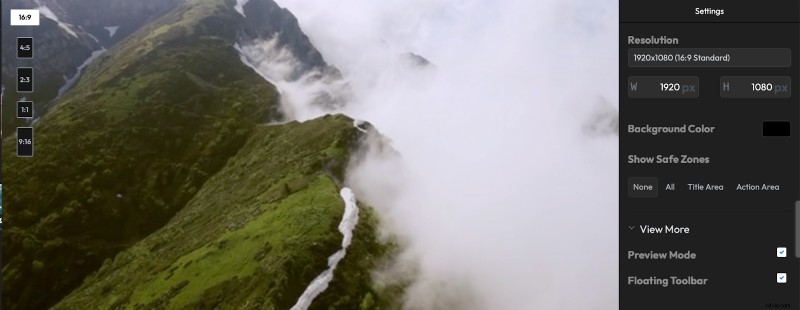
The standard specifications for the standard horizontal videos so that they look clean and professional, regardless of the screen size. If you have a video that is not in the correct aspect ratio, you can easily resize it with our online video resizer.
For more advanced edits, like creating picture-in-picture effects or using a green screen, a dedicated green screen video editor can be very helpful.
- Aspect Ratio: The universal standard for horizontal YouTube videos is 16:9.
- Resolution: Aim for at least 1080p (1920x1080).
- 4K (UHD): 3840x2160
- 2K (QHD): 2560x1440
- 1080p (Full HD): 1920x1080
- 720p (HD): 1280x720
- File Size & Length: The maximum file size is 256GB, and the maximum length is 12 hours.
- File Container: MP4 is the recommended format for quality and file size; YouTube also accepts MOV, AVI, WMV, etc.
- Video Codec: The recommended codec is H.264 (AVC). This is the most common standard format and is optimized for YouTube.
- Audio Codec: Use AAC-LC (Advanced Audio Codec) for the best results. To enhance your videos further, you can easily add audio to your YouTube video, whether it's music, a voiceover, or sound effects.
- Frame Rate: The frame rate of what you upload to YouTube should match your recordings. Common supported rates are 24, 25, 30, 48, 50, and 60 fps:
- 24 fps: It gives a cinematic feel
- 30 fps: This is the standard for live television and most online content
- 60 fps: Perfect for action, sports, or gaming videos especially if you're using an online screen recorder to capture gameplay.
- Bitrate: Video bitrate controls your video's visual quality and file size. For uploads, YouTube recommends using Variable Bitrate (VBR). Here are the suggested bitrates for uploading standard SDR:
| Resolution | Standard Frame Rate (24-30 fps) | High Frame Rate (48-60 fps) |
| 4K (2160p) | 35–45 Mbps | 53–68 Mbps |
| 2K (1440p) | 16 Mbps | 24 Mbps |
| 1080p | 8 Mbps | 12 Mbps |
| 720p | 5 Mbps | 7.5 Mbps |
YouTube Shorts Size Guide
Shorts are all about vertical, mobile-first video. The specs are designed to fill a phone screen perfectly:
- Aspect Ratio: 9:16 (the inverse of a standard video)
- Resolution: 1080x1920 is the recommended size for crisp playback on mobile
- Length: Must be up to 3 minutes
YouTube Thumbnail Size Guide
Your thumbnail is the first impression of potential viewers about your video and is the one thing that would lead them to click on your content. A great way to make your thumbnails more engaging is to add text to your video thumbnail with catchy titles or more info.
- Recommended Dimensions: 1280x720 pixels.
- Aspect Ratio: 16:9, to match the video player
- Maximum File Size: 2MB
- Accepted File Formats: JPG, PNG, GIF
Your banner tells visitors a little about your channel. The tricky part about a banner is that it is displayed across several devices. Just remember the “safe area”.
- Recommended Dimensions: 2560x1440 pixels
- Safe Area: 1235x338 pixels. All logos, text, and images must be in the safe zone to be visible on all devices
- Maximum File Size: 6MB
YouTube Profile Picture Size Guide
This is how your viewers identify or recognize your content the best. Keeping your thumbnail simple and recognizable while staying true to your brand is important.
- Recommended Dimensions: 800x800 pixels
- Aspect Ratio: 1:1 (a perfect square)
- Display Note: YouTube displays your profile picture as a circle, so make sure your main image is centered to avoid being cropped
The Final Frame
At the end of the day, it’s about having an enjoyable experience for your audience. The size of your banner and thumbnails is just as important as a clear video to build common trust and hold viewer attention. For trimming down longer videos into more digestible clips, a YouTube clip maker can be an invaluable tool.
Flixier allows you to resize your videos for YouTube, Shorts, or any social media platform using simple presets. This way, you can guarantee your content is premiered perfectly with just a few clicks and still have time to create.
About the author
Adrian Nita
Adrian is a former marine navigation officer who found his true calling in writing about technology. With over 5 years of experience creating content, he now helps Flixier users understand video editing in simple, easy-to-follow ways.

follow Adrian Nita on social