
In this post, you can learn about 10 great video editors that are good at game editing for YouTubers. Free and paid options are both included, and they are for both beginners and professionals. Learn their features, pros and cons to figure out the best one for you.
Best Gaming Video Editors:
- 5 Best Free Gaming Video Editing Software:
- 1. FilmForth
- 2. OpenShot
- 3. LosslessCut
- 4. Shotcut
- 5. Olive
- 5 Best Paid Gaming Video Editing Software:
- 6. Adobe Premiere Pro
- 7. Final Cut Pro X
- 8. Corel VideoStudio
- 9. CyberLink PowerDirector
- 10. Pinnacle Studio Ultimate
Best Gaming Video Editing Software
Gaming has witnessed an unprecedented growth arc in the last decades, especially on PCs. That comes hand in hand with more people streaming their gameplay online to a niche audience. Software like OBS, Shadowplay, Xsplit does a fantastic job in capturing the gameplay. Naturally, the next step is to polish them into gameplay, montage video, or highlights you wish to post online.
The good news is that there is plenty of gaming video editing software available, catering to both free and paid sections, as a user would prefer, this list also includes some open-source applications. Discover the top 10 gaming video editing software now.
Do Not Miss: Top 24 PC Games Download Websites, 3 Ways to Record Gameplay on PC, How to Edit Gaming Videos for Free
5 Best Free Gaming Video Editing Software
1. FilmForth
FilmForth
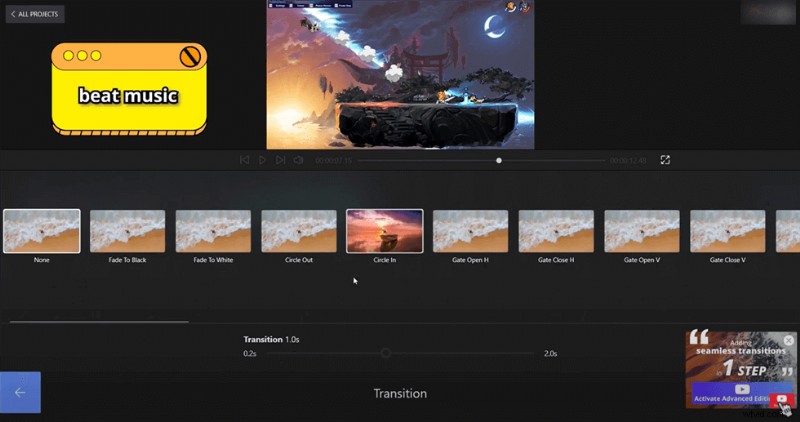
Get, set, and publish. That’s one way to define FilmForth. It gets easier as you start using the gaming video editing software. Currently, it’s available for Windows 10 platform and can be downloaded from the Microsoft Store.

There are no frills or hidden technicalities to tangle in. Everything is right there on the screen. Drag and drop a video anywhere, and it gets opened in the editor.
Starting with ease of use, we get two feeds in the project dashboard, consisting of audio and video. You get a red frame by frame feed of audio, and green contains the video.
The main four sections of editing– edit, audio, text, picture in picture, and effects can be found on the project’s home screen. Among the most notable features is the voice-over, which lets you add voice using your computer’s microphone itself. Alternatively, audio files can be added and synced as well.
After tidying things up, click on the Save video button, and a prompt will ask you regarding the output video quality.
- Learn More about FilmForth
PROS
- Free and easy for any level of computer-experienced users.
- No watermark.
- Different fonts and effects for the video.
- Change video background, logo, music, size, and length with ease.
- Add animated text and transitions to video.
CONS
- Not stable sometimes.
- Only available on Windows 10 and Windows 11
Video Tutorial: How to Edit Gaming Video for YouTubers
2. OpenShot
OpenShot Overview
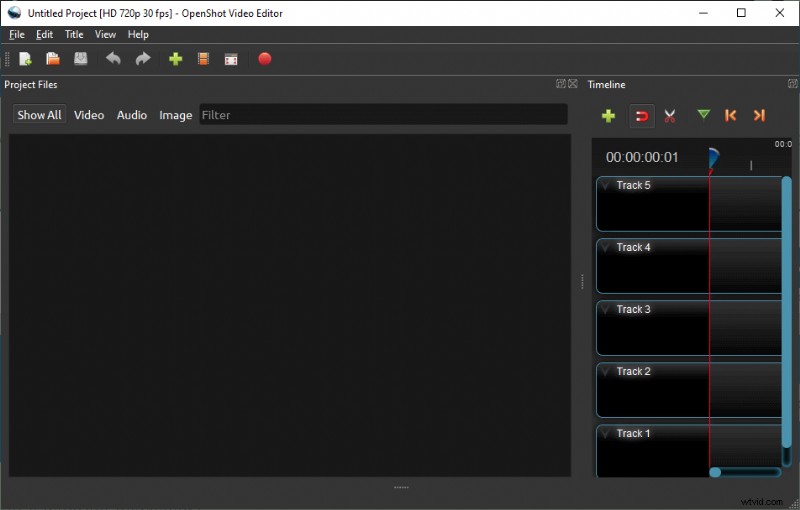
Moving on to the next gaming video editing software is OpenShot. As soon as you install and launch OpenShot, you are greeted by a first-time tutorial. The tutorial apprises you of the basics and lets you get the hang of things in the software.
You can manually open a video in your project. Alternatively, drag and drop is possible in the Timeline and project dashboard.
Similar to other applications, this video editor has projects. That way, you can compartmentalize different video projects without overlapping one video over others.
Before we forget, one thing that stands is the multi-application support. Suppose you are working in collaboration where one team member is working on Mac.
You can import their Final Cut Pro projects without any hiccups and start working on them.
- Learn More from Our OpenShot Review
PROS
- Library of effects and presets for adding to videos
- Cross-platform support
- Multiple user interfaces for different types of users
- Unlimited tracks can be added
CONS
- Accessing preferences can crash the entire application at times
- Editor lags for few moments when a video/audio file of larger size is added
3. LosslessCut
LosslessCut
Going forward on the open-source trail. LosslessCut is gaming video editing software that is built on the philosophy of Chromium.
Apart from installation, you can download the portable and edit videos on the go.
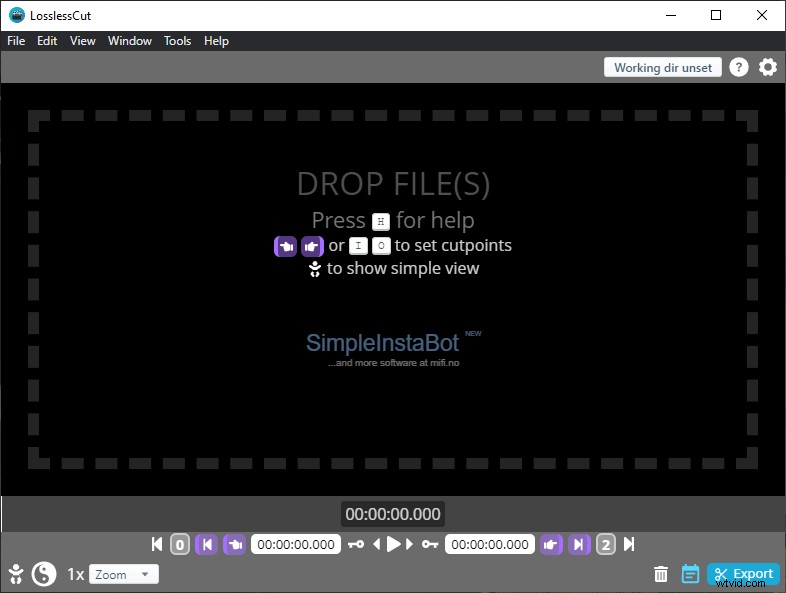
The video editor is mainly for trimming, cutting large videos without wasting any time in encoding. Being a Chromium-based editor, it omits encoding or decoding to save time.
You can drag and drop files into the editor, apart from manually opening them.
In the features department, there are a few things that keep it relevant—starting with the option to convert files in a batch into a supported format. This comes in handy when you have many videos that need to be converted into a particular format.
PROS
- Very fast trimming, merging operations
- Easy-to-use user interface
- Lossless cutting of videos without compromising on the quality
- Simple meta-data editor
CONS
- Doesn’t support all the major video formats
- Lacks features for a video editor
4. Shotcut
Shotcut
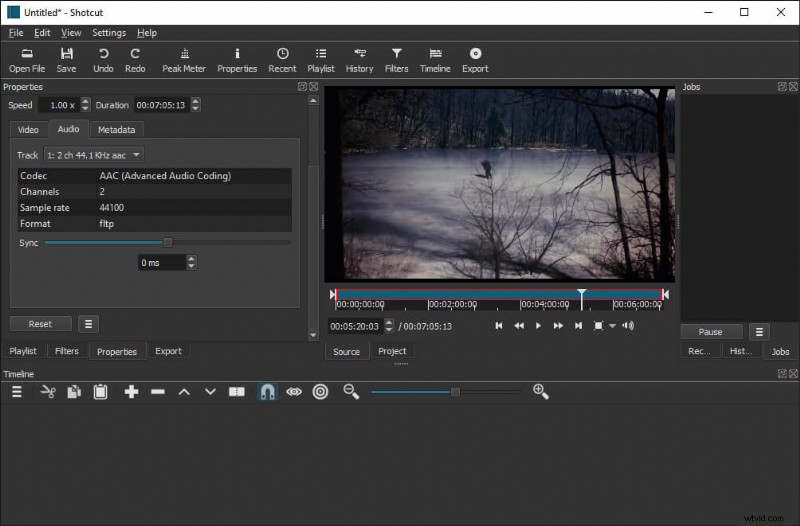
Shotcut is a capable video that supports a plethora of formats(including images). Similar to Losslesscut, it has a portable version as well.
On the homepage, you get the option to name your project, along with the video mode. Setting video mode to automatic will produce the video in the original setup. On the other hand, three are video settings as high as 4K 60FPS.
Let’s dive into the crux, the features of the editor. On the right side of the screen are the properties, which consist of the codecs, aspect ratios, and metadata, to name a few.
When you move further down, there are utility tools such as trim, ripple, merge, and many more. Going deeper into edits, there is the color-coding, effects, audio, editing, and player layout. All can be accessed individually in the top-right dashboard.
There is no overlapping for any part of the editing, keeping every section in a different layout.
- Learn More from Our Shotcut Review
PROS
- Advanced editing layout for an audio
- Separate sections for different aspects of editing
- Supports virtually all formats
- 3-way color wheelers for color grading
CONS
- Complex user interface for average users
- Separate audio and video timelines difficult in some instances
5. Olive – Video Editor
Olive Video Editor
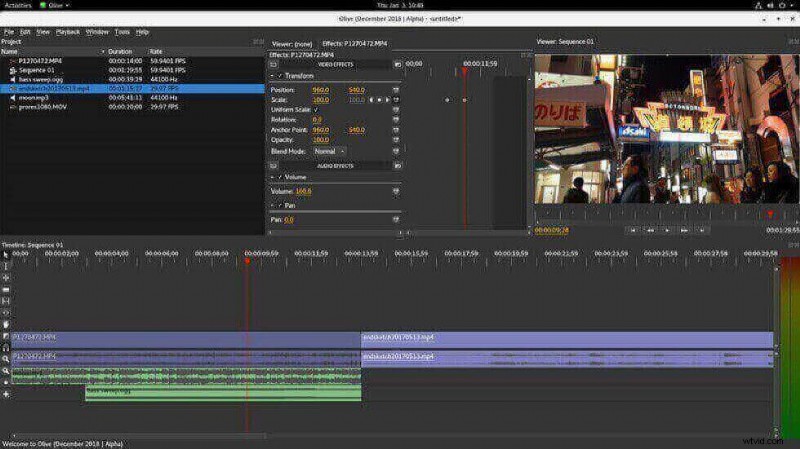
Olive is an editor meant to compete with high-end video editing tools, as the developer claims. It’s currently in beta, so expect bugs and some features missing. You can grab it in 64-bit as it’s only available across Windows, Mac OS, and various Linux distros.
Drag and drop the video in the project dashboard to open it. After that, drag them into the timeline board on the right. A handful of quick tools are not limited to a pointer, slim, zoom, transition, hand, and many more. You can access them through keyboard shortcut keys as well.
PROS
- The useful keyboard shortcut for crucial features
- Loaded with professional features
- Color management powered by OpenColorIO
- Pre-cache files to render frames or even 4K
CONS
- Not for novice users
- Currently, in alpha, it can crash at times
5 Best Paid Gaming Video Editing Software
Free tools are useful when you don’t want to make your pocket lighter. However, paid video editing software offers some extraordinary features coupled with unmatched efficiency and reliability.
6. Adobe Premiere Pro
Adobe Premiere Pro
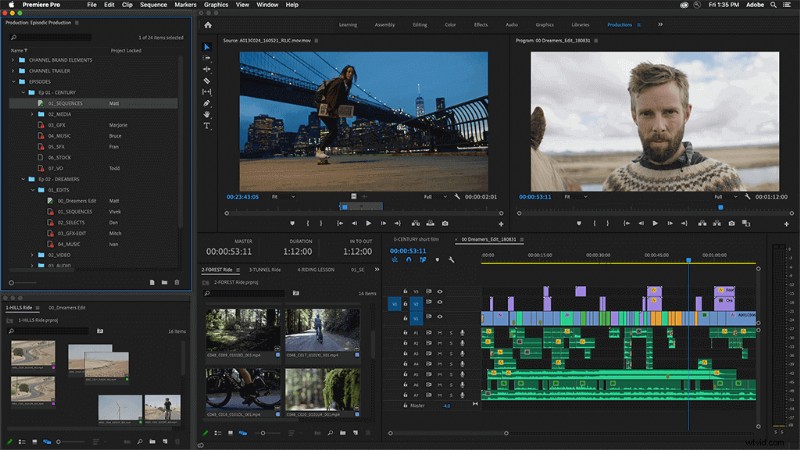
The mighty Adobe Premiere Pro is a friendly face for Windows-based video editors. Other video editing software(s) are a mere pitstop to the ultimate destination inside the Adobe Creative Suite.
With its flexible, palette-based interface, your video elements wouldn’t be lost in the bushes. On top of that, it has become touch-friendly with its recent release. Take full advantage of the light pen, touch-screens, and take preciseness down to the last pixel.
- Learn More from Our Premiere Pro Review
PROS
- Large ecosystem of video apps
- State-of-the-art stabilization
- Unlimited cam-angles
- Flexible and neat interface
CONS
- No tags for media
- Some features, and techniques require third-party applications
7. Final Cut Pro X
Final Cut Pro
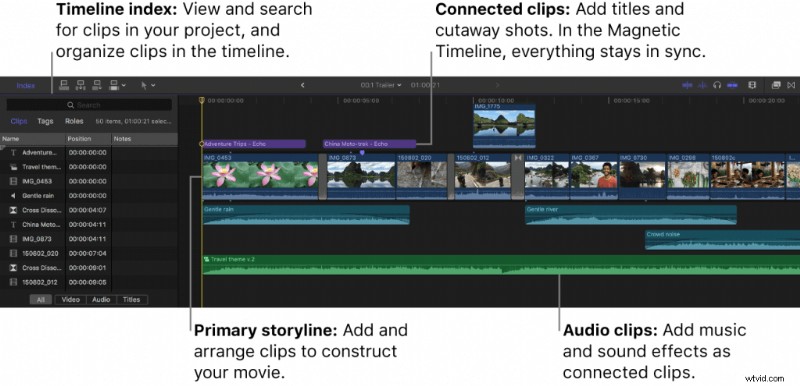
Final Cut Pro is considered the holy grail of video editing by many professional content creators out there. Apple-created video editing software USP is really easy to use. Whether you are a newbie or a seasoned professional, you get stuff done.
With its recent versions, Final Cut Pro X shunned the traditional timeline-track panel. Backed by mixed receptions on the move, Apple did it by restructuring the way crafting of videos was done while taking advantage of the newer hardware.
Libraries have been making things easier to copy assets, elements for different projects. Besides, Final Cut offers the option to copy specific assets to a new folder while starting a project.
- Learn More from Our Final Cut Pro Review
PROS
- Magnetic Timeline
- MacBook Touch Bar and iPad Sidecar support
- Simple, easy-to-use user interface
- Superior Library management
CONS
- Lacks stabilization for 360-degree videos
- Unnecessary complexity in presets
8. Corel VideoStudio
Corel VideoStudio
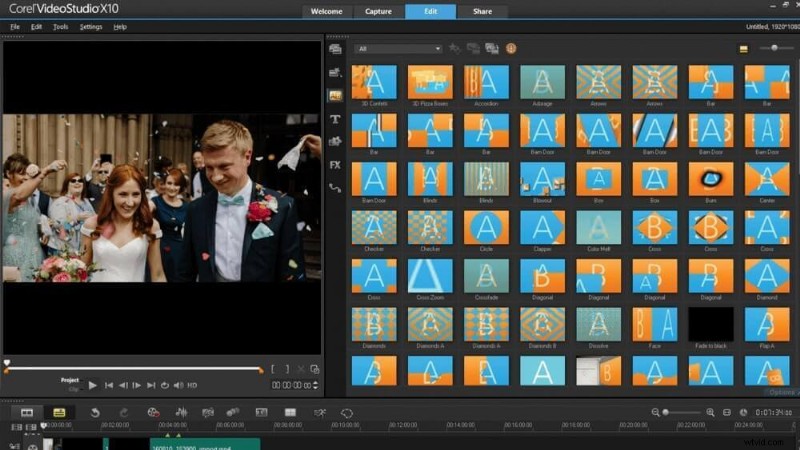
A jack of all trades video editor that is available on Windows only. There are two versions- Ultimate and Pro. The former has more effects, filters, and transitions while offering the same core functionalities.
Start importing footage from the webcam or other attached camera at 30 FPS. For times when the drag and drop functionality feels like too much work.
Moving on to the interface, it feels dated at times. Don’t get me wrong, but the user interface could use an upgrade. It exudes the feels of FilmForth, an editor that we discussed earlier.
There are four components in the editing section – viewer window, library panel, an options panel, and the Timeline. You can find options panels floating around according to the user’s convenience and preference.
- Learn More Our Our Corel VideoStudio Ultimate Review
PROS
- Value for money
- Multicam support with 6 cameras
- Over 1000 load filters and effects
- HTML5 video page creation
CONS
- Outdated interface
- Narrow flick options
9. CyberLink PowerDirector
CyberLink PowerDirector
PowerDirector lives up to its name. Giving you total control over your content needs in line with the changing demands.
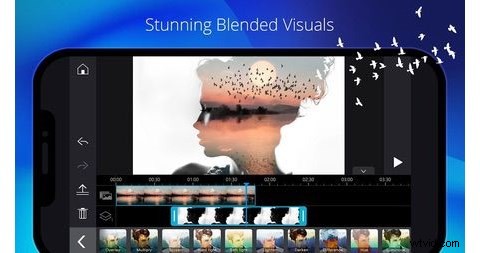
A hassle-free, easy-to-use gaming video editing software that covers all the primary bases. Suppose you are editing bare commercial or handheld videos without scratching your head? Then PowerDirector is the companion to have. Seasoned pros and people who wish to create high-quality videos can stick with tools such as Adobe Premiere Pro and Final Cut Pro X.
With PowerDirector, it’s all about minimizing the problems that one individual comes across while editing videos.
Their Magic Movie Wizard makes it seamless for first-timers to create a video out of many clips. It walks you through a preset of features, and settings before publishing the video in five easy sections—no need to look in different menus to get things done.
There is the option to access the full-fledged video editor in the last stage of the Movie Wizard. To provide you with a broader spectrum of edits that feel left out in the wizard.
- Learn More from Our CyberLink PowerDirector 365 Review
PROS
- Intuitive editing process
- Built-in video templates
- Good transition options
- Magic Movie Wizard is effortless
CONS
- Less flexibility in editing tools
- Lacks documentation of plugins use
10. Pinnacle Studio 25 Ultimate
Pinnacle Studio 24
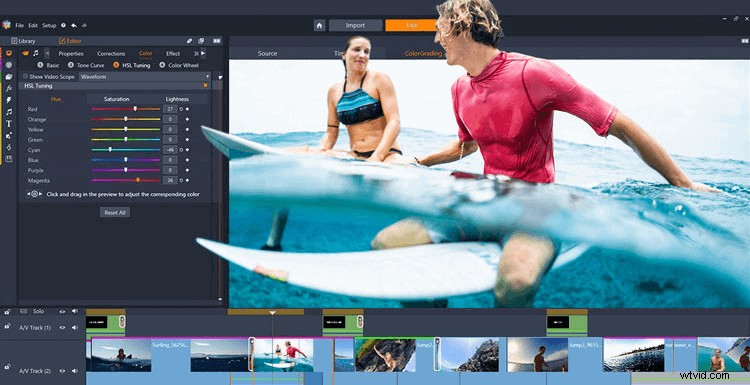
To a layperson, Pinnacle Studio will look identical to Corel’s VisualStudio. They share the same design philosophy in the UI department. Pinnacle Studio 25 Ultimate keeps it simple, and it can be used by users who are just starting, preferably in training. You wouldn’t find it oversaturated with tools, to begin with.
Importing assets and videos is a breeze on this video editing software. Next in line is a feature worth mentioning-audio ducking. It will lower your secondary audio, right below the main audio track. They have recently added the decoding options with the DVCPRO HD and XAVC Codecs. Both are prevalent among the video camcorders and standard point and shoots.
Move further to tools, just above the Timeline. It consists of traditional tools, which can be customized to display the ones which you wish on the fingertip. The newly added effects, transitions, and video template should keep you engaged for a while.
- Learn More from Our Pinnacle Studio Ultimate Review
PROS
- Compatible with standard camera formats
- Flexible utility tool dashboard
- Tools are easy to use
- Improved transition, effects panels
CONS
- Lacks the professional-level effects
- The library is difficult to sort at times.
Conclusion
Choosing the right gaming video editing software takes a bit of time. It requires testing different applications to determine what suits your needs.
The UI, workflow, and tools differ for every video editing software. You need to choose the one which hits close to home for you, aiding in efficiency and productivity in the long run.
More Related Articles
- 16 Best Video Editing Software for Mac: Free and Paid
- 12 Best Face Swap Apps to Add Some Fun to Your Photos
- Top 18 Slow Motion Video Editors to Slow Down the World
- The Complete Guide on How to Make a Smooth Video Slow Motion
- 15 Best Split-Screen Video Editors for Professionals and Beginners
- Top 24 PC Games Download Websites [Updated]