
Although GIF is more fascinating than JPG, PNG and other image formats, it takes up much more space. Fortunately, there are many animated GIF optimizers on the market that can help you compress and optimize GIFs.
Short for Graphic Exchange Format, GIF is a picture file format used for bitmap graphics. If you want to make a GIF, MiniTool software is your first choice. However, GIFs always take up more space than other image formats. So, how to optimize GIFs?
To help you save your disk space or quickly transfer the GIF to other devices, here introduce 8 best GIF optimizers, including desktop and online tools.
4 Best Online GIF Optimizers
If you just want to optimize one or a few GIFs, there is no need to download any software to optimize the GIF image. An online GIF Optimizer is enough for you to reduce GIF size in a few seconds.
1. Ezgif
Ezgif is a simple online GIF maker and toolset for basic animated GIF editing. It allows you not only to optimize GIF but also create GIF, convert video to GIF, resize GIF, crop GIF, reverse GIF, add text to GIF and apply effects to GIF.
Related article: WebM to GIF
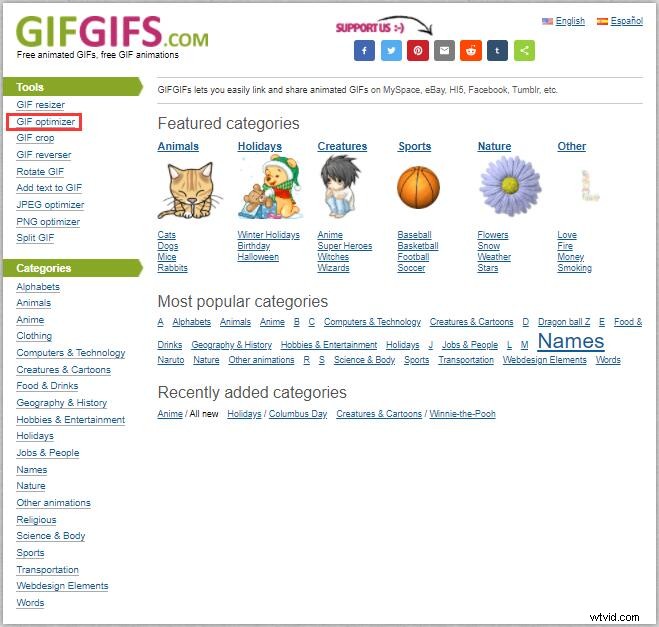
2. GIFGIFS
GIFGIFS is an all-in-one online GIF toolset. This GIF optimizer is easy-to-use. Just upload an animation, select an optimization method, and then perform the conversion. It offers many GIF-related features - GIF resizer, GIF cropper, GIF reverser, GIF rotator, JPEG optimizer, PNG optimizer, GIF splitter, etc.
3. GIFMaker.me
GIFMaker.me allows you to create animated GIFs, slideshows, and video animations with music online freely and easily, no registration required. Besides, you can use to optimize GIF, resize GIF, reverse GIF, combine multiple GIFs into one, or split a GIF into separate frames.
4. Kraken.io
Kraken.io is a free online image optimizer. Using Kraken.io, you can optimize bulk quantities of JPEG, PNG and animated GIF files. However, unlike other GIF optimizers on this list, Kraken.io optimizes your files for the lowest size.
4 Best Desktop GIF Optimizers
If there are many GIF images or large GIF images to be optimized, then downloading optimization software on the computer may be a more suitable solution.
1. FileOptimizer
FileOptimizer is an advanced GIF optimizer featuring a lossless file size reduction. The tool has a simple interface and can be used to compress various popular file formats (audio, video, and documents) on different operating systems, such as Windows, Mac, and Linux.
2. RIOT
RIOT, short for Radical Image Optimization Tool, is a free image optimizer that will let you adjust compression parameters while keeping minimum file size. With it, you can control the compression, metadata settings, number of colors and even select the output format.
Related article: Convert GIF to Any Format and Vice Versa
3. Remeolight GIFmicro
Remeolight GIFMicro is a nice GIF optimizer, which is equipped with two optimization modes. “Lossless compression mode” allows you to reduce GIF size without quality loss, while “Lossy compression mode” intentionally reduces the image quality to further reduce the file size.
4. GIF Optimizer Free
GIF Optimizer Free is a one-click GIF optimization program that can be used to easily optimize GIF files and save up to 90% of the file size. It includes two preview panes to help you compare the original GIF with the optimized GIF.
Bottom Line
8 awesome GIF optimizers have been introduced above. Try any one of them to optimize your GIFs and reduce their file size. If you have any questions or suggestions about it, please let us know via admin@wtvid.com or share them in the comments section below.