
Can’t open DAV video files with Windows Media Player? How to open DAV files? In this post, you will find 3 DAV players that can play DAV videos smoothly. Check out this post to learn more! (Try MiniTool MovieMaker to watch videos at 2x speed)
A DAV file is a video created by DVR365 digital video recorders. It stores videos in an encrypted format, so most video players do not support DAV format. How do you open DAV files? You can try the following DAV players to play DAV files.
#1. VLC Media Player
Can VLC play DAV videos? VLC is a powerful video player supporting a wide range of formats, but it cannot open DAV files directly. To play DVA files successfully, you need to make some adjustments.
Here’s how to play DAV files in VLC.
Step 1. Launch VLC media player after installing it on the computer.
Step 2. Click on Tools in the menu bar. From the drop-down menu, select the Preferences option or press and hold the “Ctrl + P” keys.
Step 3. Go to the Show settings in the lower-left corner and choose All to open the Advanced Preferences window.
Step 4. In the Advanced Preferences window, click on Demuxers from the Input / Codecs list.
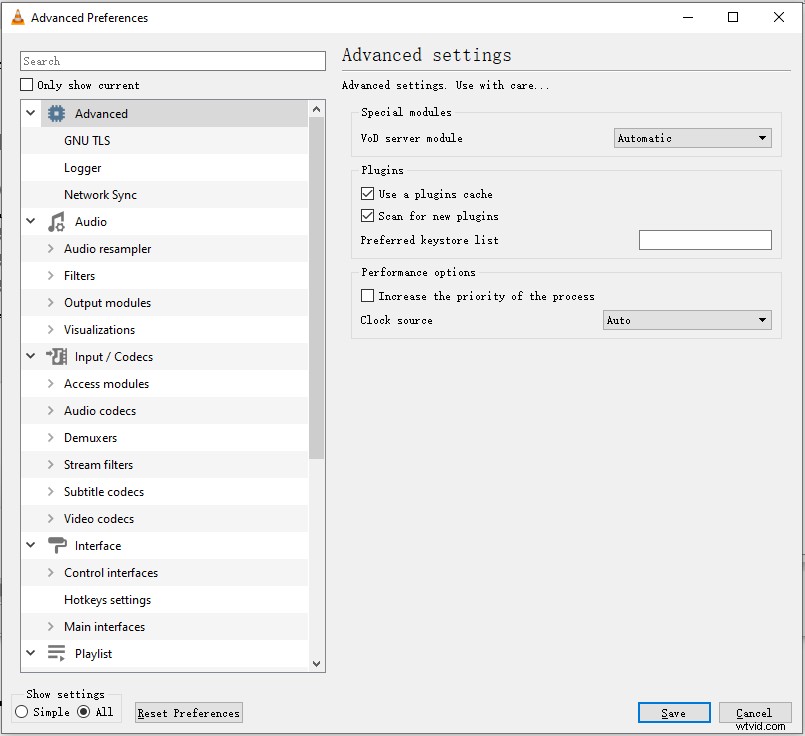
Step 5. Drop down the Demux module and find the H264 video demuxer option. Then select it and click on Save to apply the change.
Step 6. After that, head to Media > Open File… to load the DAV file. Or drag and drop the DAV file from the desktop to VLC.
#2. Amcrest Smart Play
Amcrest Smart Play is a professional DAV file player. You can use it to play DAV videos and convert DAV to other video formats such as MP4, AVI, etc. This DAV player is available for Windows and macOS.
To play DAV files, follow the below step-by-step guide.
Step 1. Get Amcrest Smart Play from the official website:
Windows: https://support.amcrest.com/hc/en-us/articles/213228038-Amcrest-Smart-Play
macOS: https://support.amcrest.com/hc/en-us/articles/213715757-Amcrest-Smart-Play
Step 2. After downloading Amcrest Smart Play, run the installer and complete the installation.
Step 3. Add the DAV video to the program and click the Playback button. Then you can watch the DAV video.
#3. 5KPlayer
5KPlayer is also a video player that supports DAV playback. It can play almost all video formats and allows you to download videos from YouTube, Dailymotion, Vimeo, and more.
5KPlayer works on both Windows and macOS.
Here’s how to play DAV files.
Step 1. Download and install 5KPlayer.
Step 2. Open the program to get the main interface.
Step 3. Drag and drop the DAV file to 5KPlayer.
Step 4. Then you can view the DAV video without quality loss.
If you don’t want to install DAV players on your computer, there is an easy solution that is converting DAV to the most popular format like MP4. Then you can play the video with any video player.
How to convert DAV to MP4? You might be interested in this post: DAV To MP4 Converter Free Download.
Conclusion
Want to play DAV files? Try the above DAV players! Or convert DAV videos to other formats. If you’d like to share some DAV players or converters with us, leave a reply!