
Square videos have gained popularity recently. Compared with landscape videos, square videos perform better in views and engagement. How to make a video square? In this post, I’ve compiled a list of the 5 best square video editors. They can help you make square video for Instagram and Facebook.
Let’s take a look at the 5 best square video editors. (Do you need a landscape video editor? Here recommend MiniTool MovieMaker.)
#1. Adobe Premiere Pro
As one of the world’s leading video editing software, Adobe Premiere Pro is capable of handling all common video editing tasks. It lets you set a custom aspect ratio for your video.
Here’s how to make video square in Adobe Premiere Pro.
Step 1. Create a new sequence.
Step 2. Right-click the new sequence and select Sequence Settings.
Step 3. Set the Frame Size to 1080x1080 and change other settings as required. Click OK to save changes.
Step 4. In the end, navigate to File > Export > Media to export the square video from Adobe Premiere Pro.
#2. iMovie + Keynote
iMovie is the video editor on Mac. It’s free and simple to use with many options such as green screen, Ken Burns effect, crop, and so on. But it doesn’t allow you to change the video aspect ratio. To resize the video to square on Mac, you can use Keynote, a presentation software application included with Apple devices.
Step 1. Edit your video using iMovie.
Step 2. Open Keynote and create a new presentation.
Step 3. Delete all the text boxes from the slide and import the edited video.
Step 4. Click Documents located in the top-right corner of the screen and select Custom Slide Size…
Step 5. Input the same value in the boxes of the Width and the Height. Click OK.
Step 6. Export the video by clicking File > Export To > Movie…
#3. InShot
For Android and iOS users, they can use the InShot app to make a square video. In addition to making square videos, InShot also enables you to create vertical and landscape videos.
Step 1. Download and install the InShot app on your phone.
Step 2. Launch InShot, tap Video, and import the target video.
Step 3. Click Canvas in the bottom menu bar. Choose 1:1 and apply the change.
Step 4. Export the video to your device or directly upload it to Instagram.
#4. Kapwing
Kapwing is another square video editor. It’s free and web-based offering a set of editing tools. With it, you can edit videos and make them square, vertical, horizontal as you like.
Step 1. Open the Kapwing website and sign into your account.
Step 2. Click New Content and upload your video.
Step 3. In the right panel, click Crop under EDIT.
Step 4. Select the option 1:1 Instagram Post and adjust the box on the video. After that, click Done Cropping.
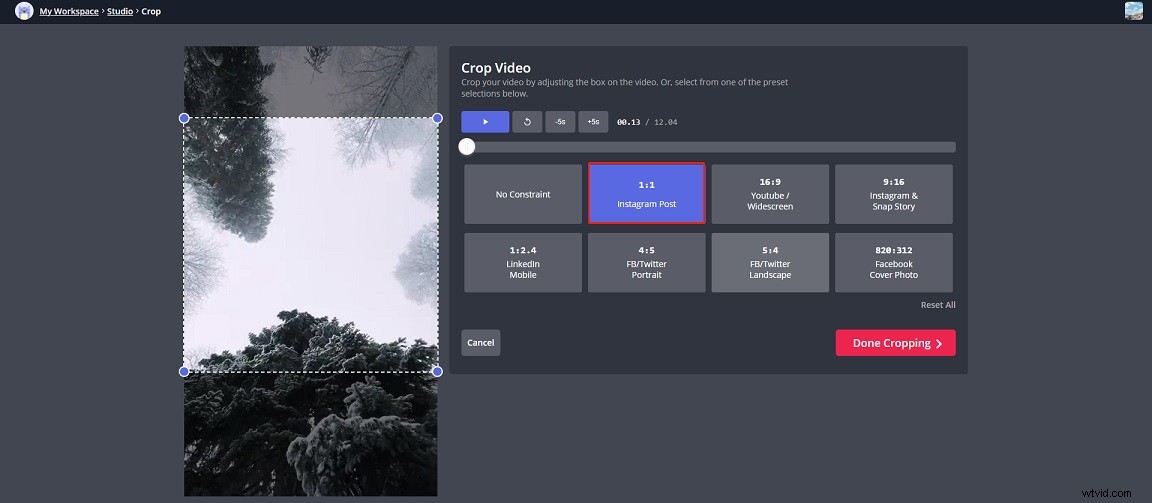
Step 5. Click Export to process the video and save it to your device.
#5. VEED.io
This Square video editor can resize videos for Instagram, YouTube, Facebook, Twitter, TikTok, Pinterest, etc. Unlike Kapwing, VEED.io makes video square by adding black bars and it will put a watermark on the output video.
Step 1. Visit the VEED.io website.
Step 2. Click Upload Your Video to upload the video from your device.
Step 3. In the Project Settings section, select Square from the drop-down list.
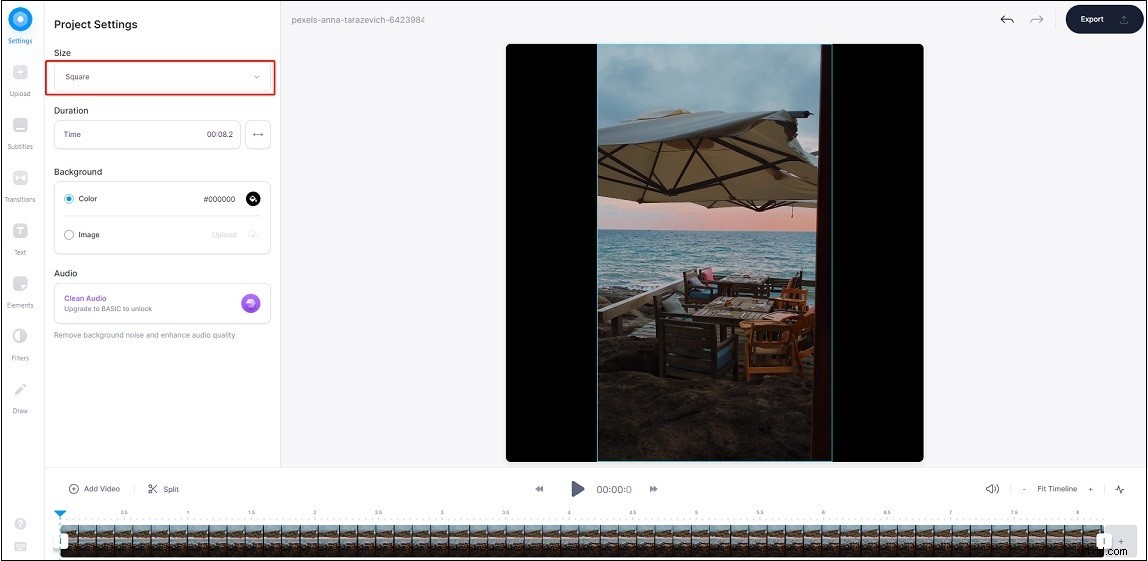
Step 4. Export the video and download it.
Conclusion
The 5 best square video editors are listed in this post. Choose a square video editor and make square sized videos!