
As you know, Facebook Stories are only available for 24 hours. Is there any way to watch expired Facebook stories? Luckily, Facebook has a Story Archive option that archives all your past stories. This post will walk you through the steps to see old stories on Facebook via Story Archive. (Try MiniTool MovieMaker to make a Facebook video!)
How to See Old Stories on Facebook
How to Turn on Facebook Story Archive
As long as your Facebook Story Archive is turned on, all your stories will be archived. Then you can view your stories even after 24 hours.
Here’s how to archive Facebook stories.
On Mobile
Step 1. Open the Facebook app.
Step 2. Click the Menu button at the bottom right corner.
Step 3 Go to Settings & Privacy > Settings.
Step 4. Choose Stories > Story archive.
Step 4. Then turn on Save to Archive.
On Desktop
Step 1. Visit the Facebook website and log in to your account.
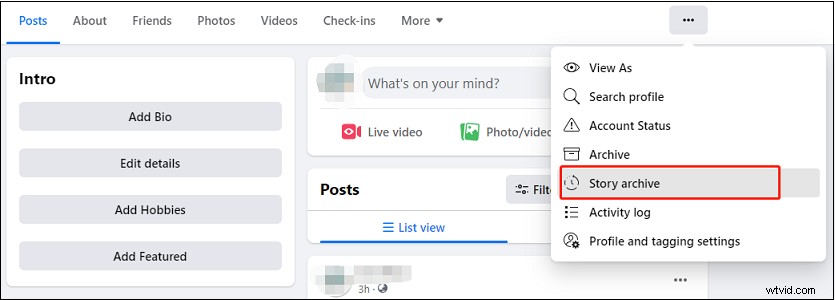
Step 2. Click on your profile and click the three dots next to More. Then choose the Story archive option.
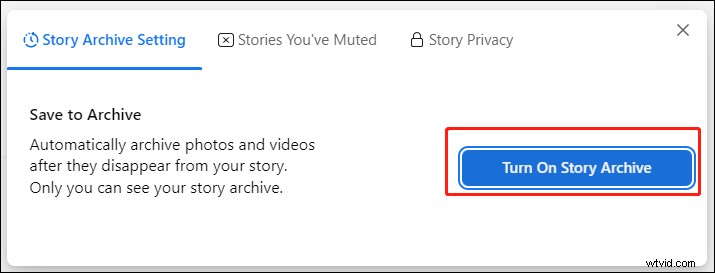
Step 3. Click on Settings and click the Turn On Story Archive button.
After turning on Story Archive, let’s see how to see archived stories on Facebook.
How to See Old Stories on Facebook on Mobile
Step 1. Launch the Facebook app.
Step 2. In the home feed, click Show All Stories.
Step 3. Tap the Archive icon in the top left corner of your screen and you will find all your archived Facebook stories.
How to See Old Stories on Facebook on Desktop
Step 1. Open the Facebook website in your web browser.
Step 2. Above What’s on your mind, you will see all the latest Facebook stories.
Step 3. Tap on Your story or See all stories (the rightwards arrow icon).
Step 4. Under Stories, click the Archive option to access the Story archive page.
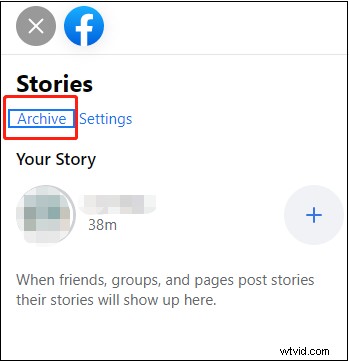
Step 5. Then you will see your old Facebook stories.
Can You See Friends’ Old Stories on Facebook?
You can’t watch your friends’ old stories on Facebook unless they add their expired stories to Story Highlights.
Here’s how to add archived stories to Story Highlights.
- Open Story Archive on the Facebook app.
- Choose the archived story you want to add to Story Highlights.
- Tap on Highlights, enter a title, and save the story highlight.
How to Download Facebook Stories
To download stories from Facebook, you can use the Chrome extension – Story Saver. It not only can download Facebook stories but also can save stories from Instagram and WhatsApp.
If you want to download all your archived Facebook stories, you should go to Settings & privacy > Settings. Next, choose Your Facebook Information and click View next to Download Your Information.
Then select All time from the Data range list and click Deselect All. Check Stories and other types of information you’d like to download.
Click the Request a download button to save your archived stories.
Conclusion
Facebook Story Archive is very useful. Turn on Story Archive and you will be able to see old stories on Facebook.