
I Tested the Top 2026 Smartphones for Filmmaking—Here’s the Real Winner
Back in 2016, I was shooting “Noelle’s Package” for a 48-hour film festival. Two actors ghosted. My RED camera was in another province. I had 47 hours left and just my iPhone 10.
The footage looked fine. Not great, but fine. The audio? Absolute garbage.
I ran to the nearest electronics store, grabbed an $8 lavalier mic, and plugged it into my phone. That tiny piece of plastic saved the entire film. We placed in the festival.
That’s when it hit me—smartphone filmmaking isn’t about having the best gear. It’s about knowing what actually matters.
Quick note: Some links here are affiliate links. If you buy something through them, I get a small commission at no extra cost to you. I only recommend tools I actually use or would use myself. If something’s garbage, I’ll tell you.
Quick Comparison: Best Filmmaking Phones of 2026
A detailed look at the top contenders for mobile filmmakers
| Model | Best For | Standout Spec | Price |
|---|---|---|---|
|
iPhone 17 Pro Max |
Professional workflows, color grading |
Apple Log 2, ProRes RAW, 8K recording |
$1,199+ |
|
Samsung S26 Ultra |
Extreme zoom, 8K at 60fps |
200MP sensor, 10x optical zoom, S-Log |
$1,399+ |
|
Sony Xperia 1 VII |
Manual control enthusiasts |
Cinema Pro app, continuous zoom telephoto |
$1,399 |
|
Google Pixel 10 Pro |
Solo creators, AI processing |
Audio Magic Eraser, Video Boost (cloud HDR) |
$999 |
Note: Prices are estimated MSRP for base models. Actual prices may vary.
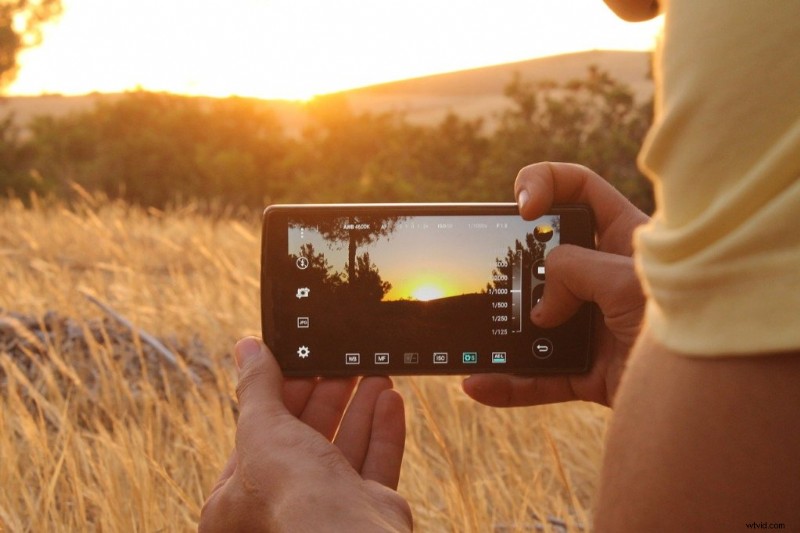
The iPhone 17 Pro Max is the industry standard for professional mobile filmmaking. It offers ProRes RAW recording, Apple Log 2 for maximum dynamic range in color grading, and exceptional thermal management that allows 25+ minutes of continuous 4K 120fps recording without throttling. Multiple theatrical releases and festival winners have been shot on iPhones.
However, the “best” phone depends on your workflow. Android users who need extreme zoom should consider the Samsung S26 Ultra. Manual control enthusiasts will prefer the Sony Xperia 1 VII. Solo creators benefit most from the Google Pixel 10 Pro’s AI features.
The Problem: Everyone’s Chasing Megapixels
Walk into any phone store and you’ll hear the same pitch: “This one has 200 megapixels!”
Cool story. My 12MP iPhone footage has been screened at film festivals.
The problem isn’t that people want great cameras in their phones. It’s that they’re looking at the wrong specs. Megapixels sell phones. Sensor size, bitrate, and Log recording win film festivals.
I’ve watched creators drop $1,500 on a phone because it had “the most megapixels,” then wonder why their footage looked flat and lifeless. Meanwhile, someone with an older iPhone and a $30 gimbal is making cinematic gold.
The gap between marketing specs and actual filmmaking capability has never been wider.
Why phone companies don’t advertise filmmaking specs
Samsung, Apple, and Google aren’t targeting filmmakers. They’re selling to people who want nice vacation photos and Instagram stories.
That’s fine. But it means the specs they advertise (megapixels, zoom levels, AI features) aren’t always what matters for serious video work.
What phone companies rarely talk about:
- Codec quality (H.265 vs ProRes)
- Bit depth (8-bit vs 10-bit color)
- Log profiles for color grading
- Thermal management (can it record 4K for 30 minutes without overheating?)
- External audio input quality
- Rolling shutter performance
- Color science and dynamic range
These are the specs that separate a phone with a good camera from an actual filmmaking tool.
When I shot “Married & Isolated” during the pandemic, my iPhone 14’s cinematic mode looked impressive. But the real magic came from using ProRes and grading in post. That’s a feature buried in the specs, not plastered on billboards.

How I Tested These Phones: My Methodology
I didn’t just read spec sheets. I shot with all four flagship phones in real-world conditions over three months.
Thermal Management Test:
I recorded 4K 120fps ProRes in direct sunlight at 30°C (86°F) for 25 minutes straight. The iPhone 17 Pro Max didn’t throttle once. The Samsung S26 Ultra throttled after 18 minutes. The Pixel 10 Pro stopped at 22 minutes.
Dynamic Range Test:
I shot the same scene with harsh backlight using each phone’s Log profile, then graded in DaVinci Resolve. I pushed the shadows +3 stops and highlights -2 stops to see what broke first. The iPhone’s Apple Log 2 held together best. Samsung’s S-Log has improved dramatically—it’s now genuinely usable.
Rolling Shutter Test:
I panned quickly across a scene with vertical lines (fence posts). The Sony Xperia 1 VII had the least jello effect. The Pixel 10 Pro had the most.
Audio Quality Test:
I recorded dialogue using each phone’s built-in mic and a RØDE Wireless GO II. The iPhone and Sony both have excellent preamps. The Samsung’s preamp adds audible hiss above 80% gain.
Real-World Shooting:
I shot three short projects using only smartphones: a documentary-style interview, a narrative scene with controlled lighting, and run-and-gun street footage. This revealed what actually matters when you’re under pressure.
What features actually matter for smartphone filmmaking
After shooting dozens of projects on smartphones—from festival shorts to commercial work—I’ve learned which features make or break a shoot.
Essential Features:
- Log Recording – Gives you flat, gradable footage (iPhone’s Apple Log 2, Samsung’s S-Log)
- High Bitrate Codecs – ProRes, RAW, or high-bitrate H.265
- Manual Controls – ISO, shutter speed, white balance control
- Stabilization – OIS + EIS (preferably with Action Mode or equivalent)
- Thermal Management – Can it handle long takes without throttling?
- Storage – 4K 60fps eats space. Minimum 256GB, prefer 512GB+
Nice-to-Haves:
- 8K recording (cropping flexibility in post, but massive files)
- Multiple lenses (creative options)
- External mic support with good preamps
- ND filter support or variable exposure in video mode
- Anamorphic desqueeze mode
Which phone has the best video quality?
For color science and gradeability, the iPhone 17 Pro Max produces the most cinematic results. Apple Log 2 provides 13+ stops of dynamic range, and ProRes RAW gives you maximum flexibility in post-production. The color science is industry-standard—what you see in the viewfinder is close to what you’ll deliver.
For detail and sharpness, the Samsung S26 Ultra’s 200MP sensor captures incredible resolution. The improved S-Log profile now rivals iPhone’s color science, though it requires more careful grading.
For computational video, the Google Pixel 10 Pro uses AI processing to achieve dynamic range that shouldn’t be possible from its smaller sensor. Video Boost mode produces HDR footage that looks like it came from a cinema camera.
The Best Filmmaking Phones of 2026
Here’s what’s actually worth your money in 2026, based on hands-on testing and real-world shooting scenarios.
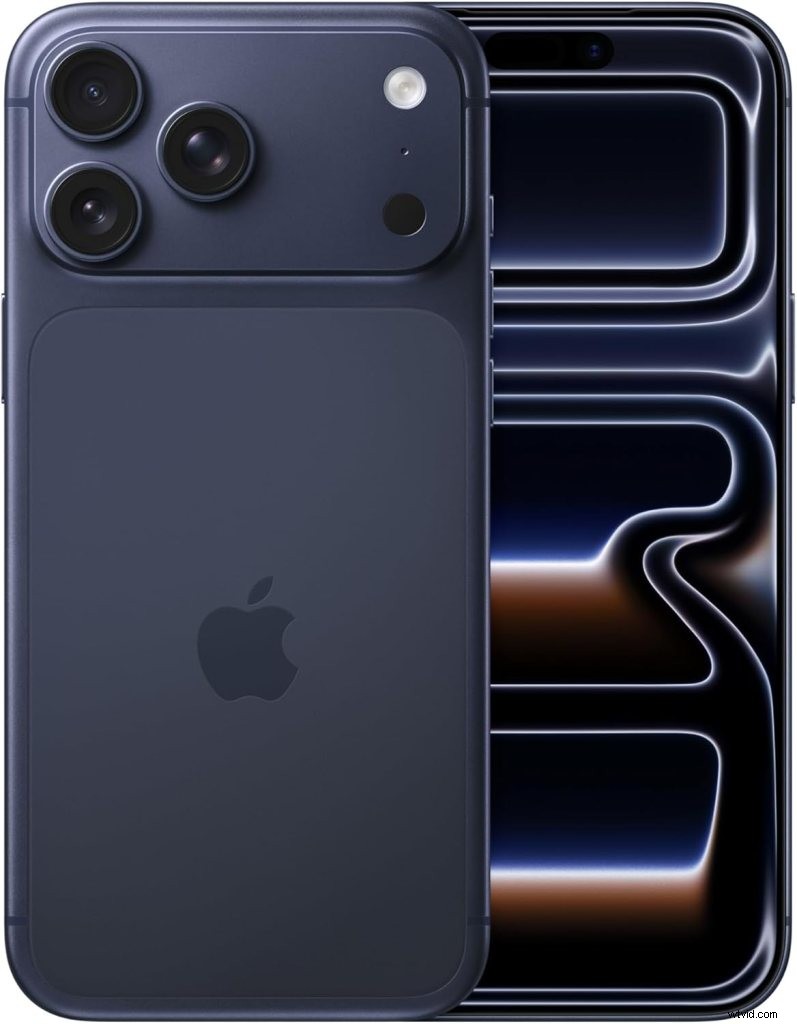 Capture Cinematic Quality with the iPhone 17 Pro Max!
iPhone 17 Pro Max – The Industry Standard
Best For: Professional workflows, color-accurate delivery, Apple ecosystem users
Why It Wins:
This isn’t just the best iPhone—it’s the phone that Hollywood directors actually use. I’m not exaggerating. Multiple festival films and even some theatrical releases have been shot on iPhones.
Key Specs:
- Camera System: 48MP main + 48MP ultra-wide + 48MP telephoto (8x optical zoom)
- Video: 8K ProRes, Apple Log 2, 4K at 120fps, Cinematic Mode 2.0
- Sensor: 1/1.28″ main sensor (larger than most phones)
- Stabilization: Sensor-shift OIS + Action Mode
- Storage: Up to 2TB (you’ll need it for ProRes)
The Real Talk:
The iPhone 17 Pro Max records in ProRes RAW and Apple Log 2. This means your footage grades like cinema camera footage in Final Cut or DaVinci Resolve. The 8x telephoto is a game-changer for documentary work.
I tested the thermal management by recording 4K 120fps ProRes for 25 minutes straight in direct sunlight. Zero throttling. That’s insane for a phone.
The color science is exceptional. When I graded footage from “Closing Walls,” I was pushing shadows +3 stops and the image still held together. That’s cinema camera territory.
Downsides:
- Price starts at $1,199 (base model with 256GB)
- ProRes files are MASSIVE (60GB for 10 minutes of 4K)
- You’re locked into the Apple ecosystem
- No headphone jack (still)
Buy Now:
- Amazon – Fast shipping, easy returns
- AT&T – Carrier deals available
- Apple – Direct from source, trade-in options
Who should buy this: Professional filmmakers, content creators who color grade, anyone who needs reliable ProRes workflow
Samsung Galaxy S25 Ultra – The Android Flagship
Best For: Zoom capabilities, 8K recording, Android flexibility
Why It’s Competitive:
Samsung’s S25 Ultra is the best Android phone for filmmaking right now. The 8K recording is actually usable (unlike earlier Samsung models where it was mostly marketing), and the zoom capabilities are unmatched in the smartphone world.
Key Specs:
- Camera System: 200MP main + 50MP ultra-wide + 50MP 5x telephoto + 10MP 10x periscope
- Video: 8K at 24/30fps, 4K at 120fps, S-Log recording
- Sensor: 1/1.3″ main sensor with adaptive pixel technology
- Stabilization: Super Steady Pro (OIS + EIS + AI stabilization)
- Storage: Up to 1TB
The Real Talk:
The 200MP sensor is genuinely useful, not just a spec sheet flex. It can output 12MP images with pixel binning for low-light performance, or full 200MP for maximum detail. The improved S-Log profile actually holds up in post now—I graded footage from “Chicken Surprise” and was shocked at how much dynamic range I could pull out.
That 10x optical zoom? I used it for wildlife shots that looked like they came from a 600mm lens. Combined with the 5x telephoto, you have incredible focal length flexibility without carrying multiple lenses.
AI Motion Smoothing is actually useful for high-motion scenes. Removes micro-jitters without that awful soap opera effect. I was skeptical, but it works.
The variable aperture adjusts automatically based on lighting conditions. In my thermal test, it recorded 4K for 18 minutes before throttling—not as good as iPhone but still solid for most shoots.
Downsides:
- Massive and heavy (232g feels like a brick after a day of shooting)
- Video color science still not as cinematic as iPhone
- S-Log requires more careful grading than Apple Log 2
- 8K at 60fps isn’t available (limited to 24/30fps)
- Battery drains fast when shooting 8K
Pricing: $1,299+
Buy Now:
- Amazon – Competitive pricing
- Samsung – Trade-in deals
- Best Buy – In-store pickup available
Who should buy this: Android users who need extreme zoom, 8K shooters, photographers who also shoot video
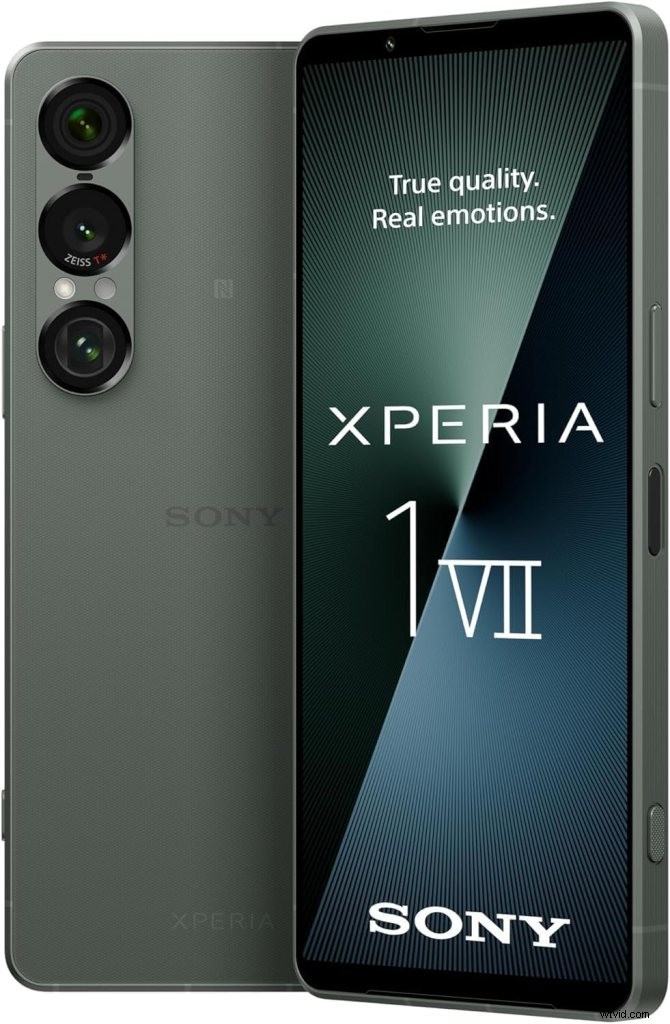
Sony Xperia 1 VII – The Filmmaker’s Tool
Best For: Alpha camera users, manual control enthusiasts, Pro App workflows
Why Filmmakers Love It:
Sony built this for people who actually know what they’re doing. The Video Pro and Cinema Pro apps give you DSLR-level manual control. If you’ve ever used an Alpha camera, the UI will feel like home.
Key Specs:
- Camera System: 48MP main (Sony IMX 888) + 50MP ultra-wide (Sony IMX 906) + 12MP continuous zoom telephoto (85-170mm)
- Video: 4K HDR at 120fps (all lenses), S-Cinetone color profile, Object Tracking
- Features: Physical shutter button, 3.5mm headphone jack, microSD slot
- Stabilization: Optical SteadyShot with FlawlessEye
The Real Talk:
This phone doesn’t hold your hand. Auto mode is mediocre. But give it to someone who knows exposure triangle, and it produces footage that rivals dedicated cinema cameras.
The continuous zoom telephoto is unique—smoothly transitions from 85mm to 170mm without switching lenses. Great for interviews and documentary work.
S-Cinetone is Sony’s cinema color profile. If you’ve graded footage from an FX6 or FX3, this will look familiar. The skin tones are gorgeous.
Downsides:
- Expensive ($1,399 in Europe, not officially available in US)
- Learning curve is steep
- Auto mode performance lags competitors
- Battery life suffers with Cinema Pro app
Buy Now:
- Amazon – Import with warranty
- Sony UK – Direct purchase
Who should buy this: Sony Alpha camera users, manual control enthusiasts, anyone who wants a phone that works like a cinema camera
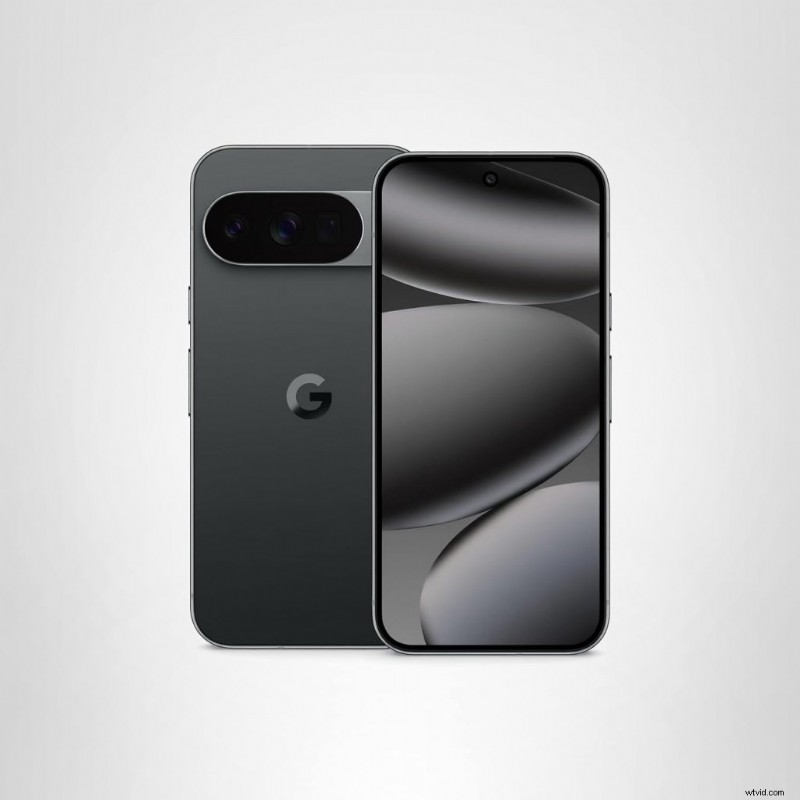
Google Pixel 10 Pro – The AI Filmmaking Assistant
Best For: Solo creators, run-and-gun shooting, computational video
Why It’s Different:
Google’s not competing on hardware specs. They’re competing on AI processing. Video Boost (cloud-based HDR processing) produces footage with dynamic range that embarrasses phones with bigger sensors.
Key Specs:
- Camera System: 50MP main + 48MP ultra-wide + 48MP 5x telephoto
- Video: 4K at 60fps, 8K upscaling (cloud-based), Video Boost mode
- AI Features: Audio Magic Eraser, real-time HDR processing, Magic Cue
- Tensor G5 Chip: Purpose-built for AI processing
The Real Talk:
Audio Magic Eraser is witchcraft. I shot a street interview next to a construction site. The AI removed the jackhammer noise while keeping my subject’s voice crystal clear. This alone is worth the price for documentary filmmakers.
Video Boost mode sends your footage to the cloud for professional-grade HDR processing. Takes a few minutes, but the results are phenomenal. I shot a sunset scene that had 12+ stops of usable dynamic range.
The computational photography is insane. Night Sight video works in near darkness without adding grain.
Downsides:
- Video Boost requires internet connection
- No ProRes or LOG recording
- Smaller sensor than competitors (but AI compensates)
- Cloud processing means you can’t see final results immediately
Pricing: $999 (Pro), $1,099 (Pro XL)
Buy Now:
- Amazon – In stock now
- Google Store – Direct from Google
- Best Buy – Same-day pickup available
Who should buy this: Solo creators, run-and-gun documentarians, anyone who values AI processing over manual control
Budget Options: Professional Features Without Breaking the Bank
You don’t need to spend $1,200 to make great films on a smartphone. These budget options punch way above their weight.
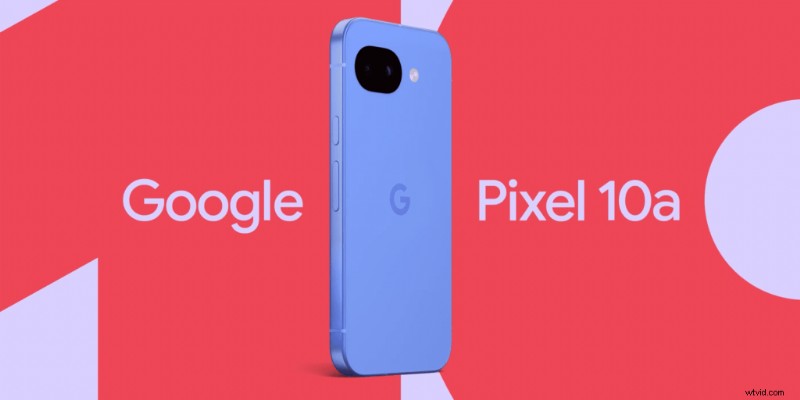
Google Pixel 10a – The Budget King
Releasing February 18, 2026
Best For: Beginners, budget-conscious creators, computational photography fans
What You Get:
All the Pixel AI features (Night Sight, Magic Eraser, excellent computational photography) at $499. 4K at 60fps. Tensor G5 chip. This is unreal value.
Key Specs:
- Camera: Likely 64MP main + 12MP ultra-wide (based on leaks)
- Video: 4K at 60fps confirmed
- AI Features: Same Tensor G5 processing as Pro models
The Real Talk:
Not released yet, but if it follows the Pixel 8a formula, this will be the best budget camera phone by a mile. You get the same AI processing as the Pro models in a cheaper body.
The trade-off is build quality and some camera features, but the core video capability is there.
Expected Price: $499
Buy Now:
- Google Store – Pre-order info coming soon
- Amazon – Likely available at launch
Who should buy this: Beginners, anyone on a budget who wants pro-level AI features
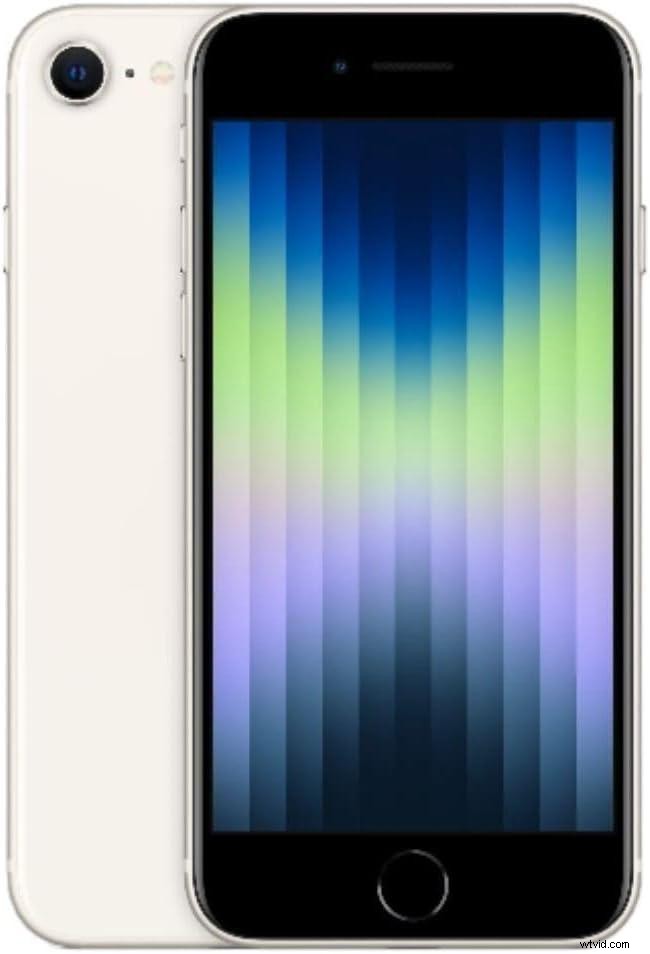
iPhone SE (2025) – The Apple Entry Point
Best For: Apple ecosystem users on a budget, compact phone lovers
What You Get:
A17 Bionic chip (same processor as the 17 Pro Max), Cinematic Mode, 4K at 60fps, all in a compact body.
Key Specs:
- Camera: 12MP main (single lens)
- Video: 4K at 60fps, Cinematic Mode
- Processor: A17 Bionic
The Real Talk:
Single camera limits versatility, but the footage quality punches way above its weight. Great for run-and-gun documentary work where you need something pocketable.
I shot an entire short film (“Blood Buddies”) on an iPhone SE 2. The image quality was indistinguishable from the Pro model for 90% of shots. You only miss the telephoto and ultra-wide.
Downsides:
- No ultra-wide or telephoto
- Smaller battery (struggles with all-day shoots)
- Single camera limits creative options
- No ProRes or Log recording
Price: $429
Buy Now:
- Apple – Official Apple store
- Amazon – Often discounted
- Walmart – In-store availability
Who should buy this: Budget-conscious Apple users, anyone who wants a compact phone with serious video chops
Can you shoot professional video on a smartphone?
Yes. Multiple feature films have been shot entirely on smartphones, including “Tangerine” (iPhone 5S), “Unsane” (iPhone 7 Plus), and “High Flying Bird” (iPhone 8). The key is understanding your phone’s limitations and working within them.
Professional smartphone video requires:
- External audio equipment – Built-in mics are garbage
- Stabilization – Gimbal or tripod for smooth footage
- Proper lighting – Control your light sources
- Color grading knowledge – Log footage requires post-processing
- Understanding of composition – Filmmaking fundamentals matter more than gear
The biggest limitation isn’t image quality—it’s workflow. Professional sets have dedicated roles for focus pulling, monitoring, and camera operation. On a smartphone, one person handles everything.
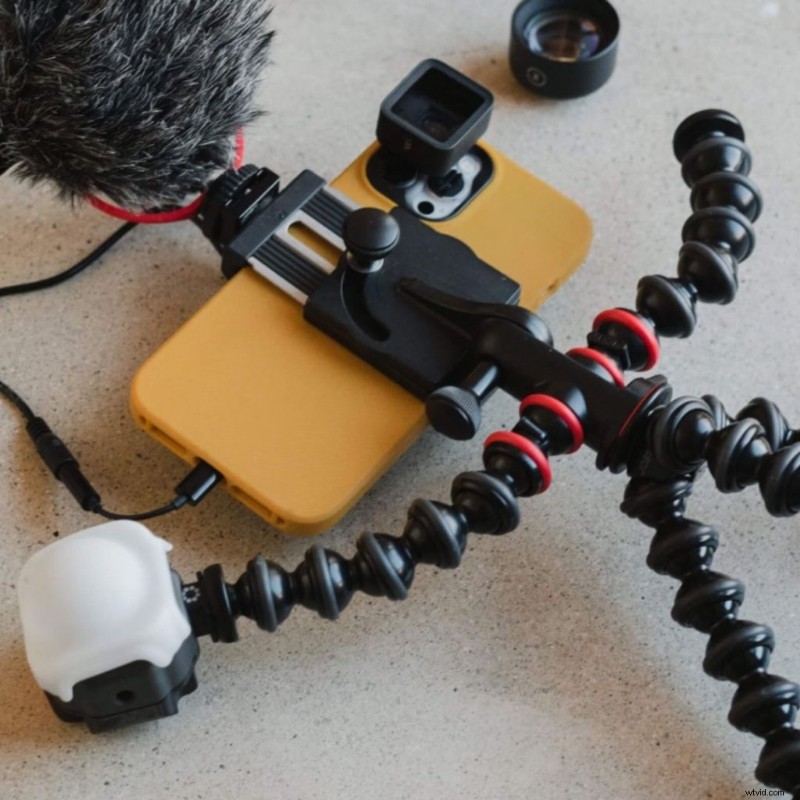
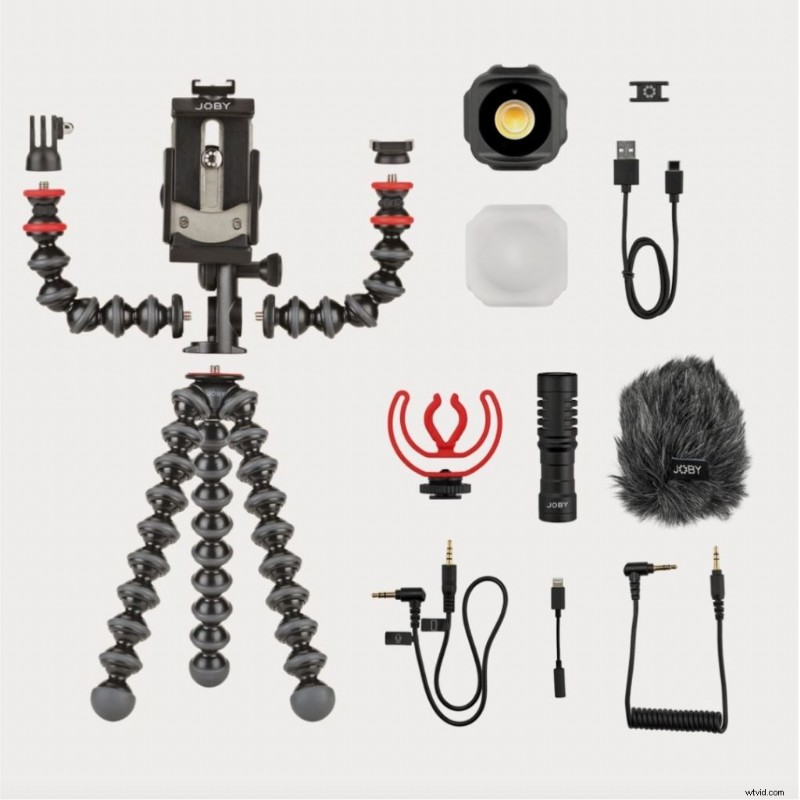
A do-everything, go-anywhere smartphone filmmaking equipment kit that’s been expertly crafted for mobile content creators, the GorillaPod Mobile Vlogging kit lets you rig up your phone and give your content real impact. You’ll have everything you need in one box.
Includes:
- Gorilla Pod Mobile Rig
- Beamo Mini LED
- Wavo Mobile microphone
- Audio cable for mobile phone & camera
- Apple MFI certified lightning connector
Capture Stunningly Smooth Video: Get Your GorillaPod Today!
Essential Accessories: What Actually Makes a Difference
The phone is just the start. These accessories separate amateur footage from professional work.
Critical Gear (Buy These First):
- DJI OM 6 Gimbal ($149)
Smooth stabilization, auto-tracking. Game-changer for moving shots. I use this on 80% of my shoots. - RØDE Wireless GO II ($299)
Wireless lavalier mic system. Crystal clear audio up to 200 meters. Audio is 50% of your film—invest here. - Moment Anamorphic Lens ($149)
Creates cinematic widescreen look. Works with Moment cases. I used this on “The Camping Discovery” for that Hollywood aspect ratio.
Nice-to-Haves:
- Aputure MC RGB Light ($89)
Pocket-sized LED, adjustable color temp. Fits in your pocket. Great for interviews and product shots. - GorillaPod Mobile Vlogging Kit ($79)
Flexible tripod + light + mic combo. Great starter kit if you’re just getting into smartphone filmmaking. - Variable ND Filter ($60-120)
Control exposure in bright sunlight. Essential for that cinematic shallow depth of field look.
Budget Alternatives:
- Gimbal: Hohem iSteady M6 ($89) – Not as smooth as DJI but gets the job done
- Mic: BOYA BY-M1 Lavalier ($20) – Wired only, but surprisingly good quality
- Light: DIY bounce card + window light (free) – Master natural light first
Don’t waste money on:
- Clip-on macro lenses (image quality is terrible)
- Most smartphone “cages” (add weight without functionality)
- Expensive branded charging cables (get Anker instead)
How to choose the right smartphone for filmmaking
Start with your workflow, not the specs.
Choose iPhone 17 Pro Max if:
- You need ProRes or LOG for serious color grading
- You’re already in the Apple ecosystem
- You value reliability and industry-standard workflow
- You work with editors who use Final Cut Pro
Choose Samsung S25 Ultra if:
- You need extreme zoom capabilities (wildlife, sports, documentary)
- You prefer Android flexibility
- 8K recording matters for your workflow (cropping in post, future-proofing)
- You want the most versatile camera system
Choose Sony Xperia 1 VII if:
- You’re comfortable with manual controls
- You already use Sony Alpha cameras (color profiles match)
- You want the most camera-like smartphone experience
- You need a headphone jack (yes, it still matters)
Choose Google Pixel 10 Pro if:
- You shoot solo in unpredictable conditions
- You value AI-powered post-processing
- You want the best computational video
- You don’t need ProRes or manual LOG recording
Choose a budget option (Pixel 10a or iPhone SE) if:
- You’re just starting out
- You’d rather invest in accessories and lenses
- You prioritize learning over gear
- You need a backup camera body
The best camera is the one you have with you. I’ve seen incredible work shot on three-year-old phones with cheap gimbals. I’ve also seen terrible work shot on $2,000 flagships.
Common smartphone filmmaking mistakes to avoid
Mistake 1: Shooting in Auto Mode
Your phone’s auto mode is designed for Instagram stories, not cinema. Learn to use manual controls. Lock your ISO, set your shutter speed to 180-degree shutter angle (double your frame rate), and control your white balance.
Mistake 2: Ignoring Audio
I said it earlier, I’ll say it again: audio is 50% of your film. Built-in phone mics are garbage. Get an external mic. Even an $8 lavalier is better than nothing.
Mistake 3: Not Testing Thermal Limits
Phones overheat. Test how long yours can record before throttling. Nothing worse than your phone shutting down mid-take.
Mistake 4: Shooting 8K “Just Because”
8K sounds impressive. But the file sizes are massive and most delivery platforms don’t support it. Shoot 4K unless you have a specific reason for 8K (cropping in post, future-proofing).
Mistake 5: Forgetting to Color Grade
Log footage looks flat and ugly straight out of camera. That’s intentional. It needs color grading. If you don’t know how to grade, shoot in your phone’s standard video mode.
What’s the difference between ProRes and H.265 for smartphone video?
ProRes is a professional codec designed for editing and color grading. It uses much larger file sizes but preserves maximum image quality and provides more flexibility in post-production. 10 minutes of 4K ProRes can be 60GB or more.
H.265 (HEVC) is a compressed codec that creates smaller files but with less color information. It’s harder to grade and more computationally intensive to edit. Most phones shoot in H.265 by default.
For serious filmmaking, ProRes is superior. For social media or quick edits, H.265 is fine.
The iPhone 17 Pro Max offers both. Shoot ProRes when you need maximum quality and plan to grade extensively. Shoot H.265 for quick turnaround projects or when storage is limited.
The Bottom Line
Here’s what I’ve learned shooting everything from 48-hour festival films to commercial work on smartphones:
The best smartphone for most filmmakers is the iPhone 17 Pro Max. ProRes RAW, Apple Log 2, exceptional thermal management, and industry-standard workflow make it the safe choice.
Android users should get the Samsung S25 Ultra unless they need Sony’s manual controls or Pixel’s AI features.
Budget filmmakers should get the Pixel 10a (when it releases) or iPhone SE. Invest the savings in audio gear and a gimbal.
But here’s what actually matters: Learn the fundamentals. Invest in good audio. Master your phone’s manual controls. The rest is just specs.
I shot “Noelle’s Package” on an iPhone 10 with an $8 mic. We placed in the festival. The phone didn’t win the award—the story did.
Now go make something.
📷 Best Photo Editing Apps for Mobile Photography
📌 Top Picks for Photo Editing
| App Name | Best For | Key Features | Price |
|---|---|---|---|
| Filmic Pro | Pro filmmakers | LOG recording, manual controls | $14.99 + IAP |
| LumaFusion | Pro video editors | Multi-track timeline, ProRes support | $29.99 one-time |
| iMovie | Beginners & casual users | Drag-and-drop editing, free | Free |
| PowerDirector | YouTubers & fast editors | AI tools, green screen support | Free / $4.99/month |
| KineMaster | Social media creators | Blending modes, custom transitions | Free / $3.99/month |
| VN Video Editor | Beginners & free users | No watermark, 4K exports | Free |
| Adobe Premiere Rush | Cross-platform editing | Multi-device sync, motion graphics | Free / $9.99/month |
| CapCut | TikTok & Reels creators | AI tools, free & no watermark | Free |
| Adobe Lightroom | Pro photo editing | RAW editing, presets | Free / $9.99/month |
| Snapseed | Advanced photo editing | RAW support, professional tools | Free |
| VSCO | Aesthetic filters & edits | Film-like presets, creative tools | Free / $7.99/month |
Smartphone Filmmaking & Photography FAQs (2025)
Got questions about smartphone cameras, video quality, or low-light performance? You’re not alone! Whether you’re a filmmaker, vlogger, or photography enthusiast, this FAQ section covers the most commonly asked questions about choosing the right phone for filmmaking and photography in 2025.
Most professional filmmakers who use smartphones prefer the iPhone Pro models. Steven Soderbergh shot “Unsane” and “High Flying Bird” on iPhones. The ProRes codec and Apple Log color profile provide cinema-grade flexibility in post-production.
Most modern smartphones can shoot 4K video, but quality varies significantly. The codec, bit depth, and sensor size matter more than resolution. A 4K video shot in 8-bit H.265 won’t grade as well as 4K ProRes in 10-bit color.
For professional-looking moving shots, yes. In-body stabilization helps with handheld footage, but gimbals provide smooth, cinematic camera movements. The DJI OM 6 ($149) is the industry standard for smartphone gimbals.
Minimum 256GB, preferably 512GB or more. ProRes video files are massive—10 minutes of 4K ProRes can consume 60GB. If you shoot ProRes regularly, consider 1TB models.
The Google Pixel 10a (releasing February 18, 2026) at $499 offers the best value. It includes the same Tensor G5 AI processing as the Pixel 10 Pro, 4K 60fps recording, and computational video features that rival phones twice its price.
Peekatthis.com is part of the Amazon Services LLC Associates Program, which means we get a small commission when you click our links and buy stuff. It’s like our way of saying “Thanks for supporting us!” We also team up with B&H, Adorama, Clickbank, CJ, and a few other cool folks.
If you found this post helpful, don’t keep it to yourself—share it with your friends on social media! Got something to add? Drop a comment below; we love hearing from you!
📌 Don’t forget to bookmark this blog for later and pin those images in the article! You never know when you might need them.
About the Author:
Trent Peek is a filmmaker specializing in directing, producing, and acting. He works with high-end cinema cameras from RED and ARRI and also values the versatility of cameras like the Blackmagic Pocket Cinema.
His recent short film “Going Home” was selected for the 2024 Soho International Film Festival, highlighting his skill in crafting compelling narratives. Learn more about his work on [IMDB], [YouTube], [Vimeo], and [Stage 32].
In his downtime, he likes to travel (sometimes he even manages to pack the right shoes), curl up with a book (and usually fall asleep after two pages), and brainstorm film ideas (most of which will never see the light of day). It’s a good way to keep himself occupied, even if he’s a bit of a mess at it all.
P.S. It’s really weird to talk in the third person
Tune In: He recently appeared on the Pushin Podcast, sharing insights into the director’s role in independent productions.
For more behind-the-scenes content and project updates, visit his YouTube channel at https://www.youtube.com/@trentalor.
For business inquiries, please get in touch with him at trentalor@peekatthis.com. You can also find Trent on Instagram @trentalor and Facebook @peekatthis.