
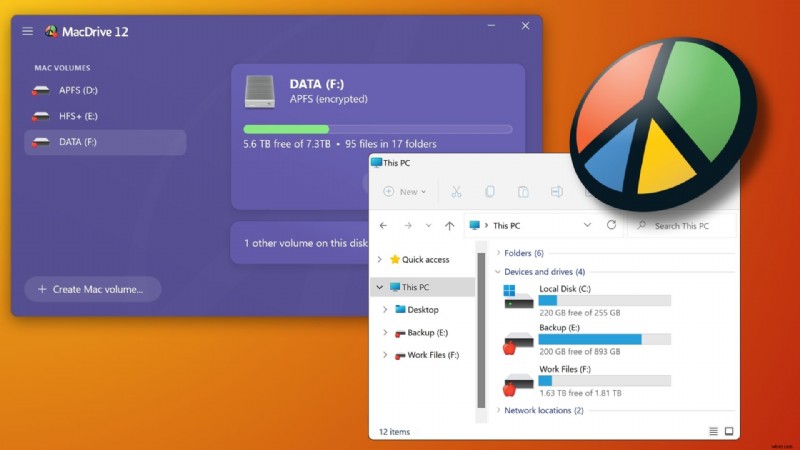
Moving data between macOS and Windows has long been a headache because each platform prefers its own native file system. While exFAT can be read on both sides, it sacrifices the performance, security, and reliability that professionals demand.
For over two decades, OWC has been developing MacDrive to bridge that gap. The software allows a Windows PC to read and write Mac‑formatted drives as if they were native Windows drives, eliminating the need for cumbersome workarounds.
A Quick Refresher on the Problem MacDrive Solves
External drives are optimised for the operating system that owns them: APFS for macOS and NTFS for Windows. When a workflow requires moving a disk between the two, the default solutions—exFAT, cloud transfers, or partial third‑party tools—often fall short. They either strip essential protections or expose sensitive data during decryption.
MacDrive was built to address these shortcomings. Version 12 closes the last remaining gaps, providing a comprehensive solution for creative teams that depend on cross‑platform data exchange.
What’s New in MacDrive 12
MacDrive 12 is the only Windows solution that delivers full native access to every Mac format—HFS+, APFS, and, critically, encrypted APFS volumes—directly within Windows Explorer.
Enabling read/write on encrypted APFS eliminates the legacy requirement to decrypt files first, preserving end‑to‑end data security. This is a game‑changer for teams that handle confidential footage or high‑value archives.
Key features of MacDrive 12 include:
- Complete Format Support: Read/write for HFS+, APFS, and encrypted APFS without exceptions.
- Disk Management Tools: Create, partition, format, and repair Mac drives entirely from Windows.
- Native Windows Integration: Mac drives appear in Explorer as regular drives—drag, drop, and work without seeing the underlying file system.
- RAID Array Support: Full compatibility with SoftRAID and Apple RAID configurations, preserving redundancy and performance.
- Advanced APFS Crash Protection: The only Windows solution that guarantees APFS‑level protection against power loss or system crashes—writes are either fully committed or safely discarded.
- Professional Performance: Engineered to handle 8K footage, large photo libraries, and direct‑edit workflows without latency.
Who Should Be Using MacDrive 12
Anyone who routinely moves drives between macOS and Windows will benefit from MacDrive 12. Specific groups that gain the most include:
- Video Editors & Photographers: Access Mac‑formatted SSDs directly on Windows editing stations—no transcoding or format delays.
- Production Companies: Offload footage from macOS to Windows post‑production pipelines without breaking the workflow.
- IT Administrators: Troubleshoot, recover, and transfer files on Mac volumes from a single Windows workstation.
- Data Recovery Specialists: Access encrypted APFS volumes without compromising encryption.
- Remote & Distributed Teams: Share drives between Mac and Windows users without format friction or corruption risk.
MacDrive 12 Launches at NAB 2026
OWC will demonstrate MacDrive 12 live for the first time this week at NAB 2026, Booth N2373 in the North Hall. If you’re attending, visit us to see the software in action.
Availability & Pricing
MacDrive 12 releases on April 28, 2026 for $59.99. Existing MacDrive users can upgrade for just $29.99.
Learn more and purchase here.

Tech lover, multimedia creator, and marketing manager for OWC's Rocket Yard and Mission Control blogs.