
This post will tell you how to add a countdown timer to a video in two different methods. Check the information below. Customize a countdown timer and add it to your video.
The countdown timer is widely used for videos, such as fitness videos, tutorial videos, e-commerce videos, etc. It can create a sense of urgency to remind people to finish a particular task or project. If you intend to add a timer to your video, but have no idea of how to do it. No worries! We provide you with two ways below, which enable you to create a video with a countdown timer in minutes.
Also Read:How to Make Your Own Countdown Timer Video
Two Ways of Adding a Countdown Timer to Videos
Countdown Video Intro Templates
Method 1: How to Add a Countdown Timer to a Video with FlexClip
As an all-in-one online video maker, FlexClip can assist you in inserting a countdown timer quickly, even if you are not adept at video making. There are additional features, including picture-in-picture, voice-over, etc. Additionally, it is very convenient that no installation is required. Click the Create a Video button and follow us to get started.
Step 1
Upload your local video clips and add them to the storyboard by simple drag and drop.
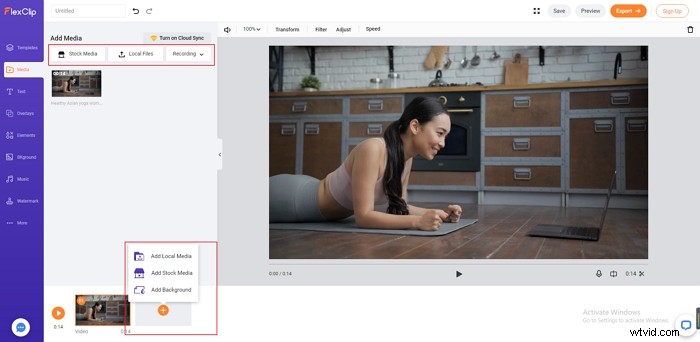
Add a Countdown Timer to Videos - Step 1
Step 2
Click the "Elements" button. Search for “countdown timer” to find out what you need instantly.
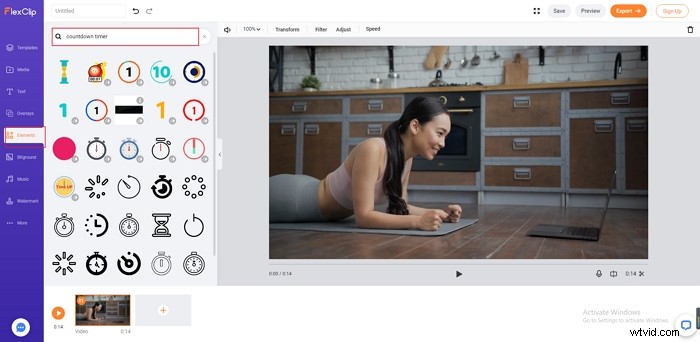
Add a Countdown Timer to Videos - Step 2
Step 3
Edit the countdown timer by altering the size, color, opacity, and duration.
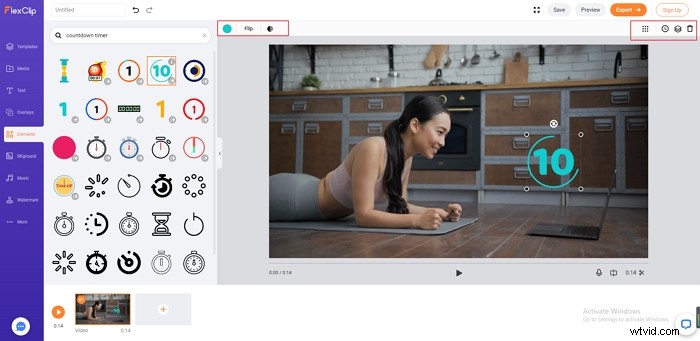
Add a Countdown Timer to Videos - Step 3
Step 4
Level the video up with a tailored text, filter, sticker etc.
Step 5
Press the "Export" button to download your video or share it on your social media.
Before creating a video, please sign up and log in your account to make sure your project is saved in real-time for further editing.
Method 2: How to add a countdown timer on a video in Premiere Pro
Premiere Pro, a timeline-based video editor, can help you add countdown to video as well, but it is more suitable for experts instead of beginners as pre-made countdown elements are not available here. That is to say, you need to create the countdown entirely on your own. The guidance is listed below:
Step 1
Create a transparent video and add it to the timeline.
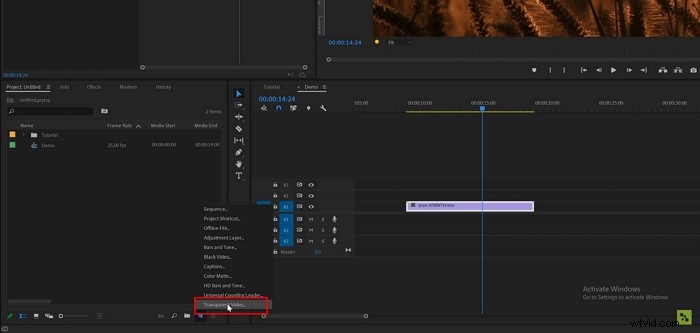
Add a Countdown Timer to Videos - Step 1
Step 2
Go to the "Effects." Search for the "Time Code" effects and then drag it over the timeline.
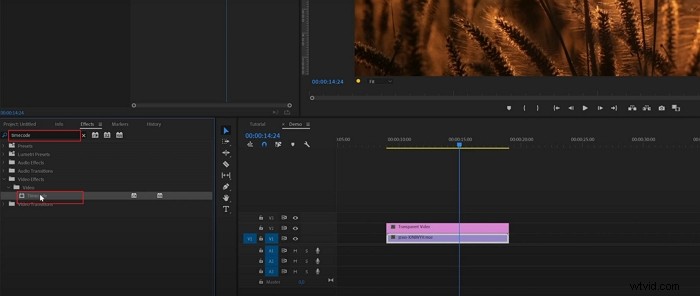
Add a Countdown Timer to Videos - Step 2
Step 3
Crop the countdown timer. If you want to hide some parts of the countdown timer, search for the "Crop" effects to modify it as you wish.
Step 4
Reverse the clip to make the timer count down. Right click on the transparent video and choose the "nest." Then, right click again and go to the "Speed/Duration," select "Reverse Speed."
The Bottom Line
This article shows you two ways to insert a countdown timer to videos, including FlexClip and Premiere Pro. Hopefully, it can serve as a reference for you in this regard. If you have any questions, don't hesitate to contact us via social media or live chat. We devote ourselves to help you settle any problems in video making. Let’s add a countdown timer to video for free now!

FlexClip Editor
/

Professional in video editing and video marketing, we’d love to give some constructive tips and tricks to help our users make fantastic videos.