In this article, we take a look at what you need to know about Canon’s auto-focus (Servo AF) before shooting video for your next project.
All images via Canon.
As a video offering, the Canon 5D is one of the best available options for prosumers and professional videographers alike. Along with its top-tier DSLR and mirrorless options — like the Panasonic GH5 and the Sony a7S — the Canon 5D has all the bells and whistles to help digital filmmakers do their jobs.
One intriguing feature of Canon’s 5D mark IV that is unique to the offering is Canon’s auto-focus technology. This “Movie Servo AF” — which is based off the same photography AF technology — gives video professionals the power to let their camera focus for them. Let’s look at how it works — and some tips for using Canon’s AF.
Turning on Movie Servo AF
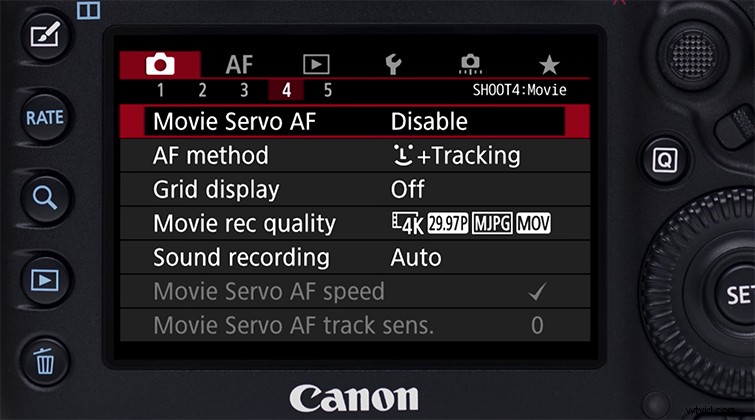
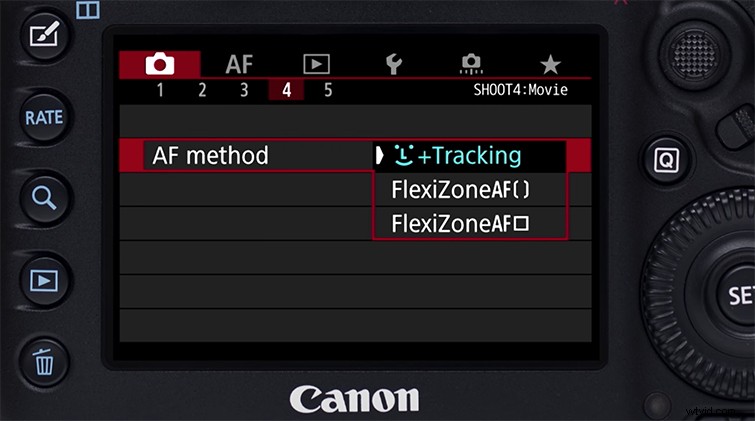
To begin, you’ll need to know where to turn your Movie Servo AF on and off. You can find the option in the menu (button on the top left of your camera). As the Canon 5D has advanced, so have its menu options, which can now take quite a bit of scrolling to get through. Scroll through to the fourth page of the camera options (the red section), which you can see above, to toggle between enabled and disabled.
Note: for all normal shooting functionality with the Canon 5D mark IV, make sure the Servo AF is disabled, or you may get some unwanted focusing in your shots.
Pausing/Locking
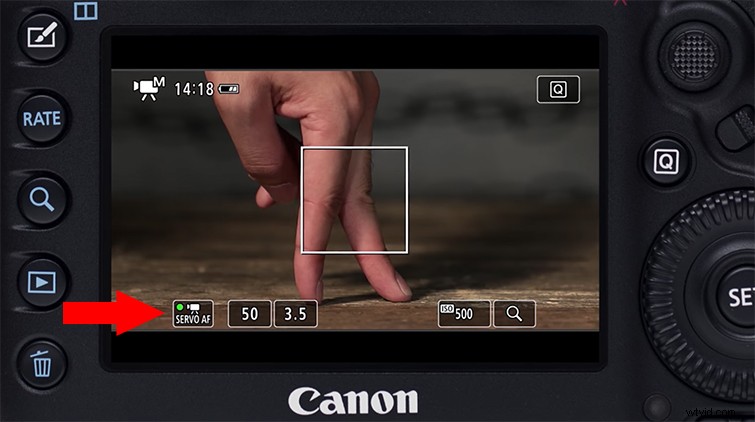
Once your Movie Servo AF is enabled, you will see it show up on your viewfinder screen in the bottom left corner (pictured above). You can then use the touch screen to pause or un-pause the technology by simply pressing it. When it’s on (as pictured above), the SERVO AF icon will be green. When it’s off, the icon will turn dark grey. You can also set and customize manual buttons for pausing and locking — like the “SET” button in the middle of the dial on the right, or the Depth of Field Preview button on the front of your camera to the left of the lens.
Auto Focus Methods