
Ditch your DSLR and start shooting smooth, cinematic videos on your phone with this list of must-have video production gear.
Cover image via Shutterstock.
Even if you don’t have access to a DSLR or cinema camera, you shouldn’t give up your dream of becoming a video professional. Clients and corporations are still demanding high-definition, professional quality video from videographers like yourself — every day. One of the advantages of this career today is the versatility that comes with capturing images. The good news for us is how easy it is rent cheap, practical, quality gear — or to take advantage of affordable options like phone video. Perhaps the most practical camera you’ll find is the one in your pocket.
Steadicam
Because of the growing popularity of mobile phone videography, many stabilization devices have come out to meet the needs of filmmakers and other professionals who use smaller, prosumer DSLRs. We no longer need bulky (and expensive) Steadicams or glidecams. The Steadicam Volt is a good example of a recent addition to the stabilization lineup. It’s an excellent choice at a reasonable price for anybody actively using their phone as their primary camera.
Price: $199
Phone videographers can also consider purchasing the DJI Osmo Mobile, which is compatible with Filmic Pro, a filmmaking app for the iPhone. Used together, these assets offer you even more control over your image, straight from your phone. The Osmo Mobile isn’t as responsive to sharp, handheld movement as the Volt, but if you’ve used DJI products before, you know the quality you’ll get.
Price: $299
Tripod
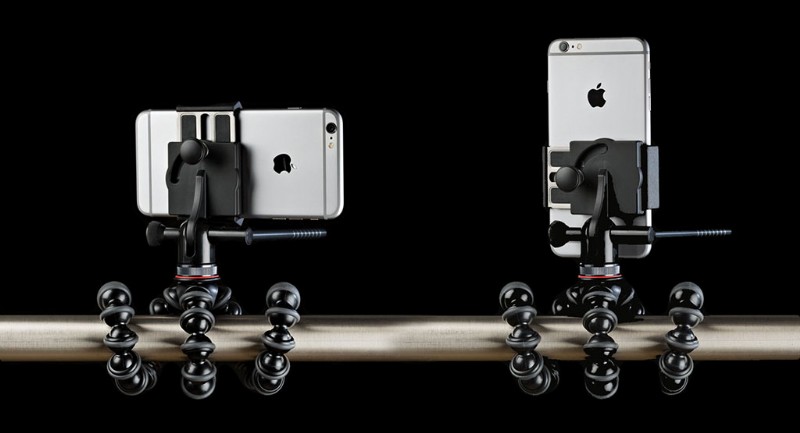
Image via JOBY.
Setting your phone on a tripod is perfect for filming time-lapses, computer-based tutorials, or instructional how-to videos. The JOBY GorillaPod is practical for anybody on a run-and-gun schedule. If you’re making a documentary or travel video, the ability to wrap a tripod’s legs around different surfaces and objects will help you capture stunning time-lapses.
Price: $69.95
If you’re not really sure what type of shooting you’ll be doing, have no fear: the Benro BK10 Mini Tripod and Selfie Stick offers a wide range of capabilities — even standing the tripod up and raising the phone to different heights. You also have the selfie stick aspect of the device. If you’re trying to vlog or take the phone with you on vacation, this tried-and-true way of recording video will yield fun results.
Price: $29
Camera Cage
If you’re considering diving into phone-based videography, you’ll still want the customization of a mirrorless or DSLR mount. The Beastgrip rig protects your phone while offering add-on space for tripods, microphones, or small LED lights. It also features side handles that offer additional control over handheld movements. In addition, there’s a lens attachment that comes with the rig. Add-on lenses are an excellent way to get the most out of your built-in camera, even if they might seem like a hassle to purchase and attach.
Price: $165.95