
Here’s a list of the highest-quality, best-priced webcams available right now to hook-up and take your work fully remote.
Working from home can be difficult for many reasons — your dog’s barking, your kids are begging to go outside — so staying focused can be a challenge. However, one aspect of working from home that doesn’t have to be difficult is communicating with your team. A good webcam is the first step, so after a ton of research, I can confidently say there are way too many options. So, let’s narrow it down a bit.
I should say before we dive in that all of these cameras attach to the top of your monitor, providing a top-down (or eye-level) view.
1. Microsoft LifeCam Cinema Camera $57.99
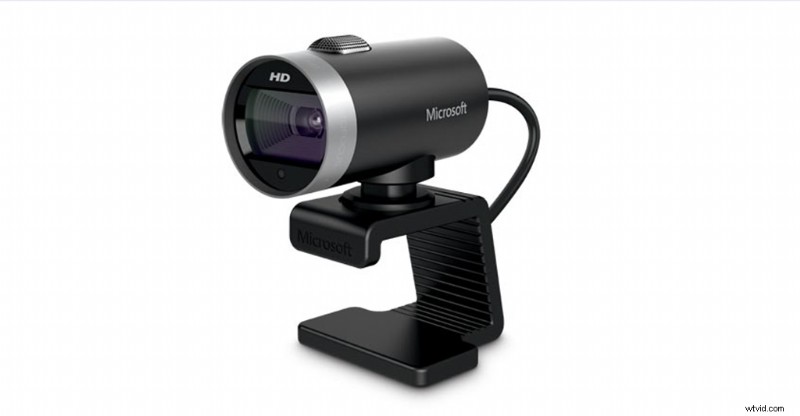
This 720p camera is a staple for remote workers everywhere. It also has a built-in microphone, if you ever find yourself without a pair of headphones. And, if you’ve ever had to quickly jump on a last-minute call, you know how important this is — especially if your computer doesn’t have speakers. When it comes to these types of cameras, there’s no point in getting something you don’t need — like a super-fancy livestreaming camera. This will allow you to take meetings and present yourself clearly.
One thing I’ll add, the built-in microphones on the cameras on this list aren’t great. Your best bet would be to use a headphone with a mic or an external microphone. If you’re curious about external mics, check out this list.
2. Microsoft Corporation LifeCam Studio Web Camera $75.99
Now, there’s also a 1080p version of the LifeCam — consider it the improved companion to the LifeCam Cinema Camera — that costs around $20 more. Here’s what to expect when pulling it out of the box: max resolution of 1920×1080, built-in microphone, USB connectivity, and a flexible mount to fit any monitor.
If you’re interested in heavy-duty livestreaming cameras, built for heavy traffic streams that demand high quality, check out this list.
3. Logitech C920 HD Pro Webcam $79.99
This Logitech classic prides itself on its autofocus capabilities. And, while most of these webcams have a good autofocus, that’s one area of these types of cameras where you don’t want to skimp. You can’t control the camera’s focus (like a normal camera), so you don’t want to be in a meeting, or live on Twitch, while trying to figure out how to get yourself in focus. It’s awkward, and we’ve all been in awkward meetings. The camera also includes eight-megapixel snapshot capabilities to help with thumbnails, or for just taking fun photos in front of a goofy background. Like the Microsoft camera, there’s a built-in mic here, as well.
If you’re interested in the Logitech C922 (another stellar option for 1080p images), check it out here.
4. Logitech C925e HD Audio Webcam $99.99
As we move up in price, expect a more seamless quality in images and audio. One aspect of webcam footage to prepare for is a certain level of choppiness. Sometimes, there’s too much movement, so it can be hard for these cameras to capture a flawless image. The C925e is probably your best bet for price and image quality, with a max resolution of 1920×1080. This blows the 720p out of the water, but you’ll be paying double the price. If you expect to be in meetings all day, or for extended periods of time, consider expanding your budget. Your coworkers will thank you.
5. Logitech Brio 4K Ultra HD Webcam $199.99
This 4K webcam is the best webcam you can get right now. I’d recommend this to anybody who needs a high-quality stream or will be in front of a large group of people. If you’re on Twitch, YouTube Live, or any other streaming platform, this is the webcam for you.
Another consideration is how long you’ll be working remotely. If you’re in this for the long haul, or will be doing this as a full-time gig, invest in a good camera like this one. When it comes to webcams, you’re never going to regret getting the best option. Remember, you get what you pay for.
Want to learn more about video production and working from home? Check out these articles.
- Filmmaking Industry Tools and Services Updates During the Pandemic
- 5 Tips For a Smooth Post-Production Sound Workflow
- 8 Best Practices for Creatives Working from Home
- 9 Beginner Tips For Editing Footage in Final Cut Pro X
- Boost Productivity and Stay Focused as a Freelancer
- Premiere Pro Playbook Part 2: 10 Workflow Tips for Streamlining Edits
Cover image via eleonimages.