
In today’s digital content arena, crystal‑clear audio is as essential as compelling visuals. Whether you’re hosting a podcast, producing a YouTube series, or delivering voice‑over work, listeners will quickly disengage if sound quality falters.
AI‑powered speech enhancement tools have transformed the way creators approach audio post‑production. With a single click, platforms such as Wondershare Filmora can remove background noise, tighten vocal dynamics, and deliver a professional‑grade listening experience—all in seconds.

Table of Contents
- Why AI Speech Enhancers Matter
- Wondershare Filmora: The Industry‑Leading Tool
- Step‑by‑Step Guide to Enhancing Your Voice
- Common Concerns & How to Address Them
- Conclusion & Next Steps
Part 1. Why AI Speech Enhancers Are Essential
Even the most polished scripts and high‑resolution footage can feel hollow without sound that resonates. AI speech enhancers address this gap by:
- Delivering crystal‑clear vocal clarity—so your message is heard, not muddied.
- Saving hours of manual editing—the AI handles noise reduction, equalization, and compression automatically.
- Offering one‑click power—no need to navigate complex menus or learn DSP fundamentals.
- Ensuring consistency across platforms—the same audio quality on mobile, desktop, and streaming services.
- Adapting to any recording environment—whether you’re in a home studio or a cramped hallway.
Industry research from AudioTech Institute (2023) shows that audio clarity directly boosts audience retention by 12 %. This underscores why AI tools are becoming a staple for serious creators.
Part 2. Wondershare Filmora – The Premier AI Speech Enhancement Solution
Filmora blends intuitive editing with advanced AI features, making it the go‑to choice for podcasters, YouTubers, filmmakers, and voice‑over artists alike.
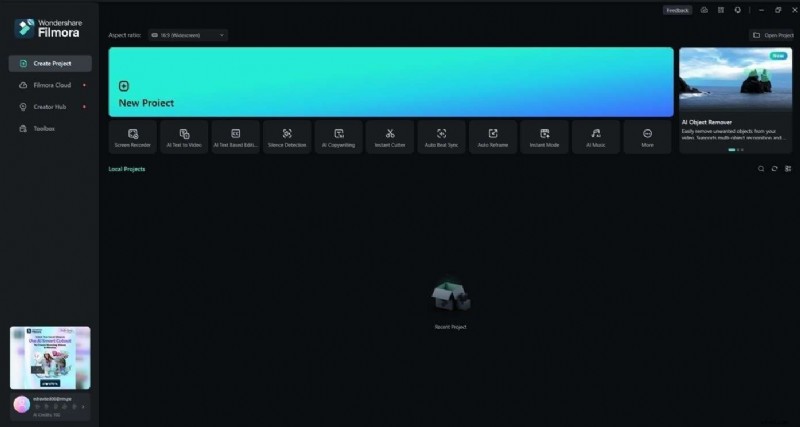
- AI Speech Enhancer – Removes hiss, hum, and room echo in one click.
- AI Voice Cloning – Replicate your voice across 16 languages for global reach.
- Voice Filters & Changers – Customize timbre for different moods or brand identities.
- Auto‑Sync – Align audio and video frames automatically, eliminating lip‑sync errors.
- Silence Detection – Erase long pauses, tightening narrative flow.
- Audio Ducking – Lower background music when dialogue enters, keeping speech clear.
Use Cases for Filmora’s AI Features
- Podcasters who need clean, studio‑grade audio without a dedicated engineer.
- YouTubers seeking seamless audio‑video integration for higher engagement.
- Voice actors and filmmakers requiring crisp dialogue and dynamic soundscapes.
- Content creators looking to experiment with voice styles for diverse platforms.
Filmora Pricing Options
Filmora offers a range of plans to fit every budget:
- Free Version – Ideal for testing the AI tools.
- Monthly / Annual / Perpetual Licenses – Flexible options for individuals and teams.
With competitive pricing and a user‑friendly interface, Filmora remains the top recommendation for creators who want professional audio with minimal effort.
Part 3. How to Enhance Voice with Filmora’s AI Speech Enhancer
Follow these simple steps to transform raw recordings into polished audio:
- Install and launch Filmora. Create a new project and drag your audio clip onto the timeline.
- Activate AI Voice Enhancer. Navigate to the Audio tab and click AI Voice Enhancer on the right panel.
- Adjust the Voice Beautification sliders. Fine‑tune parameters such as noise reduction, clarity, and brightness to match your preference.
- Apply Denoise and other tools. Use the dedicated Denoise button for additional cleanup.
- Preview and export. Once satisfied, click Export and choose your desired format and destination.
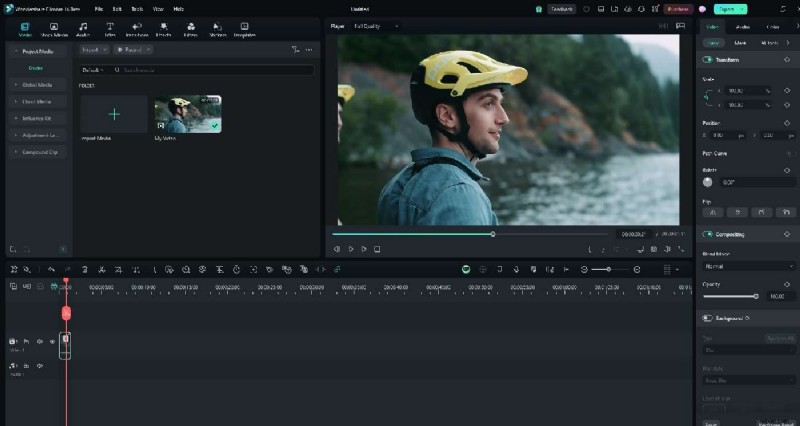
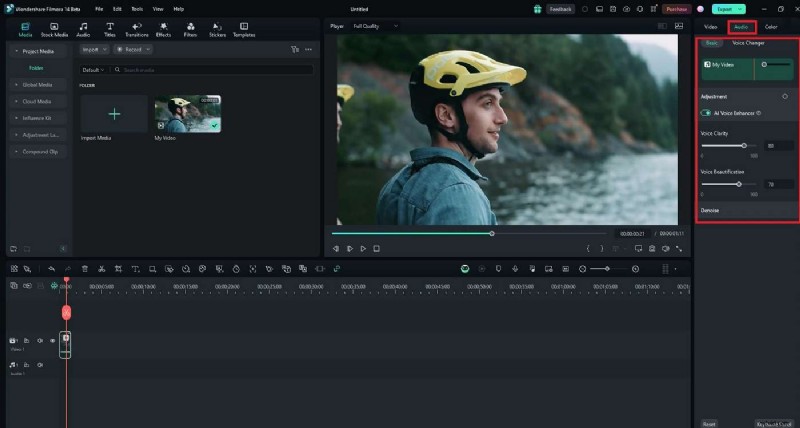
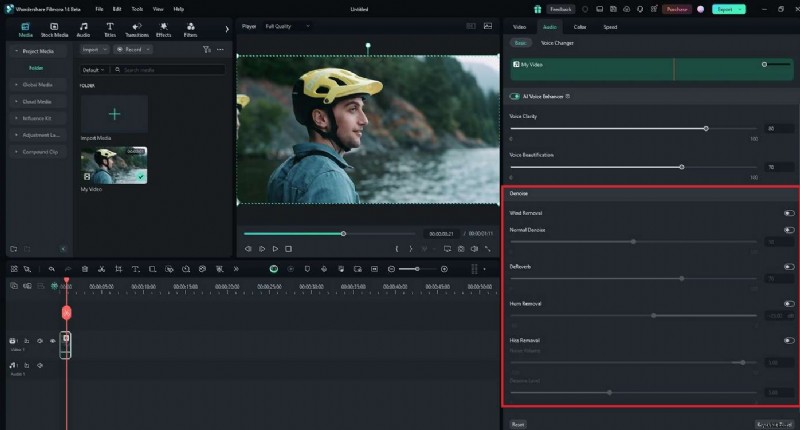
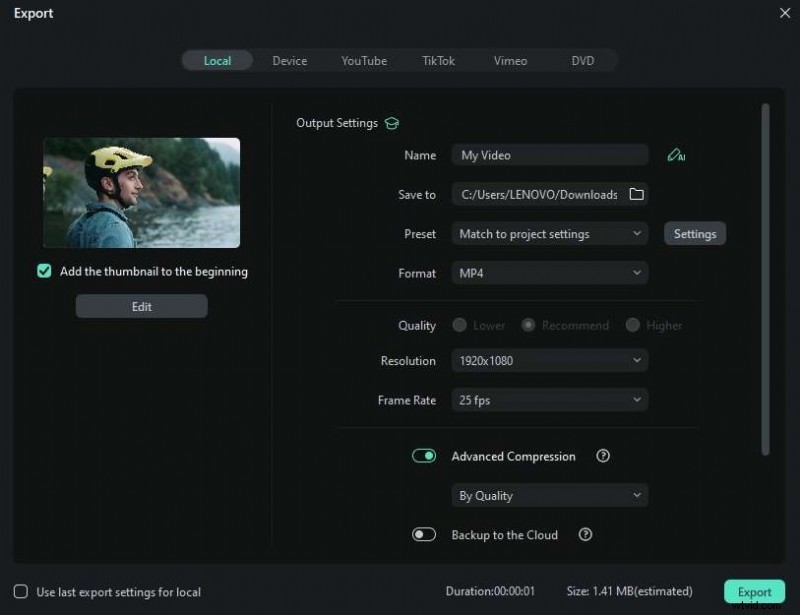
In just a handful of clicks, Filmora turns any voice recording into a high‑fidelity audio track ready for distribution.
Part 4. Addressing Common Concerns About AI Speech Enhancers
Here are the most frequently asked questions and the facts that set the record straight.
- Is it safe to use? Yes. Filmora encrypts all uploads locally; no data leaves your device without permission.
- Will my voice sound robotic? Only if you push settings to extremes. The AI is calibrated to preserve natural timbre while enhancing clarity.
- Can it fix severely damaged audio? It performs best on recordings with mild to moderate noise. For heavily corrupted files, a professional audio engineer may still be required.
- Can I manually tweak the AI output? Absolutely. Filmora provides fine‑grained sliders and manual controls to override the AI if needed.
Overall, AI speech enhancers are reliable, secure, and customizable, offering creators the confidence that their unique voice will shine.
Conclusion
High‑quality audio distinguishes memorable content from forgettable. AI speech enhancers eliminate the tedious aspects of sound editing, letting you focus on storytelling. With Wondershare Filmora, you can achieve studio‑grade clarity in seconds—whether you’re producing a podcast, a YouTube video, or a professional voice‑over.
Ready to elevate your sound? Try Filmora’s free version today and experience the difference that AI can make.