
Running a membership means your focus is split between video hosting, community tools, marketing automation, and analytics. Many creators end up paying for duplicate features or missing the one tool that silently throttles growth.
Choosing the right tech stack lets you spend less time juggling tools and more time expanding your membership base. We’ve helped over 25,000 creators streamline their workflows, and this guide explains the exact components that power successful content‑centric businesses.
What Is a Creator Tech Stack?
A creator tech stack is the suite of tools you use to run every stage of a membership, from video hosting to automated onboarding and win‑back campaigns. A cohesive stack covers:
- Recurring billing and payments
- Member access management
- Onboarding and retention automation
- Community building and engagement
When tools aren’t connected, small glitches—like a missing welcome email or a silent churn notification—can quietly drive cancellations. An integrated stack automates these touchpoints so you can focus on growth.
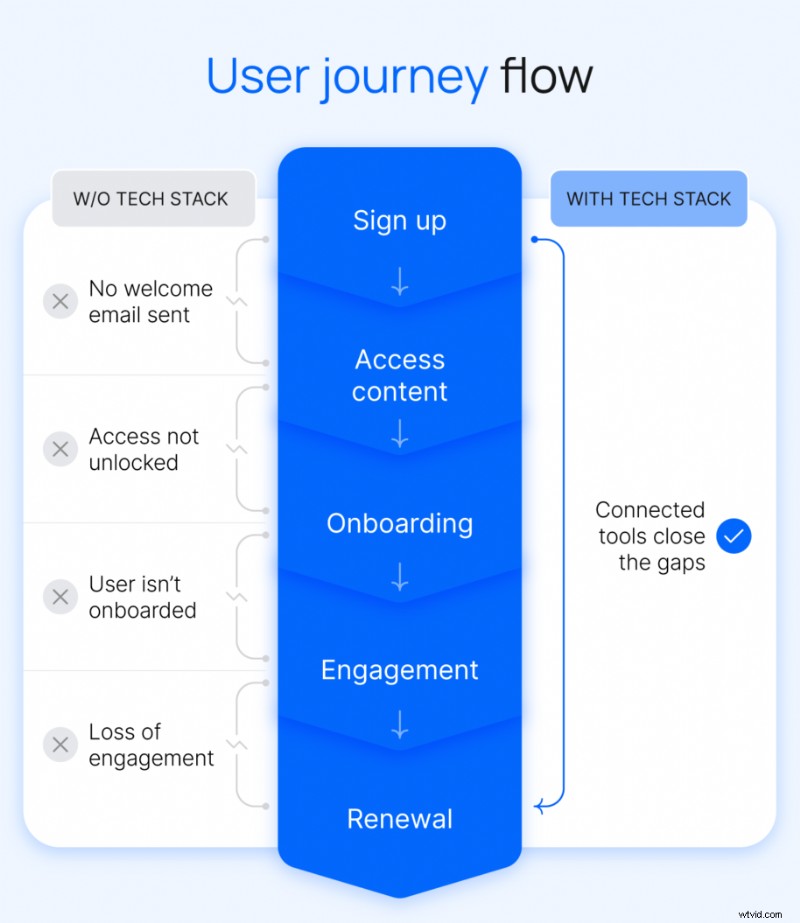
The Core Components of a Creator Tech Stack
Building a sustainable membership requires five foundational categories of tools. Each drives a step from discovery to long‑term retention:
- Content creation tools
- Hosting and monetization platform
- Email and communication tools
- Community building and engagement
- Analytics and business tracking
Use this list to audit your current setup and spot gaps that may be holding you back.
Content Creation Tools
If you publish across a membership site, YouTube, and social channels, you’re juggling multiple production workflows. Consolidated tools save time and keep brand consistency:
- Video editor that handles both long‑ and short‑form content (Final Cut Pro, DaVinci Resolve, CapCut).
- Design platform for thumbnails, graphics, and branded assets (Canva, Adobe Express).
- AI writing & editing to speed scripting, captioning, and repurposing (Descript, Opus Clip).
- Asset management to keep your media library organized.
Efficient workflows mean more time creating than searching.
Hosting and Monetization Platform
The core of your stack should bring content, payments, community, and member management into one view. Disparate systems—Vimeo for video, Stripe for payments, a separate course platform—create data silos, manual access issues, and blind spots in member activity.
A unified platform like Uscreen eliminates these pain points, giving you a single dashboard for all revenue streams and member interactions.
Email & Communication Tools
Direct email remains the most reliable channel to engage members, announce launches, and share updates—outside algorithmic reach. Without a membership‑centric CRM, communication becomes inconsistent, leading to missed onboarding, silent churn, and generic marketing blasts.
Automated email sequences—welcome flows, win‑back campaigns, launch alerts—drive retention without extra effort. Watch the video for a quick walkthrough.
Community Building & Engagement
Community is the differentiator that keeps members loyal. Early‑stage Discord or Facebook groups can suffice, but as your base grows, manual moderation and fragmented access become unsustainable.
Built‑in community modules keep conversations tied to content, automate access, and reduce admin overhead—critical for retaining value‑added members.
Watch the video on maximizing community engagement.
Analytics & Business Tracking
Decisions should be data‑driven, yet spread data across YouTube Studio, Stripe, and separate analytics tools dilutes insights. Integrated analytics link content performance, audience growth, and revenue in one place.
With a single view, you can spot declining engagement before churn, measure content ROI, and fine‑tune pricing based on real performance.
Building Your Creator Stack: Practical Tips
Start by auditing your current tools, then adopt a staged approach to avoid over‑engineering. A minimum viable stack includes:
- One all‑in‑one platform for video, payments, and membership
- One email tool
- One creation tool
Add new tools only when a clear problem emerges. This incremental strategy prevents costly mid‑growth migrations and keeps costs predictable.
Watch the video on setting up a lean stack.
Open Platforms vs. All‑In‑One Solutions
Open stacks offer flexibility but introduce integration maintenance and data fragmentation. An all‑in‑one solution consolidates these silos, reduces admin time, and provides a unified member view.
- Video: Vimeo OTT
- Email: Gmail
- Community: Circle
- Payments: Stripe
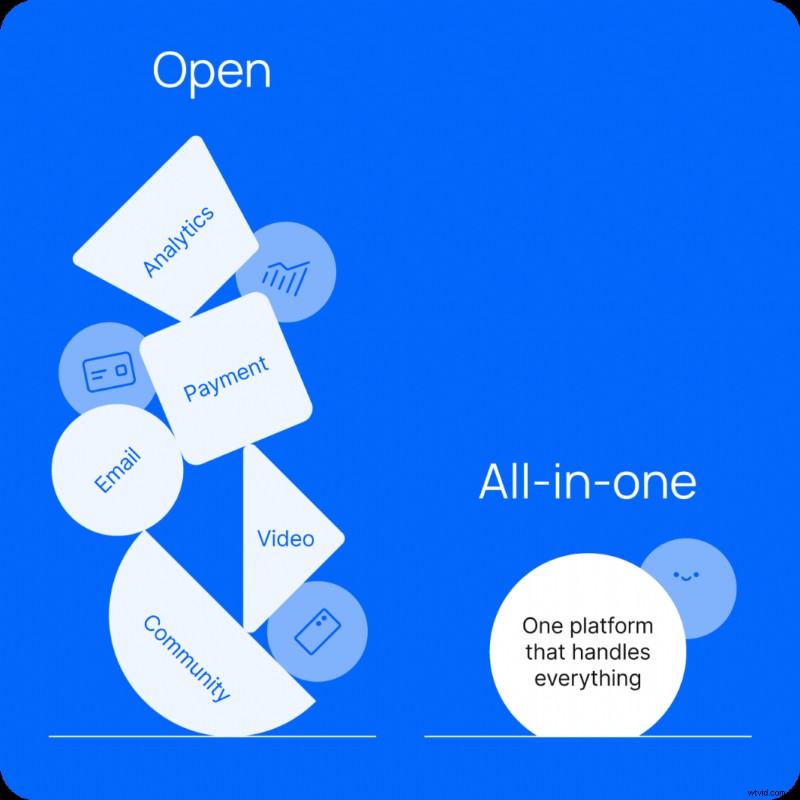
Most creators find that consolidating onto a single platform is the sustainable path for long‑term growth.
Common Stack Mistakes to Avoid
- Choosing on price alone: Migrating mid‑growth is disruptive. Pay for the right feature set from the start.
- Relying on free community tools: Data remains disconnected, hindering retention insights.
- Skipping email: Platform notifications miss the broader audience; email reaches all members.
- Over‑building before launch: Every pre‑launch tool adds cost without proven value.
- Ignoring mobile: Most members access content on phones; a mobile‑first experience is essential.
Real‑World Stack Success Stories
Pilates by Leah
Leah Maselli’s Pilates membership outgrew Playbook’s limited analytics and pricing controls. Switching to Uscreen unlocked:
- Retention automations: upsells, abandoned‑cart emails, win‑back campaigns.
- Daily analytics on churn, trial conversions, and watch time by content type.
- Branded mobile apps for iOS and Android—52.5% of members now use the app.

Result: 1,200+ members, $28,000+ MRR, and 90% revenue growth as a solo creator.
Eternal Family
Eternal Family—curated, hard‑to‑find video art—re‑launched on Uscreen after complex toolchains became unsustainable. They now use:
- OTT apps on iOS, Android, Roku, and FireTV.
- Built‑in geo‑blocking for licensing compliance.
- Platform‑level analytics to inform licensing and content strategy.
Since the rebuild, growth hit 350%, with a 25% engagement rate—double the benchmark for top platforms.
Consolidate Your Stack with Uscreen
As your membership scales, a fragmented stack becomes friction. Uscreen centralizes video, payments, community, email automation, and analytics, freeing you to focus on growth.
Our migration team handles the switch so you can move to a streamlined stack without downtime.
Creator Tech Stack FAQ
What tools do I need to start a membership site?
At minimum: a hosting & monetization platform, an email tool, and a content creation workflow. Add features as specific needs arise.
Do I need a separate community tool?
Not necessarily—an integrated community module keeps access and engagement seamless. Stand‑alone Discord or Facebook groups are suitable only for early phases.
How much does a creator tech stack cost per month?
Separate tools can range from $200 to $500+ monthly. An all‑in‑one platform consolidates those costs into one predictable plan.
What’s the difference between Uscreen and Kajabi?
Kajabi focuses on courses and funnels; Uscreen excels in memberships with native live streaming, branded OTT apps, and a Netflix‑style content library—ideal for video‑centric creators.
Can I run a membership without a big audience?
Yes. Success hinges on audience knowledge and clear value proposition, not size. A targeted video distribution strategy can grow a small, engaged base.
How do I avoid tool fatigue?
Add a new tool only when a specific problem cannot be solved by your current stack. Consolidation keeps admin low and focus high.