Since its creation, Snapchat has been successful in bringing together a young, connected and engaged audience. It has also become a perfect platform for sharing video content.

With new features like the Discover feed, brands and media can now provide Snapchat users with high-quality content. But adding subtitles can seem complicated.
That’s why we show you a way of doing the job, which makes you more productive and saves time.
Why add captions to your Snapchat videos?
With over 250 million active users, Snapchat embodies the future of social media, especially for the Y and Z generation. Media and businesses of all kinds use the Discover platform to follow future consumer trends, which will soon be the norm.
On this platform, informed, visual, and interactive content is the best way to engage young users. But it also means adapting to issues such as digital accessibility. Some people who are deaf or hard of hearing may find it harder to read and understand your videos. That’s why subtitles are so important.
In addition to this, there are also many benefits to be expected from subtitling your videos:
- More views and longer than average playback time. Captioned videos have greater visual impact and readability.
- A higher engagement rate, and a greater chance that a user will react and comment on what you say (since they can read and remember it more easily thanks to your subtitles).
- Expand your audience to a more international audience, if you translate your video into other languages or for other nationalities.
- Improved credibility and reputation for your brand, by showing that you care about video quality and inclusiveness.
Interested? Here’s how you can subtitle your videos.
Subtitles Snapchat Discover: How to make them ?
With built-in closed-captions features, Snapchat enables publishers and producers to manually include a subtitle file in their video. But you can also encode them into your video, as some media do. Anyhow, here are the different ways to do it :
- Create the transcript by hand, converting the audio content into text. We warn you that this is a long-term job, and requires specific skills.
- Use an automatic subtitle generator, which takes care of transcribing and synchronizing your subtitles. These are time-saving solutions, but they may still require human expertise to be optimized.
- Use a professional subtitling service. This guarantees you a reliable and trustworthy solution.
Here we present our professional solution Checksub, which combines automatic technology and professional expertise.
How to use an automatic closed-captions generator on Snapchat?
As speech recognition technologies have been generalized, many automatic captioning solutions have appeared on the market. By supporting transcription, audio/video synchronization, and even foreign language translation, they provide fast, high-quality results. We present the easiest way to subtitle your LinkedIn video on our solution. It has interesting features such as :
- An advanced speech recognition API.
- A collaborative interface with subtitlers and translators to manage your video project.
- An automatic translation engine to translate your video, with 128 different languages available.
- A powerful and easy to use online subtitle editor.
Here’s the step-by-step method to use it.
1# Upload your video on the interface
To get started, log in to the Checksub platform. By logging in, you will have direct access to the platform to upload your video. Select your content and indicate its original language. You can also choose between several languages to make a translation if necessary.
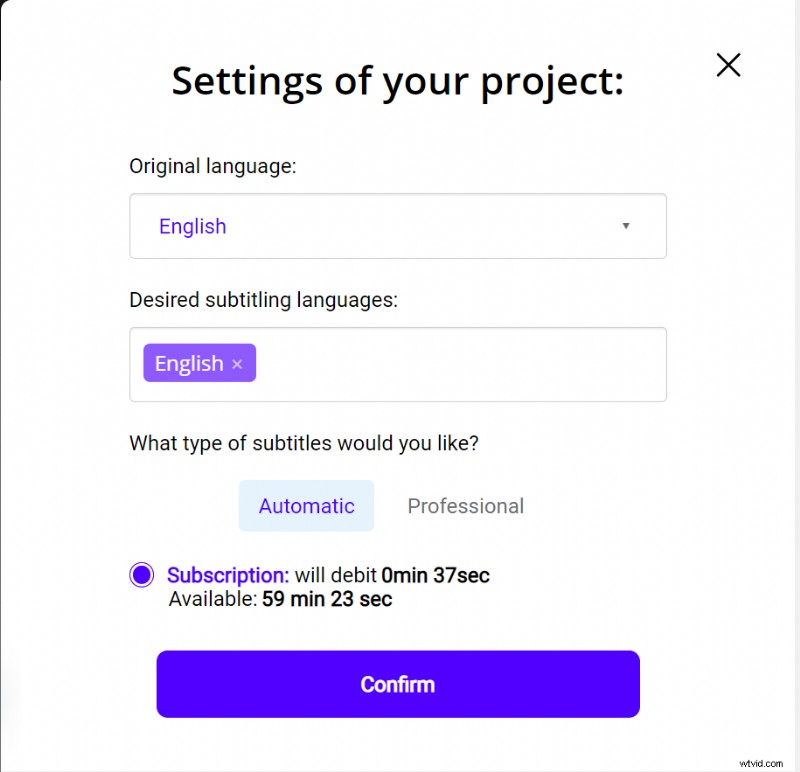
To try the platform, you have one hour free. If this is not enough, you can buy credits at a low price.
The API will then perform the speech recognition and provide you with the result in a few minutes.
2# Check and optimize the transcription
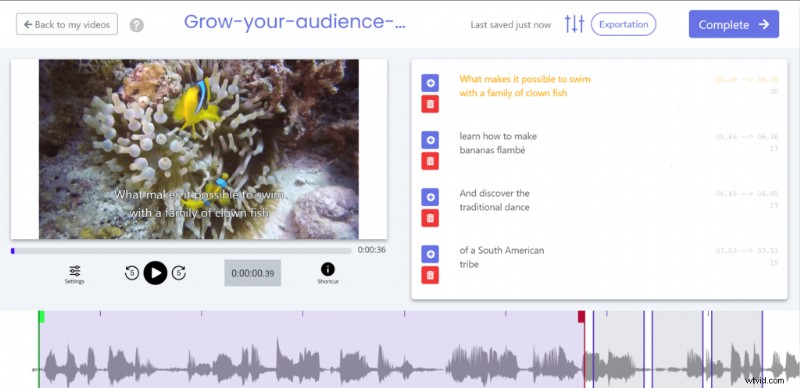
When the result is ready, you can click on the language of your video and access the dedicated subtitle editor to check and optimize the synchronization.
3# Export your SRT file or your subtitled video
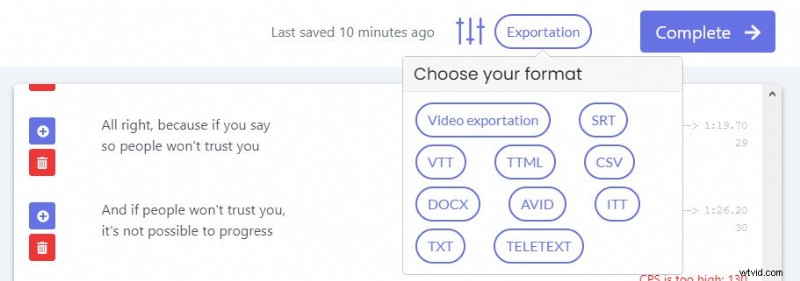
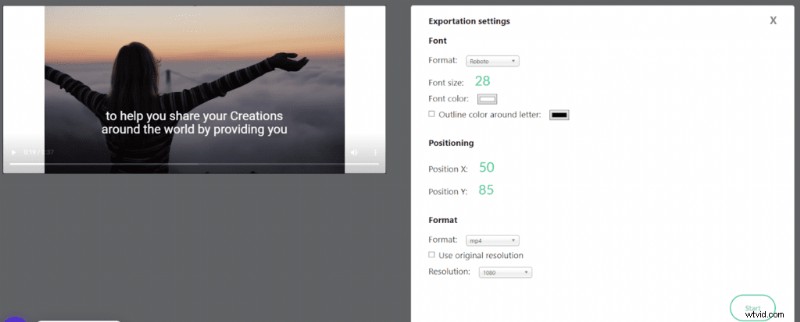
When you are satisfied with the result, you can then directly retrieve the subtitles in your video. Just click on “Export” and then on “SRT” to download the file. You can also upload your video with the built-in subtitles to export it anywhere effortlessly with the “Export Video” option. You have then acess to various customization possibilities for your caption display.
Using a professional captioning service

As you can see, creating subtitles is rather complex. This is especially true if you have a large volume of videos or LinkedIn videos that are difficult to transcribe (ambient noise).
Fortunately, there are professional services that can take care of your LinkedIn video projects. Based on proven human expertise, they deliver your projects in a short time and with high quality. For example, our subtitling experts are at your service!
There you go, we hope this helps you to target a younger and more creative audience!