
At the start of January 2021, YouTube took another step towards Twitter’s hashtag model.
From now on, users can access pages dedicated to a specific hashtag by clicking on it (for example #creationvideo). These pages group all videos that include the hashtag, and bring forward more trending topics.

But how can you make the most of this new feature for your video ranking ? Always full of advice, we tell you everything!
What are the new hashtag features on YouTube?
For a few years now, YouTube have taken up Twitter’s hashtag feature to improve its internal ranking system. With hashtag on the title or description of the video, the platform can better position a video on a particular query in users’ searches.
However, hashtags doesn’t have an obvious impact on video visibility yet, so not many video channels were using this feature. So, in 2021, YouTube went further by creating pages dedicated to these annotations.
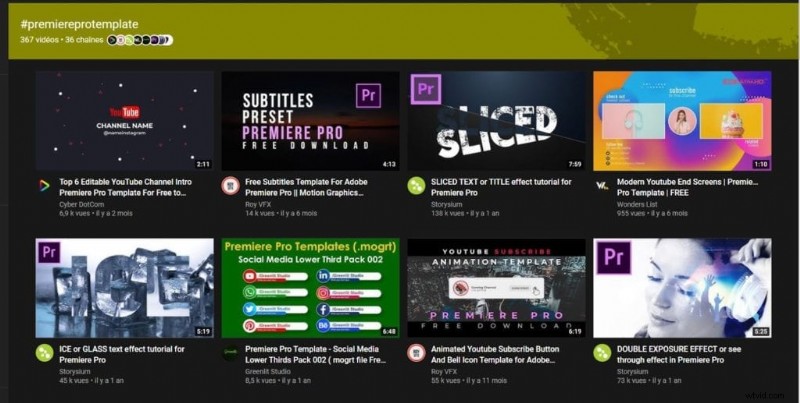
The platform decided to implement these pages to facilitate user search. They gather the videos and the channels that mention them directly, and thus give an undeniable visibility to some videos. For example, some videos may use less-classified hashtags, so that they appear on the first page. This can work well as hashtags are still rarely used.
Even though users can’t type the hashtag directly on the search bar yet, this can be an advantage for smaller channels. Successful channels could mention specific hashtag that will drive more interesting traffic on these pages. In all, it’s a great opportunity to boost your video ranking.
Why optimize your YouTube hashtags?
The value of this new feature is not immediately apparent, but it can make the difference in terms of visibility. It would be a miss opportunity to not consider it, especially when it’s so simple to include hashtags in your video description.
You’ll get various benefits from it for sure. But, to do this, you have to strategically select the hashtags you use. Here are the benefits you can expect from this optimization :
- You automatically boost traffic to your video, by placing yourself on trendy and viral keywords.
- By using little mentioned hashtags but still interesting to users, you easily increase views.
- You can create a separate category where users can find your videos without having to go through playlists. You can mention for example your brand, and thus boost your branding.
- By listing them on a dedicated page, you improve the SEO positioning of your videos. For example, the hashtag page #premiereprotemplates is referenced on Google. It remains to be seen if they are well referenced, but it likely will if hashtags become widespread.

How to use hashtags to get more views on YouTube?

If you are convinced of their importance, here are some tips to maximize the impact of your hashtags:
- To choose your hashtags, go to the “trending” page of the YouTube homepage, and find some popular hashtags. You can also take the keyword of videos that are currently working best in your field. To do so, type in the specific keyword and filter the videos according to their publication date. You’ll then see what is trending the most.
- Make sure to mention the three best hashtags first, as they will appear just below your video. Users will have a strong urge to click on them, so choose well!
- You can use hashtag tools like https://keywordtool.io/ to get inspiration from recent trends. Be aware that Twitter, TikTok, or Instagram trends well naturally transfer to YouTube. You can use tools like https://www.hashtagsforlikes.co to watch these marketing opportunities.
There you go. The important thing to remember is that successful YouTube videos will be increasingly dealing with current events and viral topics. Be aware of these trends!
Hopefully we’ve helped you stay on top of your YouTube ranking! You can also try our automatic subtitle generator to save time editing your captions.